User Profile

CodnChips
Brass Contributor
Joined 4 years ago


User Widgets
Recent Discussions
Re: Edit a single watchlist item
A logicApp does seem a bit like "a sledgehammer to crack a walnut" and I don't like that using them incurs cost. In order to manage\maintain threat intelligence, basic list admin should be a fundamental piece of functionality within the interface. I'll find somewhere to raise it as a feature request.586Views0likes0CommentsEdit a single watchlist item
Hi, I have a watchlist, let's say it has 3000 watchlist items present. I want to modify the value of an entry - an IP address that is no longer required. Can I edit this programmatically? At present I manually have to scroll through each page of results with a CTRL+F to find on the page which is really lame. Surely there must be a better way?Re: Watchlist Bulk Update - Failed to Read File (But does!)
Thanks for the input. However in my watchlist every row has all columns populated, therefore all are equal - glad it worked for you though. I don't have the time for MS to acknowledge\fix so I had to export the original watchlist, append the data, create a new watchlist and adjust the pointers in the relevant analytical rule. For me, these have to stay up to date so unfortunately have to move on with the workaround (Which I'm not a fan of & would much prefer an actual resolution\answer) 🙂1.5KViews0likes2CommentsRe: Watchlist Bulk Update - Failed to Read File (But does!)
Interestingly, I've exported the 4.9K watchlist entries, added the 300 Additional lines I was trying to append, gone through the "new watchlist" wizard and the file is accepted. I'm wandering if something changed that only affects older Watchlists....1.7KViews0likes1CommentWatchlist Bulk Update - Failed to Read File (But does!)
Hi, I've been updating watchlists with no issues for ages. Since yesterday, after selecting the file (which is a basic CSV file), the 50 rows preview is presented, a green ticket is shown next to the file, however the errir "Failed to Read file" is displayed. You can progress to the next stage in the wizard, but no further as there is an issue with Source, therefore the validate button does not enable. I have attached a screen shot. Attempts to troubleshoot this have covered: Try a copy of the CSV file; Create a new CSV file with the same data; Create a new CSV file with new data; Use a previously known good file; Try the above on a different watchlist. However, creating a new watchlist and selecting the same file works! Is there a maximum number of entries on a Watchlist?Solved1.9KViews0likes7CommentsSpecifying a blank\no value
This is harder than I anticipated. I want to query all emails sent inbound where no subject was specified. Can't get the blank bit to work: i.e. EmailEvents | where EmailDirection == "Inbound" and SenderMailFromAddress contains "gmail.com" and Subject (This is where I'm stuck - tried iterations of IsEmpty, IsNull but the penny isn't dropping!) //| project SenderMailFromAddress, Subject | limit 1000 Thanks for your timeSolved1.8KViews0likes2CommentsRestricted Sender
I've got a user that send a load of messages that triggered the outbound spam policy and placed them on the restricted senders list. The 365 Defender investigations have completed (Partial remediation because I declined the password reset as it wasn't necessary). User is removed from the Restricted users list and doesn't appear if you query from Exchange powershell. The outbound spam policy does not prevent sending for 24 hours. They were receiving: This message couldn't be delivered because the sending email address was not recognized as a valid sender. The most common reason for this error is that the email address is, or was, suspected of sending spam. Contact the organization's email admin for help and give them this error message. And also: Remote Server returned '550 5.1.8 Access denied, bad outbound sender AS(42004)' Where do I go? Many thanksDefender Remote Port Connection Sequence
Why does Defender regularly attempt to connect devices within the same subnet, using this port sequence: 106, 111, 515, 623, 660, 808, 1433, 1434, 1521, 1720, 2049, 2869, 3283, 3306, 5040, 5357, 5000 The connection attempts fail and the source is Defender, running from elevated powershell powershell.exe -ExecutionPolicy Bypass -NoProfile -NonInteractive -File "C:\ProgramData\Microsoft\Windows Defender Advanced Threat Protection\Downloads\PSScript_{GUIDGUID-GUID-GUID-GUID-GUIDGUIDGUID}.ps1" Does anyone know what this mechanism is? Is it testing local devices? Different machines do this - they aren't configured as local discovery electives (AFAIK).SolvedAutomation Processing order
Hi, When using Automation rules in Sentinel, am I right in thinking that "when something occurs", the data is ran through the automation rules first? If a matching Automation rule is found, then the rule will be obeyed and no further processing will occur. If no matches are present, then Sentinel will process accordingly The behaviour I see suggests this, so just looking for ratification, thankyouSolved1.2KViews0likes1CommentWhen is malware not malware?
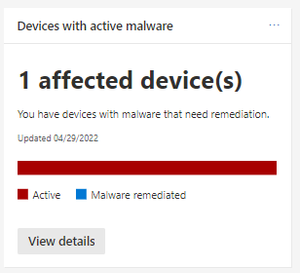
My 365 Defender Dashboard has populated the "Devices with active Malware" tile, with 1 affected device, I view the details, locate the device and check on the device page. The risk level has nothing and no 365 and Sentinel incidents triggered. If I hunt through the timeline, no malware\av events are displayed. If I use the Advanced Threat hunting and run this, I get nothing: For a sanity check, if I remove the device element, still nothing: I've gone to Sentinel and searched the SecurityAlert table for entities containing the hostname and had a return for AD Account Disabled (It is currently enabled). The owner didn't mention this but I think this is possibly part of the cause. Does anyone have any experience with this mismatch of information? ThanksHash types & watchlists
Hi, when creating watchlists, up to this point, if I have an IOC filename & the MD5, SHA1 & SHA256 hashes, I would add all entries onto the watchlist. I recently discovered that in 365 defender, there is no need to add all 3 as only the longest will be obeyed. Therefore what's the best practice for Sentinel? Should I\do I need to add all 3 hash versions?920Views0likes1Comment
Recent Blog Articles
No content to show