User Profile

kyevi
Brass Contributor
Joined 4 years ago


User Widgets
Recent Discussions
Enable Windows Hello for Business in Windows 10 Devices
Hi, I would like to enable Windows Hello in my On prem AD only environment(migrating to 100% EntraID in future), however with the minimum effort and I do not want to enable any aditional services. The docummentation looks a bit confusing to me since it always add a step to add aditional services like Kerberos, Public Key Infrastructure. I just want to know if I can only enable Windows Hello via GPO and deploy it to all devices just like that. I have set the GPO on my device only and I was able to set Windows Hello PIN and Biometrics. Regards.664Views0likes1CommentMobile device mailbox details in Exchange Online not shown after new Exchange Admin Center
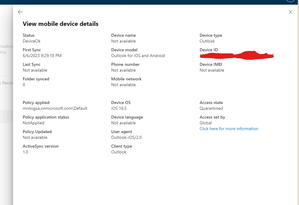
Hi everyone! I have encountered an issue with the new Exchange Online Admin Center. In the old admin center, I could easily view and validate quarantined mobile device details, allowing me to make informed decisions about allowing authentic devices to connect to Outlook App. However, in the new Exchange Online Admin Center, when I navigate to the user mailbox and click on "Manage Mobile Devices," the quarantined devices are displayed but without any device information. This lack of information makes it challenging for me to allow or remove a device from quarantine effectively. I am unable to view the last sync attempt or any other device details. I kindly request assistance from Microsoft regarding this matter as it poses a potential security breach. Please take a look at the attached screenshots for reference. In the old admin center, I could view device details, whereas the new admin center only offers options to Allow, Delete, Block, or Wipe the devices. Thank you for your attention to this matter.SolvedRe: How do i enable screen sharing from the Teams desktop app?
Hi Timothy. This might be fixed on your Teams policy by your system administrator. Have you contacted admin team already? Aks them to check your teams policies. Sometimes admins put you on a Citrix group where they disable some Teams features via policies in order to get better performance on virtual desktops. Hope this help you.24KViews0likes1CommentDelete recurring meeting on Teams Calendar
Hi team! Is there a powershell command to delete the recurring meeting on Teams Calendar of a specific user ? Something similar to Remove-CalendarEvents on Exchange Online. Or does Remove-CalendarEvents also remove recurring meetings a user is owner of on Teams as well? Regards3.8KViews0likes1CommentRe: How reliable are the calculations of the Network Planner?
Hi, Robert! You are considering everyone is using the MS Teams in your Organization at the same time, which is very unlikely. Anyway, lets consider everyone(1000 users) is using Teams Audio conference at the same time, MS recommendation states 58Kbps per user, then we multiply it by 1000, which gives you a 58Mbps bandwith, still bellow the 63Mbps given by Network Planner(I guess its considering some vídeo as well). I hope this can help: https://docs.microsoft.com/en-us/microsoftteams/prepare-network#:~:text=for%20specific%20guidance.-,Bandwidth%20requirements,-Teams%20is%20designed Regards.931Views0likes0CommentsUsers get kicked out from Teams private channels when they are blocked on Active Directory
Hi all, My customer block users on AD when they are on vacation, but the issue is that they lose access to their private channels on Teams right after. They need to be added one by one all again once they return. Is it something we can work around or Teams is designed like this?4.1KViews1like3Comments
Recent Blog Articles
No content to show