User Profile

Don_Vlogeer
Brass Contributor
Joined 4 years ago


User Widgets
Recent Discussions
Attack Simulation Training in Chinese showing as garbled character
Hi All, We recently moved to a new mail security gateway and initiated an attack simulation training from Microsoft. The scenario include 2 recipient; one from exchange online(EXO) and the other is exchange 2019 mailbox(OP). OP mail flow will go through mail security gateway before delivering to enduser while EXO go through EOP. Thing is using same payload and simulation, email to OP user always show as garbled and the link inside will contain a space which break the link. Meanwhile email to EXO works just fine. I believe it has something to do with the encoding, does anyone come around this issue before? Thanks Y'allRe: Outlook MFA issues, asks for "need password" and get blank screen
I encounter the same issue recently, user enabled with modern authentication and ask for password. Click on it and white blank screen appear and no more. things we check to resolve: 1. check internet option confirm TLS 1.2 was checked 2. Clear all windows credentials for office application 3. removed items inside aadbroker folder Finally we get the modern auth prompt1.5KViews0likes0CommentsExchange 2019 unable to open internal user calendar error "Could not be updated"
Dear All, Users are not able to view calendar that reside on specific server. Whenever they access check the free/busy on calendar either from owa/ outlook client, it will prompt error "could not be updated" in order to resolve this, user mailbox need to migrate to other server and this is very troublesome and waste of time. it might be issue with the exchange server and what other log we can review to dig further. Thank you.642Views0likes0CommentsLogged out mailbox from lost device
Dear all, our environment is exchange 2019 ; currently we have a ad-account constantly getting locked out due to wrong password. It traced down to a old device and it was missing for a long time. could anyone provide some insight how to force or logged out the mailbox from this old device? User activesync protocol was disable and only allowed to use outlook 2019 or OWA to access email for now.358Views0likes0CommentsPossibility to change move request more than 100
Dear All, We are in the middle of moving mailbox from exchange server 2016 to exchange 2019. we are using powershell to run moverequest for individual mailbox, however there a limitation of 100 concurrent mover request which slows the entire process. Our goal is to move all mailbox to exchange 2019 ASAP and decommission exchange 2016. Would like to seek some advices and suggestion how to make the transition process faster and less time consuming Thank you all in advanced.1.5KViews0likes1CommentExchange 2016 to 2019 move request failed with error
Dear All, We are moving user from exchange 2016 environment to newly setup exchange 2019 server. User are moved using new-moverequest, below error throwing back and it failed. The maximum array length quota (35000000) has been exceeded while reading XML data. This quota may be increased by changing the MaxArrayLength property on the XmlDictionaryReaderQuotas object used when creating the XML reader. --> The maximum array length quota (35000000) has been exceeded while reading XML data. I do some digging and changed the maxarraylength value from 35000000 to 95000000 but it still failed. What could be the possible cause on this. Thank you allSolved1.2KViews0likes1CommentHybrid Azure AD Joined and Azure AD Registered dual state
Dear All, Recently we enabled hybrid azure ad joined on some of our test device, on azure portal those devices will shows dual state, one is hybrid azure ad joined and the other is azure ad registered status. However, Microsoft also claim dual state will not happen to windows version 1803 and above. but this bug is observed on our environment. Machines tested are Windows 11 latest build, in order to resolve dual state issue we had to let user manually disconnect account from windows setting (no bueno ). Could any expert provide some insight, how can assure the dual state will not happen. this issue had to be resolved before go online Thank you in advanced2.9KViews0likes2CommentsConverting Azure Registered device into hybrid azure ad joined
Dear All, We are in the process of planning conditional access to manage devices. So far devices only sync to azure ad and status showing azure ad registered. How can we convert those azure ad registered device into hybrid azure ad joined. What will happen on user end if enable hybrid azure ad joined from AAD connect. Thank you all in advanced.Re: Limit user login only from domain joined or compliant pc
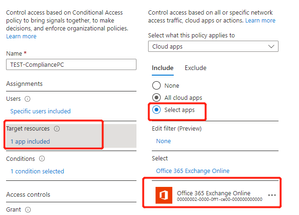
VasilMichev Thank your for quick respond. Our environment HMA already in position by following this kb, but still no luck using CA. https://learn.microsoft.com/en-us/microsoft-365/enterprise/configure-exchange-server-for-hybrid-modern-authentication?view=o365-worldwide what else would need to setup for CA to control mailbox hosted on exchange server.2.8KViews0likes4CommentsLimit user login only from domain joined or compliant pc
Dear All, is there anyway we to limit user access mailbox only from domain joined pc, not allowed to login via personal or public pc. for owa we can certainly use ADFS to setup rules, is there any possibility on outlook client either using hma, adfs, or conditional access. Our environment is exchange 2019 hybrid3.4KViews0likes8Comments
Recent Blog Articles
No content to show