User Profile

phcma
Copper Contributor
Joined 4 years ago


User Widgets
Recent Discussions
Outlook Online Sort By Categories
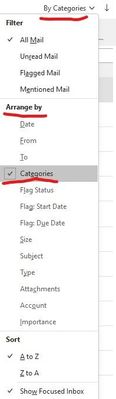
Hi, I'd like to put in for a feature request for Outlook Online, which I'm sure has come up before but I cant seem to find a similar request anywhere. Some of my team members use the premium desktop version of Outlook. They work mainly from a shared email account and arrange their emails by category. I've been trying to get team members to use the online version, but many outright refuse to use it because there is no sort by categories filter. When can we expect to see this filter implemented in the online version of outlook, considering categories is implemented in the online version already. Desktop App: Online equivalent: Thanks.Solved4.1KViews0likes3CommentsRe: Changing date and time formatting to General converts to real number
Yes, you are correct that the general format is just text. I used your method to split text values of date and time then reformat everything using =DATEVALUE() and =TIMEVALUE() and added both together which was still a bit of a process because 12hour needed to be converted to 24 hour, but it worked. The reason for using Excel was also to change the regional formatting of the date field which I did not have access to the original file throwing up another challenge. All sorted now! Thanks for your help 🙂6.6KViews1like0CommentsChanging date and time formatting to General converts to real number
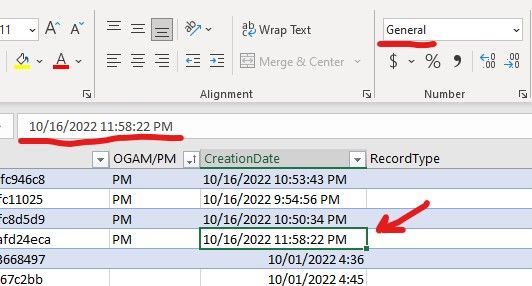
It's a bit hard to describe the issue in the title. I've downloaded a 1000 row report from Microsoft Purview Audit in csv. When importing to Excel some dates are formatted as 'General' and others are formatted as 'Custom'. They both appear to contain the same data when I click on the cells. But when I attempt to change the Custom formatted cells to General formatting, the date and time change to a decimal/float number. General represents correctly. Another type is imported as custom but represents correctly in the formula but not in the cell. Converting Custom to General changes the date time formula to a float number. I've tried splitting and reformatting as basic text then attempting to convert it back to a date time but I'm not having any luck, I just keep getting errors relating to the format. End goal is to import into Power Bi. I get the same issues importing the csv into Power Bi. Thanks.Solved7.4KViews0likes2CommentsProject for the Web export to excel only columns in Grid view
When using the 'Export to Excel' feature it exports all columns. Is it possible to export only what is visible in the grid view? Or can I feature request a checkbox system for exports. Thanks. (Edit: Title 'Project Online' to 'Project for the Web')Solved1.3KViews0likes4CommentsRe: Project for the Web export to excel only columns in Grid view
My apologies, new to both. I was referring to Project for the web. Thanks for the replies to both. I'll have to dive into Project Online it sounds like, as Project for the Web seems like a glorified to do list so far. I hope to see a lot of development for Project for the Web, the modern interface is looking good.1.2KViews0likes1Comment
Recent Blog Articles
No content to show