User Profile

PCHealer
Brass Contributor
Joined 4 years ago


User Widgets
Recent Discussions
"New Home Experience in OneNote for iPhone"
So the one thing stopping me moving from my iphone to Andriod is poor UX on the iphone OneNote app. It's currently clunky and slow and hard to sue on a small screen. I hadn't realised that there is a beta version which an improved home screen. https://insider.microsoft365.com/en-us/blog/new-home-experience-in-onenote-for-iphone I actaully had it installed on my iphone but because I was having a technial issue I had to uninstall it now I can't get back on the beta because it is full? and ideas how I can get back on it? A few questions any idea when this new home screen will be added to the public release? Does the Andriod version already have this new functionality? Is it possible to run this beta version on Andriod? Cheers377Views0likes0CommentsDisable Delegate meeting-related messages
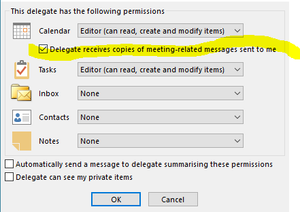
Hi All So in my business a personal assistance was granted access to a partners Calendar via Power shell. Example: Add-MailboxFolderPermission -Identity email address removed for privacy reasons:\Calendar -User email address removed for privacy reasons -AccessRights Editor -SharingPermissionFlags Delegate,CanViewPrivateItems However the user 2 is getting lots of email notifications which they don't want or need. I believe this option can be changed manually by logging onto user1 mailbox and deselecting "Delegate receives copies of meeting-related messages sent to me" However we don't want to have to disturb the partner and we don't want to grant ourselves permissions to there inbox (due to GDPR) can this be done via Exchange Powershell?Solved3.4KViews0likes3CommentsOutlook Unable to Set Meetings as Private
In my organisation the Personal Assistant is able to set some VIP Calendars as private but for other VIP Calendars she can't. She have full access to all the mailboxes already. My question is it possible that even if user A have full access permissions over user B's mailbox, their calendar permissions maybe different? She thinks that previously everyone in the company could view everybody's mailboxes but since GDPR came in about a 2 years ago a change was made to stop this. Is it possible that a previous Exchange admin has set Calendar permissions separately? and how do I check?9.2KViews0likes1CommentIOS Outlook App - All Calendars are hidden
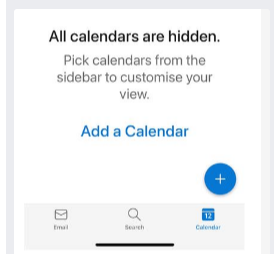
We have a user whereby she us trying to view her own Calendar inbox. but is getting the error "All Calendars are hidden. Have tried to uninstall app and re-isntall didn't work Have tried to open OWA web calendar and make sure time zone and langauge is set correctly ( they are)Solved16KViews3likes20CommentsHow to stop back to back meetings Exchange /Outlook
So we are running Office 365 Outlook version 2205 (Build 15225.20356 Click to Run) Exchange Online Hybrid Mode, 2016 ( I believe) We would like to block users booking back to back meetings on a Room Resource. We want a 15 minute Window between meetings. All I could find was this article about meeting meetings shorter which may not work as I am not sure the meetings always end early. https://support.microsoft.com/en-us/office/make-all-your-events-shorter-automatically-8fa0fdcb-5eee-4e12-9452-8d59ee33f70a Cheers2.2KViews1like0CommentsSCCM -Client Diagnostics Tools
So i am not that technical I am a 2nd line support Engineer. I have a basic understanding of SCCM - Microsoft Endpoint Configuration Manager we are using version 2010, console version 5.2010.1093.1900 My question is are their any tools I can use in it to help me diagnose slow performance on a Windows 10 client? Thanks in Advance.615Views0likes0Comments- 858Views0likes0Comments
User can't see another usrs private meetings
So User A can't see User B's private Calendar meetings. User A already has Full Control setup in Exchange Admin portal over User B's account. I would have assumed that if they have Full Access they should be able to see everything? All I could find was this: https://docs.microsoft.com/en-us/exchange/troubleshoot/user-and-shared-mailboxes/private-items-not-display it does say a shared mailbox but it's not a shared mailbox. But anyway the user is able to view them via OWA and viewing that persons mailbox that way.Solved931Views0likes2CommentsExchange Question AutoMapping Vs Manual
We have a user who has access to their own in box and they receive email alerts for this no problems. However they also have access to another shared mailbox which is auto mapped (he is not getting notifications for this but wants them). My colleague has said the solution to enable notifications on this second mailbox this is to manually add the mailbox (is this correct? it doesn't seem to make any sense, why would manually adding a mailbox be better than an auto mapped mailbox?). He also said if we manually add a mailbox which is already auto mapped Outlook/Exchange should figure this out and remove one of the duplicate mailboxes?Solved3KViews0likes1CommentRe: Exchange Online Advice
Hi Vasil, I didn't explain this very well but I am already a room delegate. Within Exchange online I went to the resource > Manage Delegates > and I have Full access, Send on Behalf I am actually thinking this is a non issue, as when I go into automatic processing and check the setings. It is set to Auto accept meeting requests. I think the user was expecting to approve bookings manually. I am not sure how auto-accept meeting requests works but I will Google it. I assume it will just assume it will notify the booking delegate when a booking has been made.1.8KViews0likes0CommentsExchange Online Advice
So looking for some advice ..hopefuly I have posted in the right group. I am a Support Analsyst and we have a user who is saying she can't accept meetings on a room (Resource Mailbox). She has full permissions on the mailbox. When someone sends her a room booking she gets this error/noficiation: ( I am sure we are using Exchange Online so I don't know why it says Exchange 2016). I have since tried to give my self full access to the resource but I get the same error/notication. What does it mean and why can't we accept meetings. This out-of-policy resource request was forwarded to you for your approval. This request was forwarded to you for approval because the organizer doesn't have permission to book this resource. Sent by Microsoft Exchange Server 20161.9KViews0likes2CommentsVDI deallocated
So very new to Microsoft Azure VDI. We have a user who has not sued there VDI in a while and it seems to have expired we get the error below: Session host information is not available because the VM cannot be reached. This can be as a result of the VM being deallocated or hibernated. It is also possible that there is a networking error that is blocking connectivity. Learn more Is it just easier to crete a new one ?946Views0likes0CommentsAzure PIM Roles
So I am not the full admin for our businesses Azure. However he has assinged me Eligible assigments. Example Intune Administrator however the end time is only set for 1 hour in the future. But in contrast my Exchange Admin role is setp to expire in june. This must be a setting somwhere?Solved1.5KViews0likes2Comments
Recent Blog Articles
No content to show