User Profile

Ajay_Joshi
Brass Contributor
Joined 5 years ago


User Widgets
Recent Discussions
Azure AD Directory extension attributes added in AD Connect not visible SCIM provisioning
We have a multi-forest AD Connect setup and have added a new attribute first in local AD of 1 forest/directory only and then a custom Directory extension attributes for the same in AD Connect(guess its for everyone now). The expectation is that as our different countries/directories will keep adding this new attribute, it'll require just a Refresh Schema on AD Connect from hereon. Please correct if this requires more actions on our part. More importantly, the new attribute is not visible list of Source attributes under Mappings in Azure AD >>> Enterprise Apps >>> SCIM Provisioning. We can find the attribute and its value in user's extension attribute once checked in PowerShell(screenshot attached). In fact, we can't see any custom AAD Directory Extensions added through AD Connect in SCIM Provisioning, only the default ones are listed. Please help us understand what we are missing here. We also have a test tenant synced with our test on-premise lab and that shows all AAD Extension attributes without any issue. No extra steps were followed while configuring the same there.847Views0likes0CommentsRe: Admins are not able to create DLs even with custom "Exchange RBAC" Distribution Groups permission
VasilMichev Hi, thanks for the reply, I'm a big fan of yours. In our setup, there are 30+ countries each having their L2 teams and have been given Exchange permissions through country scoped RBAC roles. They have DL permission enabled but not for SG mostly, for some country RBACs both are disabled. When we enabled the latter, they could manage the SGs but not create them. However, they were able to create DLs and ofcourse manage them. However, we have have a Global L3 team(includes me) who have Exchange Admin roles so they have full rights. But, we do have Default scoped RBACs meant for Country L2 Admins only that has DL permissions and not SG. We identified this issue that this RBAC allows them to create DLs actually. We have another for Mail Recipients but SG permissions aren't enabled in either of them. That was a reason and having so many custom RBACs took us some time to identify the cause. Thanks again for responding to this query.304Views0likes0CommentsRe: Prepend a constant value to an existing attribute EmployeeID in the Sync rule - AD Connect
Resolved by using the following expression:- CStr("IN") & [employeeID] or IIF(IsNullOrEmpty([employeeID]),NULL,CStr("IN") & [employeeID]) If concatenating a number with a String type Attribute value:- CStr(91) & [employeeID] or IIF(IsNullOrEmpty([employeeID]),NULL,CStr(91) & [employeeID])795Views0likes0CommentsPrepend a constant value to an existing attribute EmployeeID in the Sync rule - AD Connect
We need to create a new custom attribute in Azure AD Connect for syncing, call it OneTrustEmployeeID and populate it like:- OneTrustEmployeeID = "ISO Code of Country" + EmployeeID We are getting an "Append function is undefined" error by the use of this expression in the transformation tab of the sync rules:- Append([EmployeeID], "+91")SolvedRe: Prepend a constant value to an existing attribute EmployeeID in the Sync rule - AD Connect
juliansperling Thanks so much for looking at this. Guess you are right, I took Append as Prepend. However, it was giving this error and I've tried Join, it errors out in evaluation later. All users got sync general failure. I've modified the transformation in the User Common rule, should it be done on a different rule? Would that matter??849Views0likes0Comments"GetForest" error while adding the new forest to AD Connect
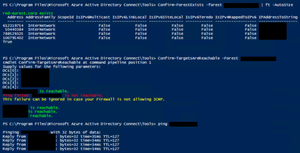
We are getting this error while trying to add a directory in out multi-forest setup. The Yellow DC is advertising correctly and all ports connectivity is established with the remote forest. Please help. Proceeding to validate that at least one of the domains associated to the obtained Forest FQDN are reachable by attempting to retrieve DomainGuid and DomainDistinguishedName Obtaining ForestFQDN Attempting to retrieve ForestFQDN... Exception calling "GetForest" with "1" argument(s): "The specified forest does not exist or cannot be contacted." There are 0 reachable domain(s) and 0 unreachable domain(s) There are no reachable domains.Re: AD Connect Start-ConnectivityValidation - GetDomain failing error while running adding directories
LainRobertson Thanks you so much again for pointing us in the right direction. We have finally been able to resolve this issue. In the end, it was not a DNS or Network issue. Here are the steps that resolved it:- 1) By narrowing down the error in PowerShell by running just the Confirm-ValidDomains or Get-ForestFQDN commands and simultaneously running a live network capture on Netmon, we got a Netlogon error however, the service was always running in the Yellow DC and restarting it as well didn’t change anything. 2) Then finally the DS Engineers from MS team asks to collect the Netlogon & DC Diag logs. It becomes clearly visible that the Yellow DC isn’t advertising itself, hence we are asked to enable the SysvolReady flag is the Registry Editor by setting its value to 1. Upon rebooting, the AD Connect validation tests are successful.14KViews1like0CommentsRe: Can anyone give PowerShell Script that export signing or last login details of Azure AD user?
Hi Andres, appreciate you sharing your knowledge and this script, it's quite useful for people like us. I wanted to additionally ask for the Last Signin/login details specifically. We have been looking to get this field for sometime now but can't find it. A particular challenge here is that AAD Sign-in logs are mostly available for last 30 days so we would need that field to be blank for users who didn't sign-in in that period. That obviously means the last logon date was more than 30 days ago. So far, the only option available is of the last Mailbox sign-in date through the Get-MailboxStatistics command but we want it on User's sign-in basis and not for mailbox as all users don't have mailboxes. Thanks in advance.2.2KViews0likes0CommentsRe: AD Connect Start-ConnectivityValidation - GetDomain failing error while running adding directories
LainRobertson Thank you so much for testing this out to the depth of the .Net class and ascertaining that DNS manipulation won't necessarily resolve our issue. These are indeed great details and finally I did manage to get hold of someone who knows Multi-forest identity sync very well. Just 1 correction here and fortunately, we are dealing with this issue on just 1 forest right now and only 2 more are remaining which don't pose this same error. So, we need to allow the internal network access to the AD Connect's subnets for just 1 country/directory/forest. I believe all the previously onboarded 40-odd directories have this allowed probably, it increasingly feels like a pre-requisite now. I have actually, already asked the country guys to arrange for this configuration. Will post the update when it finally works. The other 2 remaining forests pose the "Get-Forest not found" error and not the Get-Domain error. That one is a typical error due to lack of network connectivity or Yellow DC not being able to resolve all DCs to their FQDNs. They will get resolved as we have faced them earlier as well.15KViews1like1CommentRe: AD Connect Start-ConnectivityValidation - GetDomain failing error while running adding directories
LainRobertson MS is suggesting DNS Split brain policy for which our management is not agreeing as 40 other countries didn't need it. Is it ok to allow the network connectivity with the internal DC network in addition to the DMZ DC? Would that be a good approach considering that AD Connect does contacts all DCs once while setting up the directory. Does this happen in other companies too? Seems to me like defeating the purpose of the DMZ altogether.15KViews0likes3CommentsRe: AD Connect Start-ConnectivityValidation - GetDomain failing error while running adding directories
LainRobertson Thanks yet again Lain, for the detailed action plan. Since the site for DMZ already existed and the subnet with IP address was also attached to it, I completed the last important step by creating new subnets for the IP ranges of ADC staging & prod servers and attaching that to the DMZ site. However, this still hasn't resolved the issue and the errors persist at both ends. I've captured fresh network traces at both sides, can't upload them here as .cab & .etl files are not allowed. I have serious trouble reading them using Netmon. Will ask MS to analyze them.15KViews1like4CommentsRe: AD Connect Start-ConnectivityValidation - GetDomain failing error while running adding directories
LainRobertson Supernova Thanks for providing inputs, I've tested a lot of things. Firstly, the Netlogon logs have this error:- 03/22 12:14:38 [7968] Forest.com: NO_CLIENT_SITE: ADConnectServerName ADConnectIP Strangely, MIM server too has the same error entry, but as mentioned earlier, might not matter in its case. Nltest /DsgetDC:forest.com indeed returned the primary DC to which AD Connect doesn't have connectivity. This is the issue I think. Since, the primary DC is in Default Site, I changed the SRV records on it to point to the DMZ DC. Need to wait for replication. Meanwhile also trying to understand the DNS Split brain approach and using DNS policy. I'm unable to find a method that cane be used to force the DMZ DC to return its own name to DNS queries rather than the PDC's.15KViews0likes8CommentsRe: AD Connect Start-ConnectivityValidation - GetDomain failing error while running adding directories
LainRobertson There are 4 DCs in the forest and 1 of them is in the DMZ, conditional forwarder in the ADC forward points to it. Although I'm yet to check the Netlogon logs in the target forest, I noticed something interesting with the network connectivity tests. While the Confirm-TargetsAreReachable & Confirm-DNSConnectivity results are all green & successful, Confirm-NetworkConnectivity provides something to think about. If I run this and DC1 doesn't have port 53 open, its gives an error and doesn't even check the next DC. Confirm-NetworkConnectivity -DCs DC1.forest.com,DC2.forest.com,DC3.forest.com TCP connection to DC1.forest.com on port 53 failed. But if we mention DC3 first which has the connectivity, then it succeeds for it and then does check the next and then if it fails, stops checking further. Confirm-NetworkConnectivity -DCs DC3.forest.com,DC2.forest.com,DC1.forest.com TCP connection to DC3.forest.com on port 53 succeeded. TCP connection to DC3.forest.com on port 88 succeeded. TCP connection to DC3.forest.com on port 389 succeeded. TCP connection toDC2.forest.com on port 53 failed. Could this be the issue? Probably the lookup list has the internal DC as the first entry which doesn't have connectivity. Although an assumption, I'm more suspicious after seeing this result:- PS C:\Program Files\Microsoft Azure Active Directory Connect\Tools> Confirm-FunctionalLevel -Forest forest.com Verifying that the AD forest functional level is >= Windows2003Forest Obtaining ForestFQDN Attempting to retrieve ForestFQDN... Exception calling "GetForest" with "1" argument(s): "The specified forest does not exist or cannot be contacted." CurrentForestLevel is The binary operator GreaterThanOrEqual is not defined for the types 'System.DirectoryServices.ActiveDirectory.ForestMode' and 'System.DirectoryServices.ActiveDirectory.ForestMode'. At C:\Program Files\Microsoft Azure Active Directory Connect\Tools\ADConnectivityTool.psm1:1127 char:8 + If($CurrentForestLevel -lt $MinAdForestVersion) + ~~~~~~~~~~~~~~~~~~~~~~~~~~~~~~~~~~~~~~~~~~~ + CategoryInfo : OperationStopped: (:) [], InvalidOperationException + FullyQualifiedErrorId : System.InvalidOperationException The Active Directory forest functional level is correct True It fails in the beginning probably with the internal DC and then succeeds with the DMZ DC. This output is actually similar to the forest which were successfully onboarded to ADC. Just that the initial error statement is "The user name or password is incorrect." instead of "The specified forest does not exist or cannot be contacted". Rest all output is same including the "The binary operator GreaterThanOrEqual is not defined for the types" error.15KViews0likes11CommentsRe: AD Connect Start-ConnectivityValidation - GetDomain failing error while running adding directories
LainRobertson Thanks so much for your time on this post and the detailed analysis. I further tested as you suggested and have very strange results. Seems like ICMP is blocked for the very DMZ DC which is supposed to have more connectivity with the ADC forest as compared to the local network of the country forest. We actually have onboarded all countries on ADC successfully except last 3. Sorry need to hide the IPs as they are of our production environment, is ICMP mandatorily required for ADC? The below command took well more than 9secs, around 30 actually to fail and give the exact error. However, my observation till now was that the GetForest succeeds and GetDomain fails. [System.DirectoryServices.ActiveDirectory.Forest]::GetForest([System.DirectoryServices.ActiveDirectory.DirectoryContext]::new([System.DirectoryServices.ActiveDirectory.DirectoryContextType]::Forest, "forestFqdn.somedomain.com")) Also worth mentioning is that since that local network of countries is not directly pingable from ADC forest and we rely on the DMZ DC for that. We ensure that all the DCs IP are listed in the output for NSLookup and they further resolve to the machine FQDN by setting the Server to the DMZ DC IP. We also had some countries where there are syncing users in both Parent & Child domains, so we ensure both atleast 1 child & root DCs are included in the DMZ. The local network again will not have direct connectivity. Last but not the least, all ports mentioned are open except 5986, need to check if WinRM/TLS is required and will get it opened if yes. Here is the exact error for your ready reference:- PS C:\Program Files\Microsoft Azure Active Directory Connect\Tools> Start-ConnectivityValidation -Forest xxxxx -AutoCreateConnectorAccount:$false -UserName "xxxxx\yyyyyy" Please provide the credentials of the account you entered on AADConnect Wizard. DOMAIN\Username: xxxxx\yyyyyy (previously obtained) Diagnosis is starting... Attempting to obtain a domainFQDN Attempting to retrieve DomainFQDN object... Exception calling "GetDomain" with "1" argument(s): "The specified domain does not exist or cannot be contacted." There has been a problem while validating connectivity between AADConnect and the Active Directory. An attempt to diagnose the problem will be performed by running a set of network connectivity tests Press ENTER to continue: Starting NetworkConnectivityDiagnosisTools Verifying that 'xxxxxxx' exists xxxxxxxxx exists Verifying if the provided credentials are correct Attempting to obtain a domainFQDN Attempting to retrieve DomainFQDN object... There was an error during the validation of the credentials you have entered. Details: Exception calling "GetDomain" with "1" argument(s): "The specified domain does not exist or cannot be contacted."15KViews0likes14CommentsAD Connect Start-ConnectivityValidation - GetDomain failing error while running adding directories
We have some 40 countries i.e. 40 local forests in our environment separated by firewalls. We are trying to onboard all our local forests on AD Connect and decommission MIM. We have this issue where the Start-ConnectivityValidation command of the ADConnectivityTool PS module, fails with the error “GetDomain failed. The specified domain does not exist or cannot be contacted”. The AD Connect servers are in a different forest than the country forests. Here are the configuration details:- ADC Architecture: Multi-forest, single tenant. Country Forests Network Architecture: All forests have a DMZ, that contains an additional DC with which AD Connect has connectivity. Local forest network doesn't have direct network connectivity with ADC forest. Firewall Settings: ADC Staging & Prod servers IP ranges are allowed in country forest's firewall. ADC forest firewall allows all traffic to & from all forest networks. Ports: 53, 88, 389 & 3268 are open for both TC & UDP protocols. DNS Request Routing: AD Connect uses Conditional Forwarders, MIM uses Hosts file or Fwd Zones. SRV Records: Configured for both LDAP & Kerberos on the country forest's local DNS for the DMZ ADC. Test-NetConnectivity: Successful for above mentioned ports. NSLookup/Ping: Successfully resolves the DCs, DMZ ADC also listed in the output. Confirm-DnsConnectivity: Successful Connectivity Validation: Start-ConnectivityValidation -Forest "contoso.com" -AutoCreateConnectorAccount $False -Username "contoso.com\username" fails with the above mentioned error. Even tried the Netbios name format, but still no success. MS Premier Support Directory Services, Network(DNS) & Identity support guys have all tried but can't resolve this issue. Any help will be highly appreciated.18KViews0likes17Comments

Recent Blog Articles
No content to show