User Profile

CEStar321
Iron Contributor
Joined 8 years ago


User Widgets
Recent Discussions
SharePoint Document Library Web Part
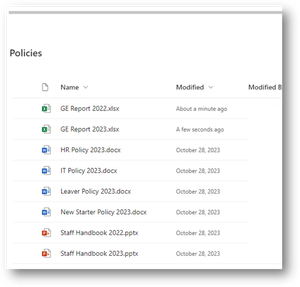
Hi All We have a SharePoint Document Library web part on a landing web page that look like this : It is very simple looking and links to a SharePoint document library on the same SharePoint site as the web part. The issue we are having is we need to view another SharePoint Document library on another SharePoint site. The Only way to do this is using the Embed SharePoint web part. The problem with the Embed web part is it adds the Document Library menu bar. We want to make it look simple like the first web part above. My question is can we add a web part that links to a document library on another SharePoint site and has a simple look and feel with no menu bar like the first screenshot above? I hope you can help Colin264Views0likes1CommentSharePoint link pauses /_layouts/closeConnection.aspx?loginasanotheruser=false&Source=
Hi, Within our company, we have multiple SharePoint sites over different Office 365 environments. What we are trying to do is when a user clicks on a SharePoint link the user is first logged out of any other SharePoint sites on the different environment and then the credentials are asked for the new SharePoint environment. This works perfectly: When you add https://b3living.sharepoint.com/sites/CeMeslaTest/_layouts/closeConnection.aspx?loginasanotheruser=false&Source=https://b3Living.sharepoint.com/sites/CeMeslaTest/ to the end of the SharePoint URL Added properties https://b3living.sharepoint.com/sites/CeMeslaTest/_layouts/closeConnection.aspx?loginasanotheruser=false&Source=https://b3Living.sharepoint.com/sites/CeMeslaTest/?loginasanotheruser=false &Source=https://company.sharepoint.com/sites/SiteName/ The full URL looks like this: When a user is logged into another SharePoint or Office 365 environment, the user is automatically logged out of that environment and automatically asked for the credentials to log into the new SharePoint site (source URL https://b3living.sharepoint.com/sites/CeMeslaTest/_layouts/closeConnection.aspx?loginasanotheruser=false&Source=https://b3Living.sharepoint.com/sites/CeMeslaTest/) The problem arises when the user is not logged into any other SharePoint or office 365 environment. When the user clicks the link above it says “You’ve signed out of your account” but doesn’t request the credentials for the new SharePoint environment. It just pauses at “You’ve signed out of your account”. I have tried changing the properties from ?loginasanotheruser=false and ?loginasanotheruser=true but it still pauses. Is there any way I can get the procedure to not pause, but redirect the user to the source SP site https://b3living.sharepoint.com/sites/CeMeslaTest/_layouts/closeConnection.aspx?loginasanotheruser=false&Source=https://b3Living.sharepoint.com/sites/CeMeslaTest/ ? Are there other properties I can add to the SharePoint link that doesn’t make it pause? Added properties https://b3living.sharepoint.com/sites/CeMeslaTest/_layouts/closeConnection.aspx?loginasanotheruser=false&Source=https://b3Living.sharepoint.com/sites/CeMeslaTest/?loginasanotheruser=false &Source=https://company.sharepoint.com/sites/SiteName/ I hope you can help Colinadd a user search box to a SharePoint online webpage
Hi All, Is there a way I can add a user search box to a modern SharePoint online webpage so a user can search for another user within the company? For example, I want the details of a user with the surname Smith. The search results list all the members of staff with the surname Smith and I just select the correct user. I hope you can help Thanks Courtney1.9KViews0likes2CommentsOffice 365 Username with App password not working in PowerShell script
Hi All, I need to use an App password in a PowerShell script that will be running constantly. The script needs to monitor an item on a server so needs to be running 24 hours a day, 7 days a week. It works OK if I use an Office 365 user account that has MFA disabled and I use its username and password, but it stops working if MFA is enabled and I use an App Password. This is the procedure I use in using an App password: 1) MFA is enabled on the Office 365 user account. 2) Create an App Password for the user account. 3) Run the credentials script to create the username and password encrypted text files: ################################################################# $Location = ".\" $securecred = Get-Credential $securecred.UserName | ConvertTo-SecureString -AsPlainText -Force | ConvertFrom-SecureString | set-content $Location"Username.txt" $securecred.Password | ConvertFrom-SecureString | set-content $Location"Password.txt" ################################################################# 4) Run the main script that uses the credentials txt files: ################################################################# # additional variable and setup code above... $username = Get-Content $PassLocation"Username.txt" | ConvertTo-SecureString $BSTRU = [System.Runtime.InteropServices.Marshal]::SecureStringToBSTR($username) $username = [System.Runtime.InteropServices.Marshal]::PtrToStringAuto($BSTRU) $AdminUserName = $username $SecurePassword = Get-Content $PassLocation"Password.txt" | ConvertTo-SecureString $Cred = new-object -typename System.Management.Automation.PSCredential -argumentlist $AdminUserName, $SecurePassword $AdminSiteURL = "https://mySubscription.sharepoint.com/sites/Demo/" Connect-PnPOnline -Url $AdminSiteURL -Credentials $Cred # additional variable and setup code below... ################################################################# 5) Error messages when using username with App password credentials: --------------------------------- 50126: Error validating credentials due to invalid username or password. Trace ID: 94e...248618f34a00 Correlation ID: 7c7df2...80dcac538d78 Timestamp: 2021-03-21 14:09:59Z Error Connecting: AADSTS50126: Error validating credentials due to invalid username or password. Trace ID: 40337fb4...513e9474900 Correlation ID: 04bb5...cb733d5110f6 Timestamp: 2021-03-21 14:10:00Z Error Connecting: AADSTS50126: Error validating credentials due to invalid username or password. Trace ID: 589e2968cc3c...f5d1c4700 --------------------------------- I know the main script is OK because it works perfectly when I disable MFA and create the credential text files using the user account username and password. Is using a username and App Password the best and secure way to run a PowerShell script that needs to run constantly? I hope you can help ColinIs it possible to turn a PowerShell script into a Windows Service?
Hi All, Is there anyway I can turn a PowerShell script into a Windows Service that will start whenever a computer starts. First we need to turn the *.PS1 script into an *.exe app. It would be ideal if this can be done with windows products and not third party apps. I hope you can help ColinRe: "Shared with Us" link in Modern SharePoint Menu (behavior)?
Brent Ellis I need help in removing the "Shared with us" link from a SharePoint site. It doesn't show up on the home page, but shows up randomly when you go into a document library. It messes up the side menu as it shows up in position three in the menu. This is very annoying and confuses a lot of are users. THIS CHANGE HAS BEEN REQUESTED SINCE IT FIRST CAME OUT 7 YEARS AGO. FOR CRYING OUT ALOUD MICROSOFT JUST ADD AN ON/OFF BUTTON FOR THE SHAREPOINT ADMINISTRATOR SO THEY CAN TURN OFF THIS USLESS FEATURE !!!!!!!!!!!!!!!!!22KViews18likes0CommentsNeed advice on setting up ADFS, Azure AD Connect, and Multifactor Authentication
Hi All, I’ve been asked to setup an ADSF server to give multifactor authentication for a client company. I know how to setup multi-factor authentication for Office 365 environment, but have never setup ADFS and multifactor authentication. Can you please answer some questions to point me in the right direction: Is there a video or a webpage that has step-by-step, beginners guide on setting up ADFS and Multifactor Authentication? Is ADFS being phased out and being replaced by the Azure AD Connect application? What are the benefits of using Azure AD with ADFS to setup multifactor-authentication? If I persuade the company to purchase Azure AD to use in conjunction with ADFS to setup multifactor authentication, is there a video or a webpage that has a step-by-step, beginners guide on setting up Azure AD, ADFS and Multifactor Authentication? I hope you can help and any advice will be greatly appreciated. ThanksEdit Tech Community profile
Hi Is there a way I can edit my Tech Community profile so when I create a new post and ask a question my full name does not appear on the post. I do not want my full name appearing in the post I prefer an initial for my first name followed by my surname. Thanks1.8KViews1like4CommentsHow do I stop my full name appearing in my post. I prefer my initial followed by my surname.
Hi Is there a way I can edit my profile name so when I create a new post and ask a question my full name does not appear on the post. I do not want my full name appearing in the post I prefer an initial for my first name followed by my surname. Thanks2.8KViews0likes3CommentsWhat communication app should we use Groups\Teams or Skype for Business (Skype Call)
I need some advice on what Microsoft communication tool we should move to. We have 150 members of staff in the office, 10 external home based members of staff, and 10 partners we communicate with on a regular bases. We want to move to Office 365 Groups and MS Teams but we also need an app that can make calls (like Skype calls). We wanted to make it as simple as possible for the members of staff and only use one communication application. We are also moving to SharePoint online for our document and records management (DLP, Records Management, Retention Policies...), so do not want three new apps for members of staff to learn. We would prefer two new apps (one Communication app and one Document Management app). Does Office 365 Groups and MS Teams have a call feature like Skype calls? If not can we add Skype to Office 365 Groups and MS Teams? Company Communication: Office 365 Groups and MS Teams Skype for Business (Skype Call) Document and Record management SharePoint Online (DLP, Records Management, Retention Policies...)Solved1.2KViews0likes2CommentsRe: Is the SharePoint created in MS Teams replacing the Classic Office 365 SharePoint Teams site?
Office 365 Groups seems so easy to create and delete from outlook. Groups seem very temporary like an outlook distribution list or shared mailbox. When you delete a Group it deletes everything, the Planner, SharePoint site, Teams... The Groups\Teams SharePoint site reminds me of the old SharePoint 2010 Workspace, where a temporary SharePoint site was created to work on a document. Members of staff would all edit and work on the document. When they had finished with the document you would delete the workspace. SharePoint 2010 Workspace was very temporary. We are storing very important documents and records that need to be stored for many, many years (20+ years). Our company requires a more permanent SharePoint site that cannot easily be deleted, for example the staff member would need access to the Office 365 Admin Centre and not from an Outlook account. We need to know where to store these very important documents and records. SharePoint Site Collection or MS Groups\Teams SharePoint site. Group\Teams SharePoint site = Temporary Documents. Office 365 SharePoint Site Collection = Permanent Documents and Records. What I do not want to happen is 5 years down the line finding out I should have stored the documents in Groups instead of Office 365 SharePoint Site Collection. Come on Microsoft point me in the right direction.5.4KViews1like3CommentsIs the SharePoint created in MS Teams replacing the Classic Office 365 SharePoint Teams site?
Hi All, I am confused with what SharePoint site I should recommended for our company. What is the difference with the SharePoint site generated by Microsoft Teams (https://teams.microsoft.com/) and the classic SharePoint Online created in the Office 365 SharePoint Admin Centre (https://portal.office.com/adminportal/)? Is the SharePoint created in MS Teams replacing the Classic Office 365 SharePoint Teams site? What are the differences? Does anyone have a video that clearly highlights the difference with the two SharePoint environments? I hope you can helpSolved

Recent Blog Articles
No content to show