User Profile

LizzyT
Copper Contributor
Joined 5 years ago


User Widgets
Recent Discussions
SharePoint List View not updating
Hello, I have a SharePoint List which contains links to files on my communication site. I created views of the list based on the response in the Process choice column and have put these views in quick links on the communication site. eg: Process = customer complaints displays the links to the customer complaint related documents. This was working well and everyone could access the process documents that they needed. Since mid-late October we noticed that the view wasn't updating when new items or links were added to the sharepoint list - only the owners of the MS Team can see the updated links or additional files in the views. Please, can anyone help me with this? With thanksSolved9KViews0likes2CommentsExcel Template won't work from MS Teams New Menu. Works from SharePoint New Menu.
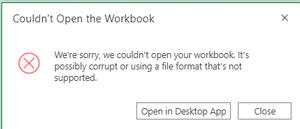
In MS Teams, Click on New Menu and select uploaded Excel template from list. Then get this message. Click Open in Desktop App and get this message. This works in SharePoint. I've done the same with Word templates and they work fine within MS Teams. Just can't get the Excel Template to work in MS Teams. Any ideas would be great?929Views0likes1CommentRe: Unable to delete "new menu" items
After discussing with our IT service desk, we thought we had this fixed. They gave these instructions to follow. This managed to remove the previously deleted items in the new menu, but on retesting by adding a template and trying to delete we still had the issue that we can't delete an item from the new menu. Inorder to resolve the issue on delete some file could you please clean cache by following below steps: 1- On your computer, open Chrome. 2- At the top right, click More . 3- Click More tools Clear browsing data. 4- At the top, choose a time range. To delete everything, select All time. 5- Next to “Cookies and other site data” and “Cached images and files,” check the boxes. 6- Click Clear data. After that can you also open the page on incognito mode? The steps are: 1- On your computer, open Chrome. 2- At the top right, click More More and then New Incognito Window. 3- A new window appears. In the top corner, check for the Incognito icon Incognito. If you see the message "Taking screenshots isn't allowed by the app or your organization," open the webpage in a normal Chrome tab. In addition to this, the Excel templates that we have loaded will not open from the new menu in Teams but will if we use SharePoint. Word templates are working in both instances.4.7KViews0likes0Comments- 5.1KViews0likes1Comment
Custom image uploaded failed - thumbnail in Stream
Yesterday, I was able to upload a thumbnail (PNG) without any problem - Chrome as browser. Today, I need to change the thumbnail and I am given this message. Custom image uploaded failed I have tried: to change browsers - used Chrome and also tried Edge different file sizes renaming the file. Can't seem to upload a custom image now. Anyone else having this issue? Are there specific requirements for the file type, size etc.? Thx
Recent Blog Articles
No content to show