User Profile

JBLT-77
Iron Contributor
Joined 8 years ago


User Widgets
Recent Discussions
Outlook is Moving Random Emails from Deleted Folder to Another Deleted Items Area
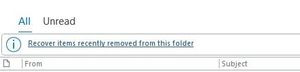
Microsoft Office 365 Outlook Desktop Application for as long as I've had the subscription over a year now, is moving random emails from my deleted items folder to another deleted area that says, "Recover items recently removed from this folder." These are emails that are not older than 30 days old and when I checked today 11/13, there were emails in what I guess I'll call the 2nd level deleted area received as recent as today (11/13). I don't have an outlook rule set up to do this, I don't know why outlook is doing this. So, I have to periodically perform the restore selected emails options to move the emails back to the deleted folder. Any ideas on why it's doing this and a solution? See the deleted on and received on dates of the emails in the mystery 2nd level deleted folder below.1.5KViews0likes1CommentHow Can I Create Criteria in a Search Folder To Show Emails I received from and sent to an email add
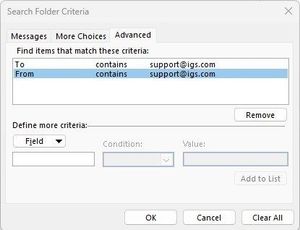
How do I use the Search folder criteria to show all messages that I both received from and sent to specific email address/outlook contact? It appears that when I add more than a single criterion on the advanced tab, outlook is using the AND query parameter meaning find all messages where both conditions are true rather than an OR. It used to be in Microsoft Outlook that the Advanced tab for search criteria let you edit the criteria and use a SQL based construct. If I used just a single search criterion such as to or from, I get results in the search folder, but when I add both criteria, I do not get any results. Basically, I'm trying to create a search folder that shows all the emails I've sent and received from the products help desk email support team.Solved4.7KViews0likes5CommentsRe: How Can I Create Criteria in a Search Folder To Show Emails I received from and sent to an email add
VasilMichev Thanks for the info. So, if I'm understanding correctly, in order to accomplish, the creating a search folder given the constraints on creating search folder criteria won't work. Instead, I would have to create a mail folder and then set up mail rules to have all emails sent to and received for a specific email address moved to that folder? The thing is I don't want those emails moved to a separate folder I want them to stay in their original sent and archive folders. Search folders are the ideal way, but there doesn't seem to be a way to set criteria that returns all emails from or sent to a specific email recipient. The advanced tab seems to be using the AND where all search criteria must be met and not where any of the search criteria are met. As I previously mentioned, older versions of outlook on the Advanced Tab use generate a sort of SQL statement and you could edit it to create additional AND/OR conditions. Can you show a screenshot of how using the OR would work for what you are mentioning.4.1KViews0likes3CommentsRe: Why Doesn't OneNote Allow File Attachment Icons to Be Placed Beside Each other?
harveer singh I am currently using the Office 365 version of OneNote. I'm not able to find the OneNote for Windows 10 app in the Microsoft store. Perhaps it's because I'm on Windows 11. I'm currently on the latest build of OneNote for Microsoft 365.4.7KViews0likes3CommentsWhy Doesn't OneNote Allow File Attachment Icons to Be Placed Beside Each other?
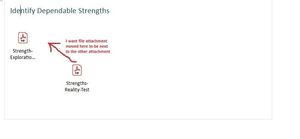
I inserted two file attachments into a page in OneNote and for some reason, OneNote will not let me move the two file attachments that I inserted side-by-side. It wants each file attachment to be below the other. If I try to drag the file attachment underneath up to be to the right of the file attachment above it, OneNote moves the file attachment on top to the bottom of the file attachment I just dragged up. This auto arranging of file attachments ends up taking up unnecessary space. Is there a setting I can change or a workaround for this?Solved5.3KViews1like5CommentsRe: Outlook is Moving Random Emails from Deleted Folder to Another Deleted Items Area
Terry_Lazer Thanks. I did check the properties on the deleted folder, and it was set to autoarchive items older than 1 month to a local data file. I changed the option to not autoarchive. This still wouldn't explain why apparently random emails were being moved out of the deleted folder and into the recover deleted area. Microsoft actually did some advanced technical stuff to deal with another issue I was having in which they removed office using uninstall, editing the registry and some other stuff and whatever they did seems to also have resolved the mysterious issue of outlook doing its own thing moving random emails.1.3KViews0likes0CommentsProblems Printing A Subpage within a Webpage in Edge
When trying to print a webpage or even using the web select feature in Microsoft Edge to print a website that appears to have a sub-page or window within the main website window, not all of the page content is included in the printout as you can see in the screenshots below. First screenshot shows in the browser that there is a subpage or window that is part of another webpage window. Second screenshot shows print preview and how content gets cut off. Is there a workaround for this?476Views0likes0CommentsMicrosoft OneNote Inserting Spreadsheet Includes Extra Space
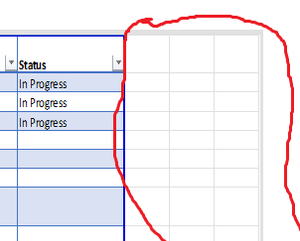
I inserted an existing excel spreadsheet into a OneNote page and it includes extra areas from the spreadsheet that do not contain any information as shown in the screenshot below. How can I adjust this so that only the area of the spreadsheet with content is displayed?866Views0likes0CommentsWhy Doesn't Pivot Table Allow Sorting On Columns Other Than First Column
I wanted to sort my pivot table to the count of Work Role column in the pivot table, however, Excel has the Sort/Filter option grayed out preventing me from being able to. Why is this and is there a fix or workaround?Solved14KViews0likes2CommentsHandling Project Baseline Updates When Rescheduling A Phase of Tasks
How should I handle updating the project baseline when I have a project phase consisting of many tasks that now cannot start until after a certain date and have all been rescheduled to start in January 2023. Another twist is that some of the tasks in this phase were subtasks under upcoming Iteration Summary Tasks occurring this year. Is it best to set a new baseline like Baseline 1 on the Entire Project, or just update the Baseline for just selected tasks and do I check both the Rollup to All Summary Tasks and From Subtasks to Selected Summary Tasks options?794Views0likes1CommentTask Finish Date Not Updating Based on Finish To Finish Predecessor
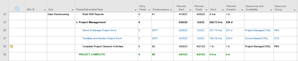
I have a "Project Management" task that spans the duration of the project to account for my Project management work. I created added the last task in the project as a predecessor to my Project Management Task with as Finish to Finish, meaning the Project Management Task can't finish until the last work task in the project finishes. At first it worked as expected, then I refined the schedule and the finish date of the last task in the project changed, however the finish date for my project management task didn't change to reflect the new finish date. Why? As shown in the screenshot below Task 82 finishes on 4/20/23, however tasks 86 and 87 which are Finish To Finish based on 82 as a predecessor, are not showing the new finish date.Solved2.4KViews0likes3CommentsWhy Is Project Setting A Start No Earlier Than Constraint When Changing Task From Manual To Auto
For some reason when I change tasks from manually scheduled, like if I don't know the start and finish dates yet, then once I have those dates I change the schedule mode from manually scheduled to auto scheduled. So I selected several tasks and changed to auto scheduled, and for some reason project assigned start no earlier than constraint dates to them, that I then had to remove and change back to Start As Soon As Possible. Why is project doing this? It's annoying.1.9KViews1like1CommentRe: Getting #ERROR in Custom Text Field Using IIf Function For The False Argument
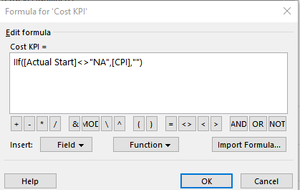
John-project All I know is I'm not getting an error. Below is the custom field and formula, and what the view looks like. Now if I do hover over the graphical indicator Cost KPI field. For tasks where the Actual Start=NA, it does display #ERROR, but only when I hover over it. Otherwise it just shows as blank.3.8KViews0likes1CommentRe: Getting #ERROR in Custom Text Field Using IIf Function For The False Argument
It works for Number fields because I have a custom field that displays graphical indicators. The formula I use for my custom Cost KPI field uses IIf ([Actual Start] <> "NA", [CPI], ""), and I don't get an error.3.9KViews0likes3CommentsRe: Getting #ERROR in Custom Text Field Using IIf Function For The False Argument
John-project Would possibly using a different custom field type than a Text field be better to produce a Yes/No value based on whether a date field contains "NA". It appears to work for number custom field types, but that field type can't produce a Yes/No Value. I played around with the flag custom field type and I don't think that will work either.3.9KViews0likes5CommentsRe: Getting #ERROR in Custom Text Field Using IIf Function For The False Argument
John-project Any idea why Project would store a numerical value for the baseline start date field instead of the value that actually displays "NA". Thats a little strange. Also I think there were other customer fields I have that evaluate whether a date field has "NA", and those didn't produce errors, but they were also different custom field types so maybe that had something to do with why the formulas worked.3.9KViews0likes7Comments


Recent Blog Articles
No content to show