User Profile

camha
Copper Contributor
Joined 5 years ago


User Widgets
Recent Discussions
Re: Sharepoint Error: This username may be incorrect for Guest User
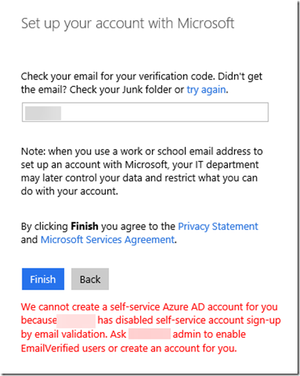
ChristianJBergstrom this is from my org setting: Am I correct to infer that the problem is not from our side? I want to clarify the re-invitation issue: - The user from p.com did receive an email invite, prompted to sign up for MS account - They also get a verification code - Once clicked Finish, they received: the blurred out names are p.com (partner's domain)7.3KViews0likes1CommentRe: Sharepoint Error: This username may be incorrect for Guest User
ChristianJBergstrom thank you! I've tried re-inviting and the user received the following error: Their organization probably changed their policy recently. I am also informed that their domain is a Microsoft one, so they probably run Azure. Their IT is not very savvy, so I may have to help them. I've searched for this article about enabling: https://docs.microsoft.com/en-us/azure/active-directory/enterprise-users/directory-self-service-signup However, I'm not very sufficient with PowerShell, is there a way to make settings in the Azure interface? Many thanks!!!7.4KViews0likes5CommentsSharepoint Error: This username may be incorrect for Guest User
Hi all, I am a Sharepoint and O365 admin (not super admin) for my organization. For all our sites the current External sharing setting is: "New and existing guests - Guests must use sign in or provide a verification code". Whenever I want to share a site with an external user, I create a guest account on Azure, add them to the Sharepoint group, and they can navigate normally. There is one site created for this specific business partner of ours, let's call them P. There is one user mailto:guest1@P.com that is able upload, edit, etc. normally on our site since April-August 2021. But recently, they have been receiving the error: This username may be incorrect. Make sure you typed it correctly. Otherwise, contact your admin We checked on our Azure directory, and the guest username invited is still the same, we did not make any changes to any setting. Other external sites and guest users are still working normally. We tried incognito, clear cookies, different browser. Our local O365 provider IT support insisted that we have to open the External sharing setting to "Anyone - Users and share files and folders using links that don't require sign-in", and explained that Microsoft is changing their policy so mailto:guest1@P.com error was the result of that. I'm not satisfied with their answer since all our other sites with the guest setting are still working, and we certainly do not want our Sharepoint links to be public. Any other suggestion to the solution will be appreciated. Can anyone please share the notice of this policy change if possible?8.3KViews1like7Comments

Recent Blog Articles
No content to show