User Profile

Mike_Joke
Copper Contributor
Joined 5 years ago


User Widgets
Recent Discussions
Update for Planner without Group removed, why?
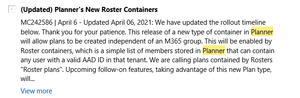
Hi all, a couple of months ago, there was an update announced that you can create MS Planner without the need of creating a 365 Group. I wanted to check again in the Notification Center of M365 when the update will be finally released and saw that the message is gone. I can't find any other hints to this update anymore. When will the update be released? Why was everything around this update deleted? Why was there no notification? We really need this update since we need a space for private planners, that you can add to private channels. The update stated, that you can create Planner without a Microsoft 365 Group within a specific way so a Container will be created which stores the data. Can someone say why this was removed without a trace? Kind regards Mike This Update is completely gone, why?783Views2likes0CommentsPowerBI - Changes are not reflected after publishing
Hi dear Community, we currently phase a strange Issue with PowerBi, it only happens for a certain report. When we publish the changes from the Desktop App to PowerBI, the changes are not reflected on the live report. You can clearly see that the timestamp has changed but the new changes are not reflected. We also receive no Error Message, any ideas? Thank you and kind regards Mike5.1KViews0likes1CommentEmbedd MS Project from project.microsoft.com to a Sharepoint Online Page
Hi all, we currently use the new MS Project from M365 to plan Tasks and to have a dynamic timeline view of those. Our current Project Management Overview is built via Sharepoint. Each Project Team has their own Sharepoint Page where all the necessary information is collected and the documents for the Project are also linked on this page. For certain projects we started to use the new Microsoft Project to be able to use the timeline view and plan ahead accordingly. Now we would like to embedd the timeline view of the MS Project (URL: project.microsoft.com) into the Sharepoint Online Page. Unfortunately, there is no existing connector to project.microsoft.com so I tried to embedd it via an iframe but project.microsoft.com com declined the connection. Has anyone an Idea how we can solve this? Thanks in advance and kind regards Mike1.7KViews2likes0CommentsRe: Disconnect Microsoft Teams calendar from Outlook calendar
Is there already an update on this? We face the exact same problem. For one team, the calendar does not sync automatically to all personal calendars and for the other Team it does. For some it created a dedicated "Group Calendar", which I can toggle on and off in Outlook. THIS is exactly what we need, but I couldn't pinpoint the exact configuration to make this work for all teams.24KViews0likes1Comment
Recent Blog Articles
No content to show