User Profile

Alber
Iron Contributor
Joined 5 years ago


User Widgets
Recent Discussions
Re: Is there a better way to upload a large Win32 app to MEM?
Moe_Kinani The links you shared are very useful. I just succeeded in uploading by checking the process every 20 mins in last 3hours. Barely acceptable because it's a one-time work. Thank you for information sharing anyway.3.7KViews0likes2CommentsRe: Is there a better way to upload a large Win32 app to MEM?
Moe_Kinani No, I never tried that way and I don't think it's better. Because it seems lacking some featuers like installation detection, app update and replacement. I prefer not to use script deployment in Intune, until there's no choice, since the mechanism is without guarantee.3.9KViews0likes4CommentsIs there a better way to upload a large Win32 app to MEM?
Hi, It's painful to upload a Win32 app larger than 5GB to MEM now. I have a total 300Mbps upload bandwidth, but the upload process always uses less than 5Mbps in average. Even the worse, the process can't keep itself running in more than 1 hours. Is there a better way to do this? Thanks for reading this post.Solved4.4KViews0likes9CommentsRe: How to remove MDE managed devices in MEM?
OK my case is closed. For short, the data retention setting is for the information INSIDE the device entry ONLY. The empty device entry itself will remain less than 180 days. So how to remove MDE managed devices in MEM? Ans: Wait 180 days, they will be deleted in MDE then also in MEM. I cannot confirm the answer is right, but I think it is.7.5KViews0likes0CommentsBroken dynamic membership rules of Autopatch managed groups?
Hi, I found these two dynamic groups in AAD seems have a broken membership rule: Devices registered with Autopatch are still not be assigned to them: Did I miss something, or these two groups are indeed broken? Thanks anyway.Solved1.8KViews0likes3CommentsRe: Autopatch service account as risky user?
Seems it's a known issue. I updated the Autopatch related Named Location with an IP list the service team provide me. Then the notification can be dismissed safely. Since the new authentication using Enterprise Application is on the way, I think it's OK to do nothing.1.3KViews0likes0CommentsHow to remove MDE managed devices in MEM?
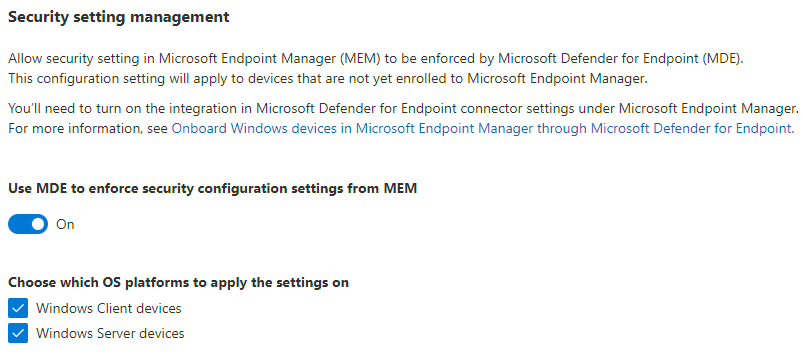
Hi, I had two windows server VMs with MDE(Microsoft Defender for Endpoint) onboarded. For test purpose, I turned on the security settings management in MDE to let MEM deploy some security policies to them. It worked fine. I got corresponding device entries in AAD and MEM and was able to manage the VMs like other Intune managed devices. After I deleted the VMs, I found the device entries are somehow lingering. For MDE, I knew there is a data retention time which is 30 days in my case. I waited for a month and the VMs do disappear from MDE. But I can still see them in AAD and MEM till now. I can't do anything to them in MEM, while I can temporarily delete them in AAD and see them respawn next day. According to the doc, there is a way to solve this problem, but I can't see how. https://learn.microsoft.com/en-us/mem/intune/protect/mde-security-integration#frequently-asked-questions-and-considerations Does anyone know what "be removed from the scope of Configuration Management in the Security Center" means and how to perform it? Thanks for reading this post.Solved7.9KViews0likes2CommentsRe: Does Windows Autopatch support DIY build PCs?
Hi RichardLian According to the docs, a duplicate serial number is not accepted by Autopatch. I guess I registered the two devices (with the same serial number) before the check mechanism be added. Now I still have one of them stay in Autopatch and works fine. Really wonder why we need serial number, model and manufacturer of a device to use Autopatch. Nonsense to me.2.4KViews0likes4CommentsRe: Does Windows Autopatch use legacy authentication?
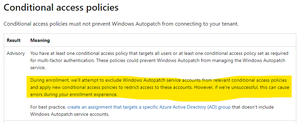
Yes, I knew the enrollment process will modify my CA policies. But I think the modification is without considering of POLP (principle of least privilege). It looks like the process doesn't check the real need, just exclude the service accounts from everywhere. Microsoft promotes blocking legacy authentication for years. I don't believe they will create a new service (Windows Autopatch) which is using legacy authentication. Hence, I need a confirmation to undo the modification (just for the block-legacy-authentication one) with confidence. Thanks.984Views0likes0CommentsRe: Does Windows Autopatch support DIY build PCs?
Seems like no one (but me) use DIY build PCs in enterprise workspace. Sounds reasonable. I may try to use more brand pre-built PC from now on. But I still need an explanation and suggestion about the problem above. And I wonder why Windows Autopatch requires more information than Windows Autopilot and Intune? Intune and AAD device IDs should be enough to identify every single device without a need of serial number, manufacturer and model, isn't it?2.4KViews0likes6CommentsDoes Windows Autopatch use legacy authentication?
Hi, During the enrollment with Windows Autopatch, my block-legacy-authentication conditional access policy is also modified automatically by the service to exclude the service accounts. Does it mean that Windows Autopatch is using legacy authentication? I don't think so, hence need a confirmation to undo the modification with confidence. Many thanks.Solved1.2KViews0likes3CommentsDoes Windows Autopatch support DIY build PCs?
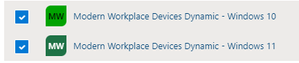
Hi, I have some DIY build PCs enrolled and managed by Intune. They don't have effective values (but not blank) of serial number, manufacturer and model. Looks like following pic in Intune portal: (For all the DIY build PCs I got similar values of serial number, manufacturer and model. Like "SystemSerialNumber", "System manufacturer", "System Product Name", "ToBeFilledByO.E.M." and "To Be Filled By O.E.M.") I tried to register 2 such PCs with Windows Autopatch and succeeded. But today one of them disappeared from Windows Autopatch portal, either in Ready or Not ready tab. The other one is fine. I can still find the missing one in "Modern Workplace *" AAD groups, and the corresponding policy assignment seems OK. Following pic are from the missing one: (membership of "Modern Workplace *" AAD groups) (corresponding policy assignment) I guess it's a bug for Windows Autopatch to handle such DIY build PCs. How could I solve it? Will there be an offical fix for this? If unfortunately it's not a bug, I wonder why. Current device records in AAD and Intune for such DIY build PCs should be enough for Windows Autopatch to work, doesn't it? Any opinions are welcome. Many thanks.Solved2.7KViews1like7CommentsRe: Can't remove 2 advisories
phull89 I think it's OK to enroll your tenant in Windows Autopatch with these advisories. During the enrollment, Windows Autopatch service try to modify the corresponding CA policy. In my experience, they will be fine. (Just remember to check CA policy after enrollment to be sure.) For Co-Managed issue, I think it's OK if you do follow the documents. Hope this helps.614Views0likes1Comment




Recent Blog Articles
No content to show