User Profile

Takuya_Fukagai
Copper Contributor
Joined 5 years ago


User Widgets
Recent Discussions
Re: Failed to install MSIX application with Error 0x80D05011
Takuya_Fukagai I don't know the reason why the problem has been solved by creating a new self-signed certificate. ( I created a previous self-signed certificate about one month ago. There was about one year before it expires. )6.3KViews0likes0CommentsRe: Failed to install MSIX application with Error 0x80D05011
Takuya_Fukagai I created a new MSIX package project with Visual Studio Community 2019. It refers to my original application project (VehicleInformationChecker). I created a new self-signed certificate this time. (I used a same self-signed certificate in my previous tests.) Other configuration settings are the same as before. I uploaded the new package on our web server. So far, both install and update are working without any problems on both of my two laptop computers.6.2KViews0likes1CommentRe: Failed to install MSIX application with Error 0x80D05011
Takuya_Fukagai I tested with two laptop computers. Both of them use the same version of Windows OS. Edition: Windows 10 Home Version: 20H2 OS build: 19042.1237 Feature Experience Pack: Windows Feature Experience Pack 120.2212.3530.0 I successfully installed my test MSIX package on one of them last night. I prepared my test MSIX package with Visual Studio Community 2019. I followed the instruction described on the following web page. https://qiita.com/smi/items/17cdc56c08b8a5dab58e When I prepared my test package, I recreated test application by copying the source code (*.cs and *.xaml files) from my original application which is based on .Net Core 5.0. My test package referred to this test application. However, I failed to install the same package on the other computer with the error code 0x80D05011. 1. other test 1 I tested with a very simple .Net Core 5.0 application. I replaced the application which is referred from my original package to the attached very simple application. I failed to install the package on both of my two computers with the same error 0x80D05011. 2. other test 2 I replaced the application which is referred from my test package to the attached very simple application. One of my two computers showed the install error with the error code 0x80D05011. The other computer showed the install error with the error code 0xC00CEE23. The contents of "MSIX_VehicleInformationChecker_Test.appinstaller" are as follows. (I modified the part of web address.) When I tested with my test package, I uploaded the following files on a Web server. .htaccess MSIX_VehicleInformationChecker_Test.appinstaller MSIX_VehicleInformationChecker_Test_1.0.10.0_Debug_Test index.html "MSIX_VehicleInformationChecker_Test.appinstaller", "MSIX_VehicleInformationChecker_Test_1.0.10.0_Debug_Test", and "index.html" were generated by Visual Studio Community 2019. I prepared ".htaccess" file with the following contents. ------------------------------------------------ AddType application/vns.ms-appx appx AddType application/vns.ms-appx appxbundle AddType application/xml appinstaller Satisfy any order allow,deny allow from all ------------------------------------------------6.1KViews0likes0CommentsFailed to install MSIX application with Error 0x80D05011
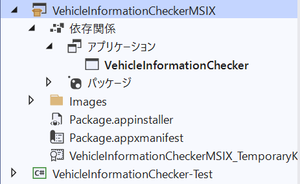
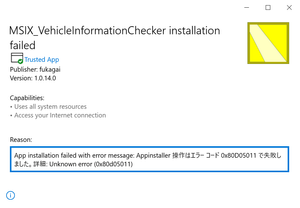
I have been using MSIX package project with Visual Studio Community 2019 for about one month. I didn't have any big troubles with MSIX package until last week. However, I met some troubles using MSIX package this week. 1. The install and automatic update windows which used to be displayed in Japanese are now displayed in English. 2. When I tried to update my MSIX package, it failed to update with error. I uninstalled the MSIX package and tried to reinstall it. However, I failed to install it with the error code 0x80D05011. I attached the picture of the install error. MSIX install and automatic update features had been working successfully until last week. I didn’t change the settings of my MSIX package generating project. I also tried creating new MSIX package project from the beginning. However, the same install error has been displayed with the error code 0x80D05011. I would appreciate it if somebody could give me any information on this issue. I also attached configuration files of my MSIX package project.6.6KViews0likes3Comments

Recent Blog Articles
No content to show