User Profile

kb2010
Brass Contributor
Joined 5 years ago


User Widgets
Recent Discussions
Re: Difference betwee managerID and supervisor indicator
It seems on the new platform to run the manager effectiveness dashboard you MUST have supervisor indicator otherwise the query won't run. Similar to the DE&I query must have Hire Date. This should be made clear on the documentation page.721Views0likes1CommentRe: Metrics Removed
I have found there is a limit that was recently put without any message or notification. a few weeks back the limit was 50 metrics in a report. so if you have an older report with more than 50 metrics or if you try to put more than 50 metrics in a new report it will show up as red and say its not available. Not sure if the limit has been increased but if you add all them metrics to the report im sure you will see some of them turn red. I dont know why microsoft decided to put sucha limit because essentially it now forces us to run the query multiple times to pull the metrics out for analysis. Not sure if this was intentional (if so the lack of messaging on the page is strange) or if it will get rolled back. We logged an issue with MS about this and so far I havent heard if there are plans to roll this restriction back.558Views0likes0CommentsManager Effectiveness PowerBI report (No Manager 1:1 definition)
Can someone from microsoft help me understand why the Powerbi report which calculates a rolling four week average only uses 2 weeks to calculate if a person has met with their manager in the code below. Is the intent to show %of people not meeting with their manager at least once a week? So if an organization wants to show how many people met with their managers at least once in the last four week I would need to adjust the base metric ([_Meetings with manager 1 on 1 last 2 weeks]) to look at last 4 weeks instead of 2 weeks correct? % of employees with no 1:1 with their manager - rolling 4 weeks = VAR LogicTest = '_All Measures'[BT_Slicer_4w_Rolling_Average] VAR __REPORT_FIRST_DATE = '_All Measures'[First date all] VAR __date = SELECTEDVALUE ( 'Manager effectiveness query'[MetricDate] ) VAR __last_4_week = DATESINPERIOD ( 'Manager effectiveness query'[MetricDate], __date, -28, DAY ) VAR metric = AVERAGEX ( __last_4_week, VAR __numerator = CALCULATE ( COUNT ( 'Manager effectiveness query'[PersonId] ), 'Manager effectiveness query'[_Meetings with manager 1 on 1 last 2 weeks] = 0 ) VAR __denominator = CALCULATE ( COUNT ( 'Manager effectiveness query'[PersonId] ) ) RETURN DIVIDE ( __numerator, __denominator, 0 ) ) RETURN IF ( LogicTest && __date >= __REPORT_FIRST_DATE + 21, IF ( [Num Of Employees] >= SELECTEDVALUE ( 'Minimum group size'[Minimum group size] ), metric ), BLANK () )SolvedRe: Time investors vs Collaborators Directionality
Thank you. Out of curiosity does thsi also apply to person to group query? Also which i get these queries do not show directionality, doesn't sending an email imply directionality or even initiating a chat with someone? Are there any queries that we can see this directionality? the network queries do not go into detail about collaboration hours etc.4.7KViews0likes1CommentRe: Time investors vs Collaborators Directionality
Thanks Jessalynn Doesn't Time investor i.e. the person initiating imply directionality? i.e. if A set up a meeting with B and C doesn't this imply that A is setting up the interaction with B and C? granted in some cases managers will ask a junior to set up the meeting but fundamentally i thought the initiator of the email, meeting, call (digital exhaust) was the source at least as I think about it for the network query. So in your example would a group to group query for a 1 on 1 look as follows if the time investor initiated or set up? - Time Investor (Person A) to Collaborator (Person B) -> Collaboration Hours = 1 For a meeting with multiple recipients (assume 1 hour meeting and A, B, and C are all participants but A set the meeting up): - Time Investor (Person A) to Collaborator (Person B) -> Collaboration Hours = 0.5 - Time Investor (Person A) to Collaborator (Person C) -> Collaboration Hours = 0.5 What about B and C who are on the same meeting and technically collaborating with each other and A? If directionality isn't a factor would it be 0.33hr for all three participants?4.7KViews0likes1CommentTime investors vs Collaborators Directionality
Hi All trying to understand if there is directionality with these two in the person to group and group to group queries. e.g. If Person A Sends emails to Person B and Person B never responds say the collaboration hours amounts to 1 hour. In the query would this show up as - Time Investor (Person A) to Collaborator (Person B) Collaboration = 1 - Time Investor (Person B) to Collaborator (Person A) Collaboration = 0 Similarly if Person A schedules a meeting with Person B say 1 hour and Person B attend the meeting. However Person B has never set up any meetings with Person A. Will this also show up as: - Time Investor (Person A) to Collaborator (Person B) Collaboration = 1 - Time Investor (Person B) to Collaborator (Person A) Collaboration = 0 Essentially In the two examples above person B aced as a collaborator but never initiated anything with Person B. so the directionality of hte time investment is always Person a to Person B. Can someone confirm this. Jake_CaddesSolved5KViews0likes8CommentsRe: Processing organization data has failed, unable to refresh.
We raised this with MS as well. What's frustrating is that the process stalls and you cant do anything until MS rolls back things. We asked if there is a way to make it so it only commits changes if there are no issues i.e. make the validation more robust. Or maybe if we have a test environment to test things first before applying to prod. More time consuming and possibly costly. The biggest issue is sometimes if the changes are half done, no one can use the tool until its fixed. I worry when I have to load org data for the entire org.3KViews1like0CommentsRe: Time Investors different than collaborators
This is just my 2 cents so I am not 100% sure as i only recently started using the Group queries. In my case i actually put a filter on both time investors and collaborators to be part of one division. However, I still noticed a discrepancy in the population of the two. The way i read it was that there are some collaborators in the same division that aren't also time investors. This could be due to the org file not being correct e.g. they have moved teams a while ago or were never in the team to begin with. They might also still be in the distribution lists which could be why we see time investors still sending them emails but they don't respond/collaborate back. However, the level of collaboration should technically be immaterial. Ill post more once i play with this data more.2.2KViews0likes0CommentsRe: Viva Insights query integration with enterprise systems
I second this request. we need a more efficient way to pull data automatically each month. the current process is fine for adhoc analysis but difficult to scale. A timeline on more flexible API would be great. In fact if there could be an api that makes it easier to build some of the different types of queries through a more advance interface it would make running analysis fair more powerful.3KViews0likes0CommentsRe: Date Field not aligning for WpA & non-WpA data sets
If my understanding of the issue is correct I think the PBI templates from MS should have followed best practice and have a calendar table to which the measures apply the filters and subsequently propagate those filters to other tables. Without this, by joining any other fact table to the Viva Insights table e.g. person query would create a many to many relationship. So, you may need to either have an intermediary table (old method) or use the Many to Many relationship (new method). That being said I haven't tried to do this. https://docs.microsoft.com/en-us/power-bi/transform-model/desktop-many-to-many-relationships. Might need a product owner to better answer this. Note: Even createing a seperate date table I think would require modifiing all the measures as they apply the filters to the Viva Insights table e.g. person query. With respect to "prevents me from making connections through other keys" the could be the option to maybe create a new column with a custom key that includes the date and whatever other dimenion you wanted to add?1.7KViews0likes0CommentsWays of Working Assessment Dashboard (Temporary File Size Issue)
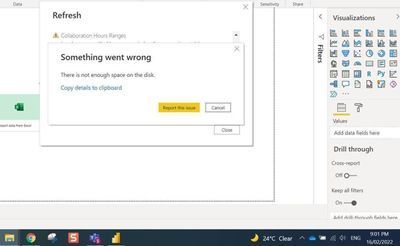
Hi All, not sure if other people have had this issue but several our analyst have encountered this and it is making the ways of working assessment dashboard unusable for larger regions. There hasn't been any resolution via Microsoft support even after 2 weeks unfortunately. The issue is that when updating the ways of working template for a last organization with a large population and with many dimensions, the temporary space on the hard drive goes out of control until all the space is used up. In fact, I had this issue happen to me for only 500 user population with about 50 dimensions. The think the issue is due to how the ways of working assessment dashboard creates duplicate rows for every dimension of data loaded. our laptops don't come with terabytes of space and upgrading space shouldn't be the solution. The final file size is only 30-40mb but during the refresh the temporary files reach over 300gb before failing. Are there any plans of optimising the ways of working dashboard so that it can handle large population and dimensions?Solved2.2KViews0likes2CommentsRe: Group to Group Query Metrics
I agree that each query has their different purposes, however this still doesn't explains why in the group to group query we can't select call hours and instant message hours. Yet we do see channel message hours and collaboration hours (which is a combination of all email, meeting, calls and instant message). The definition of the missing two channels should be similar to meeting hours e.g.: Call Hour: Number of hours the time investor group has spent in scheduled and unscheduled calls through Teams with the collaborator group. Instant Message Hours: Number of hours the time investor group has spent in instant messages (IMs) through Teams with the collaborator group.4.5KViews0likes3Comments
Groups

Advanced Insights Platform Transition Support
Join our support group for customers transitioning to the new advanced insights platform.
Viva Insights Partners
Access NDA content and participate in discussions tailored to Viva Insights partners.Recent Blog Articles
No content to show