User Profile

CANDEman
Iron Contributor
Joined 5 years ago


User Widgets
Recent Discussions
Re: Poly devices and the transition to Android Open Source Project (AOSP)
Poly OS 4.5 just got released but currently it is a manual update that you have to do either through the device web interface, or through Poly Lens if your devices are under management. Once you apply the new firmware update you then need to go in to the Settings of the device (again on the web interface or through Poly Lens portal) and change a button in General Settings > Provider > and toggle the button for "Enable AOSP authentication for Teams". Once you apply this setting the device will Switch Teams Authentication. If you have everything correctly set up in your Intune Admin Center with the AOSP profile then your device should now be migrated to AOSP within a few minutes.2KViews0likes0CommentsRe: New Feature: Schedule Microsoft Team Chat Messages
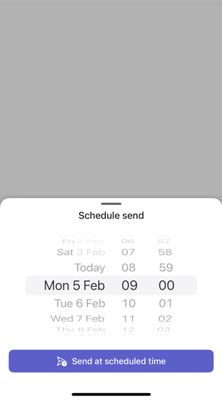
Yes definitely on the iOS app. Using my work account. I have just had a thought....maybe this is only a feature available for work account and not personal accounts. So on the same iOS Teams app I have just switched account to my personal account and tried to reply to a chat I have. I press and hold the SEND button and the scheduled send pop-up does NOT appear. Are you also signed in to your Teams app using a personal account or a work account??1.8KViews0likes1CommentRe: User's 'Switch to Public Preview' gone
Just reading through this thread now and this is exactly something that I have started to notice for myself. So far I have not heard anything from my other Public Preview users in our org, but I am expecting one or two to notice something soon. I have checked our targeted release settings and we do have a targeted release setting set for just a few users within our org and I am one of them. So this might explain now why this change of Public Preview is happening for me. Not entirely sure. Think i'll just keep an eye on the teams app for what happens in the next update.Re: Surface Hub 2s Microsoft Teams issue
because of basic authentication being disable by Microsoft now I would HIGHLY recommend that you do not add these to your domain using onprem AD. Instead join them to your AzureAD and use the resource account with a Teams Rooms license. They work beautifully that way! You can even manage them with intune if you would centralized and manageable settings and features. It took me a little while to understand it all and get it set up but it was totally worth it!1.6KViews0likes0CommentsRe: Webinar not showing in teams
I have the same occurrence for myself and a few other colleagues in the organization. And if I sign out of the Teams client and then sign in with a different account such as my own personal DEV tenant account then I get Webinars back in my Calendar options. I find that Teams on the web works fine and the option for New Webinar is available there so I just have to recommend this to colleagues who are missing New Webinar in the windows PC client. Some other things I have noticed... If i enable public preview for my windows PC client then New Webinar appears again. If i disable public preview for my windows PC client then "check for updates" several times eventually New Webinar disappears again in the client. I have double checked Meetings Policy and I believe everything is correct and I can prove this because lots of colleagues have "New Webinar" available in their Teams PC client and yet there are a few that I have found that do not. One last thing I am wondering about is whether the issue might be related to the current rollout of Webinars 2.0 from Microsoft. If they are rolling out the new webinar experience to a Tenant then could this cause disruption in who can see the "new webinar" button? https://office365itpros.com/2022/11/07/teams-webinars-2-0/6.1KViews0likes1CommentRe: Cannot fetch Calendar with Microsoft Teams Rooms Basic
Tim_Nguyen1125 I would suggest that you check that you have modern authentication enabled and selected when trying to sign in on the MTR account. This is the first thing that comes to mind for me when this cannot fetch calendar occurs.9.3KViews0likes5Comments
Recent Blog Articles
No content to show