User Profile

Maluks
Iron Contributor
Joined 10 years ago


User Widgets
Recent Discussions
Re: Teams: How can I, or we as a company, access the folders in which chats are saved? Where are they?
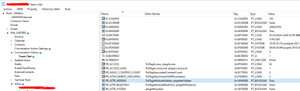
ak-usyd Teams chats are saved in users exchange mailbox. Unlike like Skype for business, conversation history folder is hidden and not accessible by the users or admins. Users can search for their chats using Teams client. If you need to perform a search of other users you need to use tools like ediscovery. Microsoft has a nice poster explaining Teams client and which part of data is stored where. You can download them here - https://learn.microsoft.com/en-us/microsoftteams/teams-architecture-solutions-posters You can see the hidden folder using MFCMAPI tool, but I strongly advise not to modify any of the properties, as you can do more harm than good playing with the tool.2.5KViews0likes0CommentsRe: Looking for expanded documentation on Exchange objects
Here's the whole Exchange powershell module documentation. From this link you can basically navigate to any parameter and any property with explanation - https://learn.microsoft.com/en-us/exchange/client-developer/management/exchange-management-shell-cmdlet-input-and-output-types For example your requested documentation about mailbox properties that were found through the URL above https://learn.microsoft.com/en-us/previous-versions/office/exchange-server-api/ff328629(v=exchg.150)503Views0likes0CommentsRe: How to migrate mailbox with over 500 GB - Migration from GWS to M365
I think regarding your topic you should talk to Microsoft support directly, this forum can only assist you in guiding you towards correct direction. Anything outside official support documentation should be addressed directly to MS. I feel that such large mailboxes should not exist in MS world and a process how to keep them in the standard size should be implemented, or the Exchange system is not the correct tool for use.1.8KViews1like1CommentRe: "No Results Found" When Allocating Teams Users Numbers
Make sure that your user is licensed with Phone System license Usage location of that user is matching that country phone number. You can assign a phone number via PowerShell using Microsoft Teams module and using a command Set-CsPhoneNumberAssignment.1.8KViews0likes0CommentsRe: Migration Tool to migrate Google Workspace email to Hosted Exchange email
This can be done by your exchange administrator. Connect to Exchange admin center, choose migration on the left side of the menu. When specifying migration type, choose google workspace. More information can be found here in MS docs: https://learn.microsoft.com/en-us/exchange/mailbox-migration/perform-g-suite-migration I am not sure if this can be done on exchange on-premises servers. Otherwise there are 3rd party tools that can do the same.959Views0likes1CommentRe: Incoming Call Queue Calls - Transfer Failed
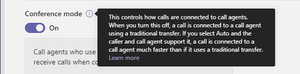
ThomasT4 In our scenario we had to configure REFER handling on the gateways - UCGeek blog post As well as "Conferencing mode" was causing the problems in the call queue. Our SBC firmware needed to be upgraded to support that feature14KViews0likes0CommentsRe: Total users on Skype for business
It's easy to say for Microsoft about MS Teams usage, cause it's all online and in their infrastructure, it's not the same with Skype for business when companies have deployed it on-premises. You've probably found this site already https://www.uctoday.com/collaboration/team-collaboration/skype-business-statistics/ Chrizzly5.6KViews0likes3CommentsRe: Teams crashes while starting a new team conversation on IOS 13 beta
You named the problem yourself 🙂 IOS 13 beta, you are using beta OS, where Teams client has not been tested yet, it can be anything from phone, to OS or Teams client. Basically when you sign yourself for beta \ early realeases, you take the risk that some things might not work as expected2.6KViews0likes1CommentRe: https://guybachar.net/2015/05/10/how-to-use-the-new-key-health-indicators-for-skype-for-business-ser
UC_Project_engineer My approach would be like this: I know it's the company rules not to have MS Office, but does it also prevent to install trial version for this particular task only? If not I would download office, execute the commands and get rid of the office. Or: If you are going to continuously monitor KHI data, maybe you should consider Statistics manager server? It's free to use, the only thing is that you have to find a server were to install it 🙂 https://docs.microsoft.com/en-us/skypeforbusiness/management-tools/statistics-manager/statistics-manager941Views0likes1CommentRe: How to prevent users saving to onedrive
Sorry, not a proposal to solution, but what bad decision to do it company wide. There are tons of policies to make Onedrive really secure place to store and access documents from managed devices. From various experience in the different companies I could say that forbidding something is not an option at all, you will forbid controlled Onedrive, unmanaged tools like Google drive, Dropbox, Box will come into the play where you won't have any control of and that will make things even worse. One of the examples is to forbid file download \ printing \ syncing from unmanaged devices by creating such policies. https://docs.microsoft.com/en-us/sharepoint/control-access-from-unmanaged-devices In addition to this Onedrive probably has the best sharing options between the business units, companies etc. https://support.office.com/en-us/article/share-onedrive-files-and-folders-9fcc2f7d-de0c-4cec-93b0-a82024800c07 https://docs.microsoft.com/en-us/sharepoint/external-sharing-overview9.3KViews0likes2CommentsRe: Win 10 Disk Mgmt not allowing me to assigning a drive letter - drive is there but options greyed out
charlie88GPT protected partitions cannot be managed via disk management in Computer management. You could try to remove GPT protection using diskpart or other 3rd party disk management tools. Note: actions below will clean all the data inside HDD, so if you need data inside, make sure that you have a backup first. Diskpart is part of windows, so to launch it you only need to run CMD, type diskpart. You will enter application and in the application type: List disk (this will display all the HDD's attached) Select disk # (replace # with the number of the disk you want to work with) Clean (this will remove GPT from the disk) Continue disk configuration via Computer Management (if you have window open, refresh the view) as you are probably mostly familiar with.1.7KViews0likes1CommentRe: SfB online migration with contacts
NewlifeMake Skype for business hybrid scenario: Skype for business hybrid configuration Migrate users from Lync to Skype for business online via Lync control panel or powershell Moving from SfB on-premises to Skype for business online Contacts will migrate together, chat history is probably stored in the mailbox Moving between Lync\Skype for business on-premises, meeting URLs change, so either sent out meetings needs to be updated by the user manually or you can use meeting migration service Meeting migration service If the company that you want to migrate uses Enterprise Voice features, you should investigate the needs separately.2.1KViews1like4CommentsRe: Response Groups and Not Ringing a Person in the Group
John Haverty This could be response group sync issue between front-ends. I would suggest on each front-end to filter down Skype event logs to "LS Response group service" and check if there are no errors, especially with 'match making. Next step can be to check connections to Front-ends for the agents using get-csconnections.ps1 script. Run it for the different agents and check against these who receive calls or don't, you should be able to spot a trend, that the ones receiving or not receiving are connected to specific fronted. Get-CsConnections.ps1 -SipAddress [sip address] -Pool [pool FQDN] And finally, you can try to restart Response group service on all PCs at the same time run this on all front-end servers at the same time Stop-CsWindowsService RTCRGS | Start-CsWindowsService Of course this will interrupt all response groups for a short period. If that will not help, try to restart problematic front-end that you figured out with "Get-CsConnections.ps1" script.4.1KViews0likes1CommentRe: Skype Meetings in Shared Mailbox
I cannot tell exactly what is the procedure in Office 365, because I have personally done this on-premises only. Found an article where others discuss about this. From my understanding flow goes like this: Find shared mailbox user under active users in Office 365 Grant license, make sure Skype Online Plan is assigned This will create Skype attributes for the mailbox Let me know us know the outcome :)7.9KViews0likes0Comments
Recent Blog Articles
No content to show