User Profile

LisaJo48
Iron Contributor
Joined 10 years ago


User Widgets
Recent Discussions
Re: Not able to move tasks between Plans
I am experiencing a similar problem: I am unable to move a task from my Private Tasks (aka To Do) in TEAMS to a plan affiliated with an M365 Group in a TEAM. It acts like it is going to and then the tasks pops back up in my Private Tasks list and is not in the Plan.1.1KViews4likes2CommentsFastTrack in a Classic site collection in my tenant
I have a very brief question for which I have not been able to get any input or answers so, I am putting it out to anyone that might have some info to offer. I have a Classic SharePoint FastTrack site collection in my tenant containing Classic Add-ins. May I delete it and the Add-ins along with it without causing problems with the use of FastTrack programs and services? https://XXXXXX.sharepoint.com/sites/fasttrack https://XXXXXX.sharepoint.com/sites/apps Thank you for any insight you can offer.148Views0likes0Commentshttps://collabtools.sharepoint.com/:u:/r/sites/ITSS-SharePointWorkshop/SitePages/Home.aspx?csf=1&web
The action for Microsoft Forms is limited to the Q and A results. It needs to mimic and include the data columns created when "Export to Excel" link is used in the survey or quiz. Especially in the quiz, the additional fields pertaining to submitter info and Total Points is a must. I am completely crippled by the action only containing the test question data elements. Does anyone else agree?Migration to New Stream Skipped videos lost
A user's videos were 'skipped', according to the log. I tried to redo them and now, nothing is there! Not in Classic Stream or New Stream. Where did they go? I need them visible in Classic SharePoint again so I can manually download them and avoid this issue. I heard you have a 'soft' delete in Classic Stream. How do I get the videos to be visible in Classic again? Please help! I'm desperate!Outline View and Master Documents
When I click on Insert under Show Document on the Outline View ribbon, nothing happens. My investigation and testing revealed that WORD will not insert a file that is stored in OneDrive for Business or SharePoint Online. It will, however, work if I save the file into C:\Users\[username]\Documents which is NOT synced to or saved in OneDrive or SharePoint. I had to do some significant troubleshooting to figure out how I could find a 'spot' that is not synced/interfacing with ODB or SPO so, clearly, it's not an easy, viable option for the majority of users. Are my findings are accurate? Is it true that Master Document and subdocuments DO NOT WORK IN M365 with files stored in its apps? And, if this is true, is there any plan to fix it so that it does? If it should be workiing, then why am I unable to insert a file, stored in my ODB libary or in a SPO library, as a subdocument?4.6KViews2likes5CommentsRe: Set Default Sharing to "People with Existing Access"
Thank you Dorje-McKinnon, I have the code that you referenced; however, this command requires that a specific site in the tenant ("YourSite" portion) which means that I would need to run the command for each site [collection], one at a time. This is what I want to avoid. I would like to know of a PS command that will set ALL site [collections] in our tenant to 'people with existing access'. Are you saying that my interpretation of this command is incorrect and it, actually, does affect all sites in a tenant simultaneously? If not, I am looking for a command that does.3.7KViews0likes6CommentsCustomizing category/list names on Add Members UI pages for Champions Management Platform
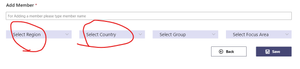
I have tried using the Customization instructions in GitHub but have been unsuccessful. I'm not a developer/coder by trade, only by osmosis, so I need some help. Anyone out there that might be willing to assist? I would like to change "Region" to "Division" and "Group" to "Company" on the Add Member user interface pages. [From my perspective, it would be great if we could change the name of the field in the SharePoint List which would then automatically update the UI pages. This does not change the underlying name of the field; only what the users see. Just like, when we change the "Title" or "Name" field in a list or library, the actual name for it (shown at the bottom of the Library/List Settings page when you mouse over the field name in the list) is not changed which, I'm guessing, is the name that is used in the programming/coding/commands and, therefore, wouldn't cause errors/problems when upgrading to new versions.]512Views0likes0CommentsHow to restrict Communication site creation to a designated security group
Here's what I see under SharePoint Administration -> Settings -> Site Creation. This says, to me, that enabling this will allow all users to create SharePoint sites (and it is unclear whether this means with or without TEAMS). I have created a security group and assigned it, via PowerShell, to be the designated group that can create M365 Groups (therefore TEAMS) and it is working fine. I need to set it up so that the same is true for non-TEAMS enabled sites, like Communication sites. Resolution needed: How do I set it up so that only the members of this designated security group can create a SharePoint Communication site (not associated with a M365 Group) without being given the SPAdmin role (in addition to the GAs and SPAdmins)? Or is there another way to achieve this goal; I am open to whatever works.1.4KViews0likes1CommentRe: Champions Management Platform: Events vs. Tournaments
MandyGlim Believe it or not, I am still in the setup phase. There are several smallish problems that I've encountered with regards to the 'assumptions' made by the app. I FINALLY caught on that the events are TYPES of learning initiative, not each individual event. 🙄 That was a major aha moment! But some things still allude me. For example, Not all businesses have locations in other countries or, as in our case, we support multiple companies as part of one parent company in the same country. So, it would be nice to be able to change the labeling in the Add/Suggest Members UIs so that it said "Select company". There appears to be a way to do so by getting into the code (see 'Customizations' in GitHub), but not being a developer/programmer, I am struggling to follow the instructions (they assume a lot of knowledge; not for newbie's). I can't seem to update the logo using the instructions offered. (FYI: HELP! Anyone!) I find it interesting that there's no way to verify that an event entered by a champion actually happened (and the points are warranted) or what the subject was, so I'm looking for ways to know/add more about their event than just a date. Since I'm struggling with the Events part, I've not fleshed out the Tournaments yet but, generally speaking, they make more sense to me than the Events. The badging is the unique element. I could probably set up the rest on my own but the badging would be missing and this is the incentive/promotion piece that we really wanted to take advantage of, therefore, I've got to get the rest of it to work/make sense for us. I have until December 8th to figure it out! Check here often....I may be posting lost of questions! (Sorry, in advance, JoshLeporati)4.6KViews1like3CommentsRe: Champions Management Platform: Events vs. Tournaments
Question JoshLeporati or anyone else: Is there a way to safeguard against a Champions 'stacking the deck' by saying they are hosting more events than they really are? For example, a champions notes that he's written 4 blog posts therefore giving himself 40 points when, the fact is, he's only written 1 and should only be awarded 10 points.4.6KViews1like1CommentRe: Missing sites under Destinations when I try to move or copy files in modern library
It's ironic that after all this time, I am having to search for a solution because I am flabberguasted that it is still not. I thought I was just being a stupid user for not seeing the way to do this. I don't get why the list of locations to move a file to isn't a list of all the sites to which the user has access. Seems pretty obvious and straightforward.14KViews1like15CommentsRe: Auto SharePoint New Digest not happening in my tenant
DaveMehr365 Thank you. I am aware of the PS script and the feature is enabled ($true) and yet I am not experiencing the expected results - no emails, digests being sent automatically with or without branding. Do you know anything else I might check to dig into why it is not working as described by MS?1.4KViews0likes1CommentAuto SharePoint New Digest not happening in my tenant
This feature, supposedly, should have been working for a year or so but there is no evidence of it. The only place I see new articles is on the SharePoint home page. No changes have been made via PowerShell. I need to understand what is/isn't happening and test/verify it all. I don't know where to start. Any suggestions?1.6KViews0likes3CommentsRe: Champions Management Platform: Events vs. Tournaments
JoshLeporati Thank you SO much. This was very helpful. I will likely have more questions... 🤔 For some reason, this one is hard to sink into my brain. In your list of 'To Do's, please include some written documentation and/or tutorials. Your answer to me was the most I have found! Also, I am so grateful that you are looking into being able to change, at least, the frontend UI labeling. We are deploying it as is so it will be important that we can make a change like that (asap) without having to reinstall. I do have one subjective question I could use some input for. We were planning to only make it available to Champions...for champions to excel in the apps and then act as mentors. We weren't planning to make it available to everyone; we don't have sufficient support to manage the influx. So, with that in mind, can you think of a use case for the Tournaments if they are only available to champions? I'm curious what you might envision. Thanks!5.8KViews2likes4CommentsRe: Champions Management Platform: Events vs. Tournaments
Karuana_Gatimu_MSFT I have several follow-up questions. I'm not sure if this is correct forum to ask them so please let me know if I should ask a different Tech Community or direct me to the correct MS resource. Thanks! For Tournaments, So Tournaments are not for the champions? I thought they were another means through which champions could get points, along with Events. Two lists, ToT User Actions and User Actions have the same columns in them. What is the difference between them and how are they to be used? For Events, What does is the "Count" column in the Events Track List for and what does it do? How is the Actions List list connected to the Events list, or is it? My perception is that the items in the Actions List are the tasks to be completed, for/with a particular event, in order to earn points, however, I'm not seeing a reference to the Events List in the Actions List (in the same manner as there's a link between the ToT User Actions list and the Tournaments lists). So I'm not sure I understand how/if they connect and how they work together or how to use them if they are not connected. Is it possible to change the column headers shown when you click on the Add Members tile in the app? For my company, Region and Country are not applicable. We'd like those to be "Company" and "Division" instead. I see no need to change the underlying column names in the lists, just what is visible to the end-user/champion when they are submitting the name of a new champion.5.8KViews0likes13CommentsChampions Management Platform: Events vs. Tournaments
I am new to this app, after the Tournament feature was added so I am having difficulty distinguishing between the two: Events and Tournaments and how the Event Track Details list works. Would someone mind defining Events and Tournaments, explaining the distinctions between them, and describe the purpose of and how to populate each of the associated lists for them: Event Track Details, Action Lists, ToT User Actions, Tournament Actions, and User Actions. They are named so similarly I'm struggling with keeping it all straight. Some examples of how they are to be used would help, too. Or, if there is documentation that does these things, that would be fine. I have looked everyone and cannot come up with any that digs in a bit and explains these. Thank you.Solved6.6KViews0likes20Comments
Recent Blog Articles
No content to show