User Profile

dilanmic
MCT
Joined 5 years ago


User Widgets
Recent Discussions
Entra ID LAPS and BitLocker on Hybrid AD–Joined Devices
Hi All, We have Hybrid AD–joined Windows devices with BitLocker managed on-prem via GPO and BitLocker recovery keys already escrowed to Microsoft Entra ID. If we enable Windows LAPS in Entra ID (cloud LAPS), will this have any impact on: Existing BitLocker recovery keys stored in Entra ID, or Current/future BitLocker configuration and escrow behavior? Is there any dependency or interaction between Entra ID LAPS and BitLocker on hybrid devices? Thanks in advance DilanSolvedMicrosoft Defender for Endpoint for Vulnerability Management and Reporting
Hi All, We’re currently using Rapid7 for vulnerability management and reporting, but we’re actively evaluating the possibility of moving to Microsoft Defender for Endpoint going forward. We’d like to better understand how to properly leverage Defender for Endpoint for vulnerability management and reporting. If this means using custom reports—such as building dashboards in Power BI—we’re definitely open to that approach. At a high level, we’re looking for guidance on best practices and the right direction to meet the following requirements: Ongoing vulnerability tracking and remediation Clearer reporting on vulnerability trends and areas needing improvement Breakdown of vulnerabilities by severity (Critical, High, Medium, Low), grouped by aging buckets (e.g., 30, 60, 90 days) Defender Secure Score reporting over time (30, 60, and 90-day views) Visibility into non-compliant devices in Intune, including devices in grace period and PCs that have checked in within the last 14 days Any recommendations, examples, or pointers to documentation or reporting approaches would be greatly appreciated. Thanks in advance, Dilan59Views1like0CommentsHow to deploy M365 Companion app through Intune
Hi All, I have a requirement of deploying M365 companion app to a few users in the company. However, when I tried with Win32 apps in Intune, it gets failed every time even though the scripts success manually. Does anyone know how to deploy M365 companion app from Intune? I have downloaded the app from below link and used the below command: https://learn.microsoft.com/en-us/microsoft-365-apps/companions/overview#set-up-the-companion-apps Echo OFF m365companionsetup.exe /quiet Thanks in advanced, DilanBest Approach for Managing Microsoft 365 Apps Policies in Intune
Hi All, Our company is currently operating in a Hybrid Active Directory (AD) environment, with all policies being deployed via Group Policy Objects (GPOs). We have GPOs in place for Microsoft Office and Outlook, and we are planning to transition these to Microsoft Intune. My question is: What is the recommended approach for creating and managing policies related to Office 365 and Outlook (Microsoft 365 Apps) in Intune? Specifically, would it be better to implement these settings using Configuration Profiles, or should we use Policies for Microsoft 365 Apps within Intune? I’d appreciate guidance on the best practice for this migration. Thanks, DilanSolvedExpedite Install Status in Intune
Hi All, I was curious to know that is there anyway that we can expedite the install status in Intune. I have already tried running "sync" from Settings > Accounts > Access work or School and restart the "Microsoft Intune Management Extension" service. However, as per my experience it will take at least couple of hours to sync the status even after ran Sync from settings and restart the service. Therefore, I was wondering is there any way that we can do manually to get a install status ASAP. thanks in advance, DilanBizarre reinstall loop for M365 365 Apps
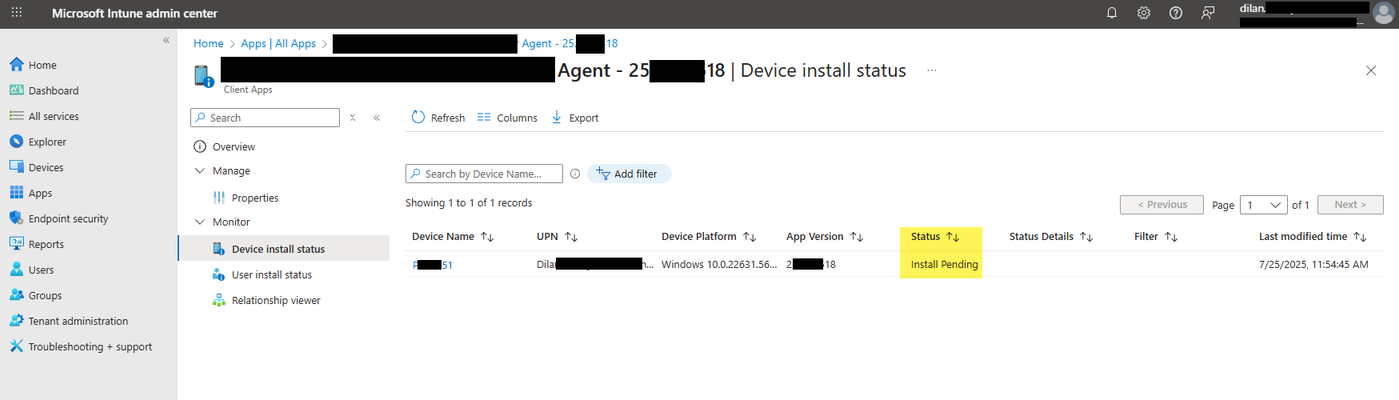
Hi All, We have deployed M365 Apps x32 bit version to all devices (app type is Microsoft 365 Apps (Windows 10 and later)). We have experienced random reinstallation for some users for last 1 to 2 months even the M365 apps has already been installed successfully on the devices. I have tried to find a any Intune logs related to this reinstallation but unfortunately I am not able to find any logs either by application ID or application name. However, I Checked that MSIInstaller logs in event viewer, I could find the successful installation about every 5-6 days (Image01, Image02). even in control panel keep updating the installation date accordantly. Again, When I checked the deployment status for the specific app in Intune, it says as install pending (Image03, Image04, Image05). I would appreciate it any hep to find what happening in the background and anywhere that I can find logs for M365 apps installation from Intune. Thanks, DilanInitiate Windows Updates devices not logged in by users
Hi All, We have a scenario deploy windows updates for devices enrolled to Microsoft Intune and no user logged in. Our IT administrators keep the newly imaged laptops for about 3-4 weeks on their shelf before hand over to a new user. Because of that during that time those devices report to Intune as non-compliant due to Windows OS version. Therefore we are looking for a way to deploy windows updates for them without depending on logged in users. Appreciate any ideas. thanks in advance! DilanSolvedProactive Remediation in Intune doesn't pick up special characters
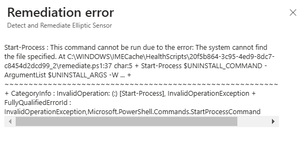
Hi All, I have a remediation script to uninstall an application. However, that will throw an error message even though it runs on PowerShell manually without an issue. Based on my troubleshooting, it seems remediation script doesn't identify the special characters contents in the file path. I would really appreciate it your help if anyone come across this before. surprisingly, although it gives an error, the command is executing and application is uninstalling without and issue. But I am curious to get rid of the error message for reporting purpose. Below is the command executing: Start-Process "C:\ProgramData\Package Cache\{7b06c930-fc32-47a7-8bea-5f1fb6099ee8}\elliptic_virtual_lock_sensor.exe" /uninstall /quiet -Wait Error message: Troubleshooting methods tried so far: Use cmd.exe '/C', instead of start-process. Used file path with start-process (Start-Process -Filepath ...... ) Add error action as either ignored or silently continue, but it still give an error in Intune. Start-Process "C:\ProgramData\Package Cache\{7b06c930-fc32-47a7-8bea-5f1fb6099ee8}\elliptic_virtual_lock_sensor.exe" /uninstall /quiet -Wait -erroraction silentlycontinue Start-Process "C:\ProgramData\Package Cache\{7b06c930-fc32-47a7-8bea-5f1fb6099ee8}\elliptic_virtual_lock_sensor.exe" /uninstall /quiet -Wait -erroraction ignore Used backtick ( ` ) with special characters ( { and } ). below is the command used. whenever I used this bactick ( `) it didn't work the script at all. Start-Process "C:\ProgramData\Package Cache\`{7b06c930-fc32-47a7-8bea-5f1fb6099ee8`}\elliptic_virtual_lock_sensor.exe" /uninstall /quiet -Wait Thanks advance, DilanRe: Work or School Account Problem just after Hybrid AD Joined Autopilot
True, if we wait for a about 30min or so, the process will complete. I was thinking, is there anyway to automate and Fastrack the process? Because, this is the major limitation for go ahead with Hybrid AD joined AutoPilot in the production for us.799Views0likes0CommentsMonitor logical disk space through Intune
Hi All, We have a requirement to monitor low disk space, particularly on devices with less than 1GB of available space. We were considering creating a custom compliance policy, but this would lead to blocking access to company resources as soon as the device becomes non-compliant. Therefore, we were wondering if there are any other automated methods we could use to monitor the logical disk space (primarily the C drive) using Intune or Microsoft Graph. Thanks in advance, DilanMonitor low disk space for computers
Hi All, We have a requirement to monitor low disk space, particularly on devices with less than 1GB of available space. We were considering creating a custom compliance policy, but this would lead to blocking access to company resources as soon as the device becomes non-compliant. Therefore, we were wondering if there are any other automated methods we could use to monitor the logical disk space (primarily the C drive) using Intune or Microsoft Graph. Thanks in advance, DilanFind emails with attachments over 1 year old and remove those attachments for governance purposes
Hi All, I have a somewhat unusual requirement and would appreciate any help. I need to find emails with attachments that are over 1 year old and automatically remove the attachments from those emails. I was wondering if there is a way to achieve this using Microsoft Purview or any other Microsoft feature. At the very least, if there is a way to identify emails with attachments that are over 1 year old, that would be helpful. Thanks in advance, Dilan206Views0likes0Comments
Recent Blog Articles
No content to show