User Profile

EricDeferm
Iron Contributor
Joined 10 years ago


User Widgets
Recent Discussions
EOL - DDG - EQ operator wildcard bug fix
EOL > MSFT recently announced (i/t Health - Message center - MC912176) a bug fix related to the -eq operator and use of wildcards ('*') to compile the member list for Dynamic Distribution Groups. When the update takes effect, the * character will be treated as a literal value and not a wildcard. Therefore, expressions using the -eq operator will only evaluate to true if the right-hand side value matches the property values exactly. For example, the expression (WindowsLiveID -eq '*@microsoft.com') will only return true if the recipient’s WindowsLiveID property is exactly "*@microsoft.com". The current behavior will no longer function after the fix, and this may impact any processes that rely on this behavior. To distinguish the DLs (for corporate communication) membership of internal employees only and external consultants/contractors, we've created several DDGs using PowerShell to define the Recipient filter options based on our internal naming conventions (FTEs get FN.LN@emaildomain whereas consultants/contractors get FN.LN.ext@emaildomain). The formula was based on -eq operator combined with '*' wildcard > formula extract > -RecipientFilter {(( RecipientType -eq 'UserMailbox') -and ((WindowsLiveID -eq '*.*.ext@emaildomain') ... When the bug fix is corrected the formulas will no longer return the expected members. We've tried already several alternatives w/t -like operator but were not able to retrieve the same list. Other operators as -contains and -match are not supported i/t context of EOL. Are there other operators or other parameters to compile a filtered list using wildcards?1.1KViews0likes3CommentsRe: Lists - JSON Custom formatting - Multi value columns
ganeshsanap I guess the answer to my question/issue is mentioned i/t article you shared. The columns from which I want to retrieve the values are simply not (yet) supported :exclamation_mark: Would be interesting to know if MSFT will support these type of columns i/t nearby future.1.9KViews1like1CommentRe: Lists - JSON Custom formatting - Multi value columns
Hi ganeshsanap, the issue is occrurring with Choice columns (with the option allow multiple selections enabled) and also with Managed Metadata columns. All these columns are shown in the View as well as on the list Form. Tx for your reply.1.9KViews0likes0CommentsLists - JSON Custom formatting - Multi value columns
According the Formatting syntax reference | Microsoft Learn it would be possible to use Length, Join, & LoopIndex operators for Multi-value columns ($SelectMainProcess). The Join (& other functions) are working as expected when creating a dedicated column and use JSON to format a view column while retrieving the selected values as expected. See image 2 > "txtContent":"='<txt>' + join($MultiValueColumn, '<sep>') However when applying the same Join or Length operator for a Multi-Value column in the List to Configure the Header/Footer layout the Join nor Length operator are working, actually the selected values of the Multi-Value column are simply not retrieved. If we turn-off the multi-value option for that column, then a single selected value is retrieved and working as expected. See image3 Why can the selected values of Multi-value columns not be retrieved i/t Lists-Configure Layout-Header/Footer context (whereas in View-Column Settings-Format a multi-value column is working like charm)?Solved2.4KViews0likes4CommentsSite Page - PNP Search Box web part - Syntax to use managed property
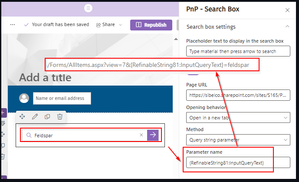
I've put the PnP-Search Box web part on a modern SP Page and would like to retrieve the text (search term) input from a user to launch a search using a managed property (RefinableString80). When performing a manual search in a modern Document library using the search box at the top by specifying the managed property & search term as follows: RefinableStringi80:Feldspar, the search returns the expected results. When investigating the URL it shows the following format ...?view=7&q=RefinableString81%3AFeldspar . When using the PnP-Search Box web part on a page I can't find a proper way to obtain the same result. I've tried multiple combinations, yet either the entered search term is not coming true or the URL syntax is different > see image. How to configure the 'Parameter name' o/t PnP-SB web part to obtain the same URL syntax as described above?Solved1.1KViews0likes2CommentsForm Response print or mail as PDF for respondant
When respondents have answered all the questions and they submit the form we can send them a link to view their response. We want to provide the respondents also the possibility to print the form w/ the answers on paper, as they have to physically sign the form at the bottom (for audit purposes). Currently the link opens the response I/t browser and the only option to print is the browser 'Print' option, which is quite limited as it only prints 2 pages (1st page = current view, 2nd page = empty). Are there any other options? Triggering Power Automation on Form submit and create a PDF document (of the Form response) is not really an option as the available 3rd party options (Plumsail f.i.) can only save docs to OneDrive personal and not OneDrive for Business, and usually also require an additional license.Solved4.1KViews0likes3CommentsHow to copy a Forms for Excel to another site collection and keep it working?
Use case: we use the New-Forms for Excel in a modern Site Collection option to create a new Form. On completion (all questions & options defined) of the form we want to create a copy the Excel document to another Site Collection and start using it there for another target audience. When opening the Excel in ExcelOnline the Insert-Forms-Preview (and other options are grey > see 2nd image), though the Excel contains a worksheet 'Form1' with all the columns as the original one. When opening the original in ExcelOnline all Insert-Forms options are available. What's the best way to copy a Form for Excel to another Site Collection? (using the Forms UI you can also copy a Form but these are created in the same Site Collection-Library). ite Collection > Insert -Forms options are not available > all Insert Forms options are available4.2KViews0likes1CommentForms - Build/link choice list with SP Term Store
Is there a possibility to retrieve and show the values of a SP Term Store set as a choice list for the user interface within a Form while editing/submitting the Form? If it's not possible in the Front-End, can we link/retrieve the values in the Back-End? When submitting the Form, we're creating/adding a new Item to a SP List using Flow > standard & straightforward functionality. This is working very well and easy to implement. Yet we're struggling with Field items that use Managed Meta Data (linked with a Term Store Set). The values captured by the Form and copied by Flow to the new Item are just plain Text values and don't contain any reference to the Term Store set. When mapping that plain text value to a Managed Meta Data type field an error is raised. Logically as the MMD field expects a unique ID referencing a value in the Term Store set. Is there a method/way to convert/link a plain text field such that it can reference/map with unique IDs of Term Store set in MMD fields?Solved4.1KViews0likes5CommentsForms - List of questions that trigger auto suggestion of answers
Is there a page (URL) where we can find a list of the all the Form questions that trigger the auto suggestion of answers feature? I've seen it working for questions like: Which day/week ... How often ... Should we ... Which color ... Probably & hopefully there are many more.3.1KViews3likes3CommentsSharePoint site usage - Export - What's the difference?
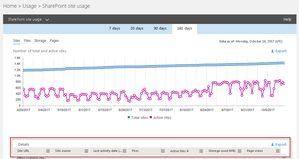
From the Office 365 Admin center you can Select the SharePoint Site Usage report to obtain stats about site usage. The report provides a csv export option. The exported file contains a 'Page Views' and a 'Pages Visited' column. What's the difference between those 2 stats? There's also a 'Files viewed or edited' column. Why can't we have a separate column for those 2 stats? Will there be a distinction between these actions in the future?SolvedOutlook O365 - Calendar - Events from Email - missing
According to this thread https://techcommunity.microsoft.com/t5/Change-Alerts/Events-from-Email-now-showing-up-in-Calendars/m-p/14373#M243 the 'Events from Email' would be available in Office 365 (though not specifically mentioned in the conversation , the thread is tagged with Office365). We still don't see these options in our Calendars. What do we need to do to get them?11KViews1like5CommentsRe: SharePoint 2016 Wiki Page and Library View Analytics
Similar question in our company, as MS recently announced 'Wiki retirement and the future of note taking in Teams Channels', MC496248, change will be rolled out starting mid-February. We want to compile a report about Wiki pages creation & usage for all our Teams.2KViews0likes1CommentOrganization asset library to share Corporate Office templates
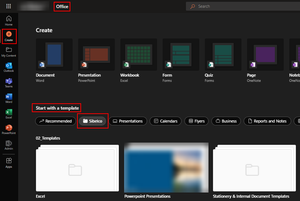
We've configured an Organisation asset library according the specifications given by MSFT. Our Corporate Office templates (Word, Excel & PPT) surface as expected when using the Desktop version of Office. When using the Office online version (https://www.office.com) our company name appears on a tab within the list of "Start with a Template", we can drill-down in the folder structure (where we created separate folders to store Word/Excel/PP templates, yet only the Power Point templates show up, the Word & Excel don't surface (we get an empty folder, whereas the Word & Excel templates are surfacing when we use the Dekstop version of Word/Excel). Anybody else experiencing the same w/ Office online?2.5KViews1like5CommentsRe: Automate - Rules - Notification mail - Language
Tx for insisting on checking the Site Collection - Regional settings > these settings are indeed controlling the language of the notification mails. Due to recent holidays it slipped out of my mind that I changed the settings to French. Changed them now to Chinese and all notifications mail are sent in Chinese. 👍 (apologies to start a threat for something trivial)2.2KViews1like1CommentAutomate - Rules - Notification mail - Language
A few weeks ago we started to use the new Rules feature in SP Libraries & Lists. Initially all notifcation mails (for both Doc Lib & Lists) were sent in English. Recently the nofitication mails are sent in the French language. Which settings (Site Collection, Library, List, ... other (browser settings of rule configurator)) determine the language for the notification mails (subject & body)?Solved2.4KViews1like3Comments


Recent Blog Articles
No content to show