User Profile

Kendethar
Iron Contributor
Joined 5 years ago


User Widgets
Recent Discussions
Re: SOLVED - Hyperlink function works as Flash Fill but not as Dynamic/spill array
Updated for when result should be looked for and found in another column: =IFERROR(FILTER(IF($I$3:$I$1000="","",HYPERLINK( IF($I3="<No Mismatches>","", "#LET(x,ISNUMBER(SEARCH(""Bank"",rc9)), y,VALUE(LEFT(rc9,FIND("" "",rc9)-1)), z,IF(x,'Tracker Import'!r2c4:r1000c4,'Bank Import'!r2c17:r1000c17), n,'Tracker Import'!r2c5:r1000c5, XLOOKUP(y,z,z,XLOOKUP(""*""&ABS(y)&""*"",n,n,,2,1)))"), IF($I3="<No Mismatches>","", IF(ISNUMBER(SEARCH("Bank",$I$3:$I$1000)),"View Log","View Transaction")))),$I$3:$I$1000<>""),"")271Views0likes0CommentsRe: Why is my SUMIF formula not working?
Just figured it out. It was reading the "<" as a value. Unfortunately, the VALUETOTEXT doesn't like working as the RANGE argument in SUMIF but I just changed all the <Unnamed #> to '<Unnamed #> and it works now with: SUMIF($A$5:$A$29,INDEX($A$5:$A$29,MATCH($F$5:$F$29,$A$5:$A$29,0),1),$C$5:$C$29)61Views0likes0CommentsWhy is my SUMIF formula not working?
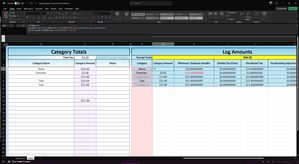
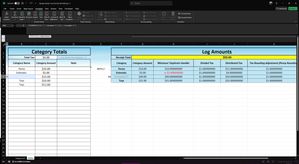
In this sheet, there is a hidden formula that just displays "<Unnamed #"> if the user puts a number with no category name. My sumif formula works for categories that have the same name or single names but not if it's "<Unnamed #>". Each <Unnamed #>" is a unique number and I have the match function set to EXACT (0). Any thoughts as to why the sumif is summing everything (and not $15 in this case)? =IFERROR(IF($B7="","<Unnamed 3>",$B7),"<Unnamed 3>") =SUMIF($A$5:$A$29,INDEX($A$5:$A$29,MATCH($F$7,$A$5:$A$29,0),1),$C$5:$C$29)Solved57Views0likes1CommentRe: SOLVED - Hyperlink function works as Flash Fill but not as Dynamic/spill array
Yeah, that was the issue I initially posted about because the way I wrote the formula should've technically worked (A1 syntax and the math) but didn't for whatever reason. The way Excel's C++ code was written for the =HYPERLINK() function I'd imagine.1.5KViews0likes0CommentsRESOLVED - Sync ONE (or specified) folders/files to OneDrive personal
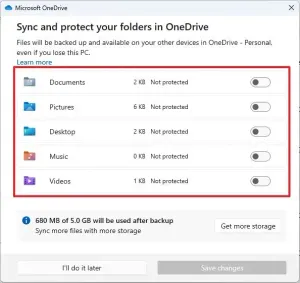
Hello, Without needing to get, configure, and map a NAS on my home network, how do I use OneDrive on my Windows 10 Home to sync ONE single folder? In the Settings' Choose Folders option, I can only select Desktop, Documents, etc. entirely - there's no folder tree drop-down or any options. It's an all or none. Also, I "backed up" my Desktop for testing and found the location of Desktop went from C:\Desktop to C:\Users\MY NAME\OneDrive\Desktop - MOVED to the cloud instead of syncing from my PC. I still need my data local to my PC if I'm using OneDrive. Any steps to achieve my requirements would be much appreciated. Thank you.Solved10KViews0likes23CommentsRe: RESOLVED - Sync ONE (or specified) folders/files to OneDrive personal
Deleted Well, I tired that and still all or none. Thanks for all the feedback however. As much as I basically use MSO for everything I can and love MSO (esp. Excel), their SaaS is just simply trash. The code for OneDrive is just poor, it doesn't have good/useful options, it breaks desktop.ini files, it won't download all your folders when trying to bring folders from OneDrive to PC (it just downloads the ones with files in them and discards the empty ones, which is obnoxious because people like me still have those as part of a file structure whether currently in use or not), and overall has caused many issues. All my IT coworkers and everyone else I know who has similar needs agrees to not even use OneDrive as a solution, past being a non-computer-savvy person who just wants their wedding photos or grandkids on their phone from their PC. My solution is to use Google Drive (solved all the issues addressed in this post) or buy a NAS if it just needs to be within your private network. If it is a home network and smaller needs, absolutely just plug an external hard drive into your router (if you have one with a USB port) or if needed, buy a NAS adapter for about $15-$20 (USB to ethernet) off Amazon to connect. Use the network folder on your devices from there. And, (I'm in IT but I don't recommend doing this unless your a professional) if you know good port security, you can even port forward your NAS to be your own cloud service on the internet from your home network. I do believe there's programs/devices to make that easier though. However, it's still going to be more advanced than using a Google Drive regardless.8.3KViews0likes6CommentsRe: RESOLVED - Sync ONE (or specified) folders/files to OneDrive personal
Forget the icons, that's actually not relative to this OneDrive issue specifically. My apologizes there. But brother, I am tracking where and what "choose folders" is, that's not my issue. My issues is WHAT "choose folders" is. It just brings up that dialog shown in the picture from my last reply and I have no options to do anything.8KViews0likes14CommentsRe: RESOLVED - Sync ONE (or specified) folders/files to OneDrive personal
The 1 folder with a custom icon on my desktop and all the folders I had in there. Even with the correct mapping in my desktop.ini, I still had to manually go through ALL my folders to reset the custom icons I had. Idk why it wasn't updating from the .INIs8KViews0likes1CommentRe: RESOLVED - Sync ONE (or specified) folders/files to OneDrive personal
That seems like a solution for the data's storage location but what about syncing only one folder? Also, annoyingly it dropped all my desktop.ini icon configs so I don't feel like going through all my folders again to set back the icons - don't feel like backing up desktop again to test.8.5KViews0likes21CommentsRe: Need Help - Conditional format keeps changing the number format when it should be CLEAR
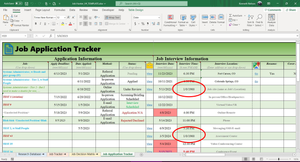
I tried only circling the affected rules/info in the pictures because I have a lot of rules. Also, the affected rules are on top (the ones above it are applied to column B so are N/A here) so I don't think other rules are overwriting it. Esp. since column I is being changed to a date format due to the affected rules (as seen in the picture) when the only other conditional format rules as well as the cells themselves for I are formatted as "h:mm AM/PM" (time). All in all, the affected rules are just simply changing the number format when they should be set to Clear for everything but fill. Regardless, I'll message you the workbook as I have done before with you, and therefore, do trust you (as always though, please do not distribute and/or sell for profit). If you find the issue, please share here for everyone to see and your "best response" credit. Regarding the amount of rules. There are a lot rules and I really did try to have them as minimal as possible but there are a lot of things I want to happen.1.5KViews0likes0CommentsNeed Help - Conditional format keeps changing the number format when it should be CLEAR
Greetings all, I have a sheet that has several columns of dates and a column for time, in a table. This workbook is for job searching. However, usually after opening the file, for some reason one of my conditional formats changes from the set number format I put. Happens regardless of whether the sheet is locked or unlocked. I very deliberately want the number format to NOT be set (or set to Clear) so it can apply to a range of various different number formats - changing the backcolor but not the number format or anything else. Why is it changing to Date (in this case, it has changed to General before too) when it should be permanently set to Clear? Notes: • The range $C$6:$Q$55 is: "Apply Deadline" through "Follow-up Action" (not shown in pictures but shouldn't be relevant) • All columns (like "Interview Time" in the picture above) are formatted with the proper number format in the cells themselves already. I also verified this - double checked. I would be very grateful for any solution to make this conditional formatting rule never change (namely Number format). Thank you!1.6KViews0likes2CommentsSOLVED - Split data in dynamic/spill array by delimiter
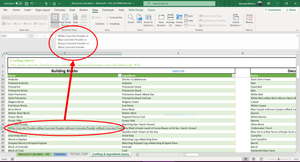
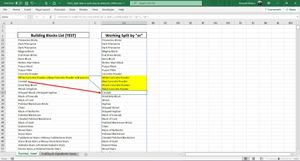
Greetings everyone, I have a calculation tool for Minecraft items that lists data from minecraft.fandom.com/wiki/Crafting and does various things with that data. I cannot get the queried data to spill properly because I don't know how. I have a query to minecraft.fandom.com/wiki/Crafting/Bulding_blocks (to name one) that excludes the "Crafting recipe" column and the "Description column" (in Power Query Editor), on a sheet called Crafting & Ingredients Query. The data's listings sometimes show a choice of materials in the game by using an " or ". The cells display this with character 10 from the website. I need a spill formula to separate and then continue the spill down for each occurrence of the " or ". I also need to show the same "Ingredient" on the right of those separations. On a test sheet in range $B$4, I have a spill formula that simply references and filters the blanks of the Name column from the query on the Crafting & Ingredients Query sheet ('Crafting & Ingredients Query'!$B$5:$B$2000). In in range $D$4 of the test sheet, I am attempting to make a spill formula that will 1), remove all instances of " or " (CHAR(160)&"or"&CHAR(10)) then 2), display each item after the cell's delimiter ("or") sequentially underneath in the spill, and then 3) display the same Ingredient next to each item of the items that are transposed down. Spill Formula so far (separates each item by the delimiter of Character 160, up to 10 delimiters for now): Current Formula (spill from range $D$4 - incomplete) =MID(SUBSTITUTE($B4:$B2000,CHAR(160),REPT(" ",LEN($B4:$B2000))),(TRANSPOSE(SEQUENCE(10,1)-1))*LEN($B4:$B2000)+1,LEN($B4:$B2000)) (Original formula credit: https://exceljet.net/formula/split-text-with-delimiter) Notes: • The =SEQUENCE() function is not dynamic (is just 10) and is temporary. Once each cell that has a delimiter is displayed underneath, the spill should be only 1 column wide. • I want the number of delimiters a cell can have to be dynamic (no limit - infinite, 1 or 7 or 100 or whatever). • Attached is the file with the relevant data. I would be very grateful for any solution to make this spill formula happen. Thank you!Solved7.6KViews1like14CommentsRe: SOLVED - Split data in dynamic/spill array by delimiter
SergeiBaklan That is exactly what I needed! Your genius formula splits text in a single cell by a delimiter ("or" in my case) and dynamically transposes it into a running spill array (even starts at the first string in the cell and inserts it where it appeared in the range - not all condensed at the top/bottom or something). Thank you so much! You're a gentleman and a scholar. Best of luck to you in all your Excel endeavors.6KViews0likes2Comments

Recent Blog Articles
No content to show