User Profile

Jack_Chen1780
Brass Contributor
Joined 5 years ago


User Widgets
Recent Discussions
Windows Hello for business PIN and Kerberos
I would like to get some help to troubleshoot WHfB PIN authentication and Kerberos. I have deployed WHfB with Key trust model in our environment. It is working as supposed and I have configured two Windows 10 machines with WHfb PIN: machine 1: Windows 10 enterprise (2004) laptop , Hybrid joined. machine 2: a virtual machine running on machine1, Windows 10 enterprise (20H2) with bridged network, AAD joined. I can login into both machine with PIN, in office and in home. Problem: when I am in office and connected to on-premises network with wire, machine 1: I can login with my AD credential or the PIN, after login, I can see shared disks. klist shows Kerberos tickets. Machine 2: If I login with AD credential ( UPN and password), klist shows one ticket after login, and I can access shares. If I login with PIN, klist show 0 ticket, and I can't access share ( when I tried, it popup login window and ask to login with pin, then it failed again and claim I don't have permission ). nltest /sc_query:mycompany.local I_NetLogonControl failed: Status = 1722 0x6ba RPC_S_SERVER_UNAVAILABLE I think PIN should also grant me access to Kerberos for AAD joined machines, not sure where to start look at. our DC environment: 2 old Windows 2012R2 DC. 2 new Windows 2019 DC. klist Current LogonId is 0:0x1ceb8a Cached Tickets: (0) nltest /sc_query:mycompany.local I_NetLogonControl failed: Status = 1722 0x6ba RPC_S_SERVER_UNAVAILABLESolved9.3KViews1like3CommentsRe: Microsoft Teams Network Assessment Tool always fail
run the same test from a Azure VM with full Internet access, and got same error. "Relay connectivity and Qos (Media Priority) check is successful for all relays. Please ensure your firewall allows connections to the following domains: *.cc.skype.com Please check if IP 52.114.201.11 is reachable using HTTP Service verifications failed." Maybe the tool is outdated?7.7KViews0likes0CommentsRe: Microsoft Teams Network Assessment Tool always fail
here is the command line output: C:\Program Files (x86)\Microsoft Teams Network Assessment Tool>NetworkAssessmentTool.exe Microsoft Teams - Network Assessment Tool Starting Relay Connectivity Check: UDP, PseudoTLS, FullTLS, HTTPS connectivity will be checked to this relay (VIP) FQDN: worldaz.tr.teams.microsoft.com If user wants to check connectivity to a particular relay (VIP) IP, please specify in NetworkAssessment.exe.config. Connectivity check source port range: 50000 - 50019 Relay : 52.115.86.6 is the relay load balancer (VIP) Starting Service Connectivity Check: Relay : 52.115.86.6 is reachable using Protocol UDP and Port 3478 Relay : 52.115.86.6 is QOS (Media Priority) enabled Relay : 52.115.86.6 is the relay load balancer (VIP) Relay : 52.115.86.6 is reachable using Protocol PseudoTLS and Port 443 Relay : 52.115.86.6 is the relay load balancer (VIP) Relay : 52.115.86.6 is reachable using Protocol FullTLS and Port 443 Relay : 52.115.86.6 is the relay load balancer (VIP) Relay : 52.115.86.6 is reachable using Protocol HTTPS and Port 443 Relay : 52.115.86.228 is the actual relay instance (DIP) Relay : 52.115.86.228 is reachable using Protocol UDP and Port 3478 Relay : 52.115.86.228 is the actual relay instance (DIP) Relay : 52.115.86.228 is reachable using Protocol UDP and Port 3479 Relay : 52.115.86.228 is the actual relay instance (DIP) Relay : 52.115.86.228 is reachable using Protocol UDP and Port 3480 Relay : 52.115.86.228 is the actual relay instance (DIP) Relay : 52.115.86.228 is reachable using Protocol UDP and Port 3481 Relay connectivity and Qos (Media Priority) check is successful for all relays. Please ensure your firewall allows connections to the following domains: *.cc.skype.com Please check if IP 52.114.201.15 is reachable using HTTP Service verifications failed. More information on Office 365 URLs and IP address ranges can be found at following page. https://support.office.com/en-us/article/Office-365-URLs-and-IP-address-ranges-8548a211-3fe7-47cb-abb1-355ea5aa88a2 Service connectivity result has been written to: C:\Users\XXX\AppData\Local\Microsoft Teams Network Assessment Tool\202302150916482595_service_connectivity_check_results.txt7.4KViews0likes1CommentMicrosoft Teams Network Assessment Tool always fail
Hi , I am trying to use this Microsoft tool to verify Teams Network connectivity from my office : https://www.microsoft.com/en-us/download/details.aspx?id=103017 But it always showed error: " Starting Service Connectivity Check: Please ensure your firewall allows connections to the following domains: *.cc.skype.com Please check if IP 52.114.201.11 is reachable using HTTP Service verifications failed." It's always the same message, but the IP could change to other 52.114.201.xx IP. The problem is I have no problem to connect to those IP's port 80 and 443. I captured the traffic to 52.114.201.0/24 (attached the capture ) and the communication looks normal: There was TLS handshake and then there are some data transferred via TLS1.2. The server certificate is *.flightproxy.teams.microsoft.com signed by Microsoft ( and I traced DNS and found the real DNS is latm-noam.flightproxy.teams.microsoft.com ). I can access https://latm-noam.flightproxy.teams.microsoft.com/ and confirm the certificate is trusted and signed by "Microsoft RSA TLS CA 02". So I have no idea why the assess tool is complaining 52.114.201.11 is not reachable? Any help is appreciated.8.7KViews0likes2Commentshaving a problem with sysprep on a Azure Windows 10 VM
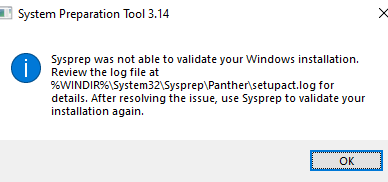
OS version: 22H2 OS Build 19045.2251 When I run "Sysprep.exe /generalize /oobe /shutdown" , it showed a error : setupact.log has : 2022-12-03 10:31:57, Info SYSPRP ActionPlatform::LaunchModule: Executing method 'ValidateBitLockerState' from C:\Windows\System32\BdeSysprep.dll 2022-12-03 10:31:57, Error SYSPRP BitLocker-Sysprep: BitLocker is on for the OS volume. Turn BitLocker off to run Sysprep. (0x80310039) 2022-12-03 10:31:57, Error SYSPRP ActionPlatform::LaunchModule: Failure occurred while executing 'ValidateBitLockerState' from C:\Windows\System32\BdeSysprep.dll; dwRet = 0x80310039 2022-12-03 10:31:57, Error SYSPRP SysprepSession::Validate: Error in validating actions from C:\Windows\System32\Sysprep\ActionFiles\Generalize.xml; dwRet = 0x80310039 Seems indicate a bitlocker issue. But "manage-bde -status" shows: BitLocker Drive Encryption: Configuration Tool version 10.0.19041 Copyright (C) 2013 Microsoft Corporation. All rights reserved. Disk volumes that can be protected with BitLocker Drive Encryption: Volume C: [Windows] [OS Volume] Size: 126.45 GB BitLocker Version: 2.0 Conversion Status: Fully Decrypted Percentage Encrypted: 0.0% Encryption Method: None Protection Status: Protection Off Lock Status: Unlocked Identification Field: Unknown Key Protectors: Numerical Password Volume E: [DATA] [Data Volume] Size: 255.98 GB BitLocker Version: None Conversion Status: Fully Decrypted Percentage Encrypted: 0.0% Encryption Method: None Protection Status: Protection Off Lock Status: Unlocked Identification Field: None Automatic Unlock: Disabled Key Protectors: None Found Now I have no idea where to troubleshoot.1.4KViews0likes1CommentRe: Weird behavior of Exchange Online for none-existing email address
BTW, EOP doesn't allow Dev tenants to setup incoming connector now: https://techcommunity.microsoft.com/t5/exchange/exchange-online-connector-creation-failed/m-p/3624401 Can someone reason with Microsoft we need to test stuff in dev tenant 😞8KViews0likes1CommentRe: Weird behavior of Exchange Online for none-existing email address
Thanks Arindam_Thokder and VasilMichev . With your help, I was able to verify EOP's behavior and find a solution. The blog link send by Arindam provided the information I need. I have confirmed EOP will behave this way: 1. if the sender IP is not included in any tenant's incoming connector, the message is considered as Incoming, and "RCPT TO" will work as expected for any receipt email address. 2. If the sender IP is include in one or more tenant's incoming connector, the message is considered as Originating and things are getting more interesting. For originating message, if the "mail from" and "rcpt to" email address match one of the setup incoming connector, then "rcpt to" will work as expected. If either of the "mail from" or "rcpt to" doesn't match the tenant's email, "rcpt to" will always return 250. So to fix the problem, I will need to create a incoming connector in my tenant with the IP from Fortimail, then change Fortimail 's "Recipient address verification" from "use system setting" to "use domain setting". So mail from:noreply @ my email domain .com rcpt to:my email domain .com will work as expected ( return 550). mail from: noreply @ Fortinet .com rcpt to:my email domain .com won't work.8KViews0likes2CommentsRe: Weird behavior of Exchange Online for none-existing email address
Thanks for the detailed explanation Arindam! That make much better sense now. I will try to setup inbound connector for 20.48.254.109 , see if I can reproduce the problem. If this is the issue, I can check with Fortinet if they can provide us a dedicated outbound IP. Currently this configuration will cause we exceed Fortimail user license and although they haven't restricted it yet, Fortmail support mentioned they will restrict it in future release, so we need to figure out a way to make sure it's working.8KViews0likes4CommentsRe: Weird behavior of Exchange Online for none-existing email address
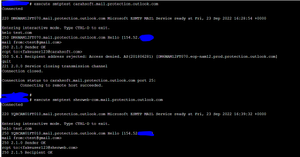
I am more confused now 😞 EOP should allow any sending IP send emails to any tenants. I don't think you have a way to identify a sending IP belong to a particular tenant. For example, I have a Azure VM with public IP 20.48.254.109. when I use it to connect to EOP Canada VIP 104.47.75.164 : telnet 104.47.75.164 25 Trying 104.47.75.164... Connected to 104.47.75.164. Escape character is '^]'. 220 YT3CAN01FT005.mail.protection.outlook.com Microsoft ESMTP MAIL Service ready at Thu, 29 Sep 2022 13:29:17 +0000 helo test.com 250 YT3CAN01FT005.mail.protection.outlook.com Hello [20.48.254.109] mail from:email address removed for privacy reasons 250 2.1.0 Sender OK rcpt to:email address removed for privacy reasons 550 5.4.1 Recipient address rejected: Access denied. AS(201806281) [YT3CAN01FT005.eop-CAN01.prod.protection.outlook.com] rcpt to:email address removed for privacy reasons 250 2.1.5 Recipient OK quit telnet 104.47.75.164 25 Trying 104.47.75.164... Connected to 104.47.75.164. Escape character is '^]'. 220 YT3CAN01FT013.mail.protection.outlook.com Microsoft ESMTP MAIL Service ready at Thu, 29 Sep 2022 13:30:57 +0000 helo test.com 250 YT3CAN01FT013.mail.protection.outlook.com Hello [20.48.254.109] mail from:email address removed for privacy reasons 250 2.1.0 Sender OK rcpt to:email address removed for privacy reasons 550 5.4.1 Recipient address rejected: Access denied. AS(201806281) [YT3CAN01FT013.eop-CAN01.prod.protection.outlook.com] rcpt to:email address removed for privacy reasons 250 2.1.5 Recipient OK quit 221 2.0.0 Service closing transmission channel I don't believe EOP has any way to identify 20.48.254.109 belong to a tenant; when it is connected to EOP, before the "RCPT TO", there isn't any data indicating which EOP tenant it want to send email. Yet EOP can still correctly response with 500 or 250 for multiple tenants. The problem is when I do exact same test from Fortimail Cloud 154.52.4.131 , EOP only response with 250. EOP Canada is treating sending IP 154.52.4.131 and 20.48.254.109 differently.8KViews0likes6CommentsRe: Weird behavior of Exchange Online for none-existing email address
Thanks Arindam! Your answer helped me to understand a little more of the behavior. By "sending IP", do you mean there is a "front-end" EOP server and work like : like "smtp client" -> EOP front-end IP shared between tenants ( sending IP ? ) -> different servers for different tenants? I can see many (if not all) EOP Canada server share same two IPs currently: 104.47.75.228 104.47.75.164 I am still confused why when testing from a Azure VM to 104.47.75.164, "RCPT TO" is working perfectly for multiple tenant's email addresses; but when testing from Fortimail to same 104.47.75.164, "RCPT TO" doesn't work as expected at all. I guess the front-end server might have rules : If the smtp client IP is a known high traffic SMTP servers, don't check with backend tenant server and just accept "RCPT TO" and verify later ; if it's a unknown client IP, verify the address in "RCPT TO" step with backend tenant servers.8.1KViews0likes8CommentsRe: Weird behavior of Exchange Online for none-existing email address
I am wondering if there are anyone from Exchange Online support team can verify this behavior ? I opened support ticket with Fortinet and Microsoft, Fortinet support 's attitude is "not my problem, ask Microsoft"; The Microsoft support working on my case doesn't seem understand the issue so far. Now I see other customers are having same problem: https://www.reddit.com/r/fortinet/comments/un12cw/fortimail_recipient_verification_using_rcpt/ "I’ve come across an interesting issue that support from either side has been unable to solve so far" This doesn't look promising. The result is Fortimail will count any bogus email as a valid user account and consume a user license.8.3KViews0likes13CommentsRe: Weird behavior of Exchange Online for none-existing email address
VasilMichev Indeed, It looks like a issue with Exchange Online Canada service, it might have some special rules for Fortimail Cloud. I searched Microsoft Partners and found two partners using Exchange Online and does send 550 for none-existing users : Sherweb.com : MX sherweb-com.mail.protection.outlook.com, Canada. carahsoft.com: MX carahsoft.mail.protection.outlook.com. US. Test result from Fortimail Cloud : Opened a ticket with Fortinet, they are investigating, hopefully they can work it out with Microsoft.8.3KViews0likes0CommentsWeird behavior of Exchange Online for none-existing email address
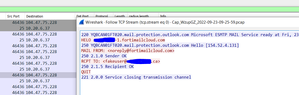
I am see a weird behavior of Exchange Online for none-existing email address, wondering if anyone can explain it. I am setting up a Fortimail Cloud service ( third party email protection service ) to Exchange Online, but noticed one function "Recipient address Verification" (using RCPT method) doesn't work as I thought. I did some troubleshooting, my understanding is Fortimail will send a "RCPT TO:" to Exchange Online to verify if the recipient is a valid email. I did traffic capture from Fortimail to Exchange Online : Somehow Exchange Online replied with "250 2.1.5" for the fake email ! But when I do a manual test from a random azure machine, with all the same input, same recipient, Exchange Online return "550 5.4.1" : Now I am really confused why this is happenning. I tested with a second test M365 tenant with a different email domain and it behave same way, the test domain 's MX and TXT SPF record doesn't have any reference to Fortimail Cloud, so there shouldn't be any reason it's treated differently.Solved8.9KViews0likes16CommentsRe: Endpoint menu missing in security.microsoft.com
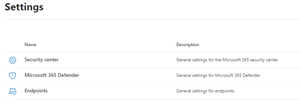
John Matrix Did you finally get it resolved? I got the same problem on my dev tenant ( login with global admin account). I have a production tenant with M365 E3 license, and the setting is: But on Dev tenant ( M365 E5 developer without windows and audio conferencing 😞 It's missing endpoints but has email and identities. Maybe because E5 developer doesn't include Windows ?21KViews0likes2CommentsRe: Whiteboard with external participants
I just tested it and whiteboard sharing with external user is kind of working now. https://www.microsoft.com/en-us/microsoft-365/roadmap?filters=In%20development%2CRolling%20out&searchterms=66759 shows: GA April 2022. There are some hops need to go through, whiteboard data need to opt-in to Onedrive for business. Set-SPOTenant -IsWBFluidEnabled $true But there is a big blocker : OneDriveLoopSharingCapability need to be set as ExternalUserAndGuestSharing : Set-SPOTenant -OneDriveLoopSharingCapability ExternalUserAndGuestSharing I found the only way I can change OneDriveLoopSharingCapability is change SharingCapability to ExternalUserAndGuestSharing : Set-SPOTenant -SharingCapability ExternalUserAndGuestSharing But this will change Sharepoint 's global External sharing policy to "Anyone", which is a big security concern. Check https://docs.microsoft.com/en-us/powershell/module/sharepoint-online/set-spotenant?view=sharepoint-ps Would love to know if there is way to enable OneDriveLoopSharingCapability without changing Sharepoint "External Sharing" to anyone.11KViews2likes5Comments

Recent Blog Articles
No content to show