User Profile

leolapa
Brass Contributor
Joined 5 years ago


User Widgets
Recent Discussions
Re: Way to make BYROW and BYCOL work together
That's a very ELLEGANT solution, thanks! I marked djclements contribution as the solution because on my original sheet I have the drivers (Aircraft, Flight Hours, etc.) on a separate column further to the left from the output data.359Views0likes0Comments- 432Views0likes0Comments
Way to make BYROW and BYCOL work together
I have the following sample dataset below: Then I can run a SUMIF that can be dynamic down or across by using BYROW and BYCOL respectively: But I need that SUMIF to be simultaneously dynamic down AND across. I tried nesting BYROW and BYCOL and it apparently doesn't work. Then I saw there is a workaround by using MAKEARRAY, which I applied but it also throws an error as shown below: Is there a way to make BYROW and BYCOL work together for that particular SUMIF use case, so I have an output that is dynamic both down and across, even if it requires the use of an alternative function?Solved583Views0likes4Comments- 111Views1like0Comments
Create array with repeated values from another array
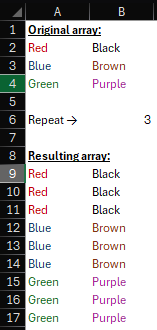
The screenshot below pretty much summarizes what I need to accomplish. Say I have the "Original array" below. I need to come up with a formula that will create another array (the "Resulting array" below) by repeating each value from the "Original array" on this case 3 times. How can I do it?Solved242Views0likes4CommentsRe: Excel's stock data type can't find several stock exchange indexes (i.e: FTSE, CAC 40, Hang Seng...)
You're welcome acflorea! This agreement between Microsoft and Refinitiv does not include proprietary data from some stock exchanges, but apparently they keep adding on new exchanges as new data providers are added on over time, which must've happened with XAMS since the date of my original post.15KViews1like1CommentColumn Array Repeated Sequence of Numbers
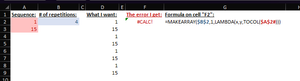
Hi, I have a sequence of two numbers 1 and 15 stacked on top of each other "=SEQUENCE(2,,,14)". I just want to have that pattern repeated 4x in one single "spilled" array, like this: 1 15 1 15 1 15 1 15 I tried to accomplish this by using MAKEARRAY and TOCOL but I keep getting the #CALC! error. What am I missing here? Any help is greatly appreciated... Thanks in advance!Solved984Views0likes3CommentsINDEX multiple matches and criteria, growing lists
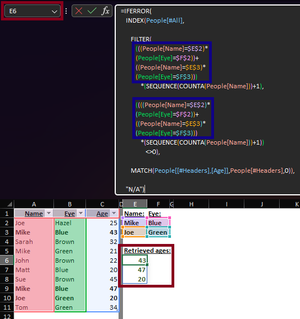
Below is a snapshot of a table "People" containing names, eye colors and ages. Then to the right of it, under a light blue background, there is a list with a couple of names and eye colors combinations which I need to retrieve a list of ages from (the matches are bold highlighted on the table). E6 (red) successfully returned a spilled result listing all 3 corresponding ages I'm supposed to get from the above combinations. However the formula is static, meaning in case I add more combinations to the above list I need to manually bring an additional set of People[Name] and People[Eye] boolean validation in the FILTER section of the created formula (blue). Say I have a list of 100 names/eye colors combination the formula would be impossibly long. I'm pretty sure there is a way, perhaps by the use of LAMBDA and its enablers (BYROW/BYCOL?), to make this formula pick up additional names/eye colors combinations as the list grows. I'm currently down the BYROW/BYCOL path but as of now with no luck. Any help is greatly appreciated... P.S.: I also attached the file from the shared screenshot.Solved1.1KViews0likes3CommentsRe: Join names (TEXTJOIN?) with one-cell 2D spilled formula
mtarler they're both pretty good solutions albeit only covering as far as 2 rows by X columns ranges. I suppose a recursive LAMBDA approach on top of the INDEX option would address the issue of covering any length of rows, but OliverScheurich's BYCOL solution above does take care of that with a much shorter formula. Thanks a lot!1.5KViews0likes0CommentsJoin names (TEXTJOIN?) with one-cell 2D spilled formula
Below is a snippet of a list of names that follows some pre-specified criteria: How I got there doesn't really matter, but the fact that I was able to get to this point via a dynamic formula under cell L57 that 2D spills all results down and across through R58 as highlighted by the blue-shaded area above. My goal is to consolidate on row 60 the above list under a one-row list, and if any column has more than one name then all names be placed under the same cell and separated by "&" (i.e.: "Paul & Joe" on cell L60, "Ringo" on cell M60, and so on...). So far, I was able to get there by use of the TEXTJOIN function, as it can be seen on the screenshot below: The only problem with the above approach is that it must be done to each individual cell, so I need to drag it across row 60 through cell R60 to get the desired results. But that won't work for me as in real life this list may grow down and across in the future. What I need is a solution that will get to the same one-row list in red but using one single-cell 2D dynamic formula on cell L60 that will always pick up all names regardless of size. I've tried using TEXTJOIN, but when I do that =TEXTJOIN(" & ",,$L$57#) the result I end up getting is one single list of names separated by "&" (Paul & John & Ringo & George & Bill & Max & Mary & Ann & John) and that is not what I want. Any help is appreciated...Solved1.8KViews0likes4CommentsDynamic MATCH 2D array with one-cell spilled formula
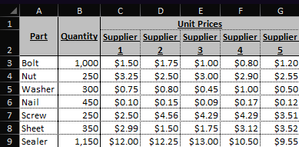
I've got the sample table below with a list of parts/quantities and respective price quotes from 5 dummy suppliers: What I need to accomplish here is to automatically generate a separate table that will rank all suppliers by price (from lowest to highest) for each part row. But since this is a dynamic sheet that may grow either in number of quoted items and/or suppliers, I need this formula 2D dynamic that "spills" the results down the list of items and across the ranked suppliers for each item. This is something I was able to accomplish using a 3-step approach detailed on the screenshot below: Each step is detailed on the blue, orange and yellow sections above. The yellow part is the result I want to get, and in both blue and yellow I managed to do so by inputting a formula in one cell only (I3 and U3 respectively) and Excel spill the results down and across for me - I won't bother with the details of both formulas... The middle orange part, the 2nd step is the one I'm having trouble with since MATCH in itself works only with one-dimensional arrays, as per the screenshot below: In order for this formula to work I'd always need to copy/paste down every time new items are added to the quote table, as it only covers growth on number of suppliers across. I've tried a couple different approaches using RANK and BYROW but to no avail, any help is appreciated here... I also attached the Excel file that produces the above screenshots. Thanks in advance!Solved2.2KViews0likes2CommentsFigure out character showing as space on Power Query
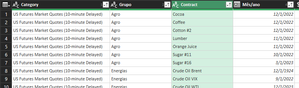
After running an API GET request method I get a set of data whose snippet is shown by the below screenshot: However when I run a `Merge Queries` of the `Contract` column with another table so I can get each correspondent translation to Portuguese it'll only match a few items, as shown below: After checking the other table's contents every correspondent `Contract` was there, but then after copying the entire `Contract` column from the API dataset and pasting it to a blank Excel spreadsheet I realized that the spaces displayed on Power Query are actually some unrecognizable characters displayed as "?" inside a diamond: I've already tried the `Clean` tool but it won't work. I also tried other think such as `Trim` and `Replace Values...` space by something else and no glory. Something tells me I need to figure out which character is actually being imported instead of space so I can try to replace it on Power Query, but the question is: how can I do that? How can I turn those "?" into readable characters in Excel?! LeonardoSolved3.1KViews0likes2CommentsMake POST request from RapidAPI in Power Query (credential key required)
I'm trying to build a query out of PQ to fetch a list of available currencies out of an Investing.com data repository located within RapidAPI. The endpoint uses POST method and RapidAPI requires a credential key. Below is the snippet of the HTTP type code for such request: POST /currencies/get-list-currency HTTP/1.1 X-Rapidapi-Key: ***MY_RapidAPI_KEY*** X-Rapidapi-Host: investing4.p.rapidapi.com Host: investing4.p.rapidapi.com The endpoint URL is as follows (sitting as a standalone query in text format on PQ): URL_FX_Lista_Pares = https://investing4.p.rapidapi.com/currencies/get-list-currency There is no other requested input field, such as country names or such, but there are a couple of what appears to me to be required credentials that apparently need to be sent ("X-Rapidapi-Key:" which I'm illustrating as "***MY_RapidAPI_KEY***" for this purpose, and "X-Rapidapi-Host") and then expect to return the desired list of currencies. At least that's the process I've been led to believe that shall happen every time we run a POST request method (I'm a newbie on this...). Then from some tutorials I've been seeing around I turned those 2 credentials info into an Excel table "Creds" and then created a new query also called "Creds" whose goal is to turn this table into a binary JSON file: let Source = Excel.CurrentWorkbook(){[Name="Creds"]}[Content], #"Changed Type" = Table.TransformColumnTypes(Source,{{"Campo", type text}, {"Valor", type text}}), #"Transposed Table" = Table.Transpose(#"Changed Type"), #"Promoted Headers" = Table.PromoteHeaders(#"Transposed Table", [PromoteAllScalars=true]), #"Changed Type Text" = Table.TransformColumnTypes(#"Promoted Headers",{{"X-RapidAPI-Key", type text}, {"X-RapidAPI-Host", type text}}), TableRecords = Table.ToRecords(#"Changed Type Text"){0}, JSONRecords = Json.FromValue(TableRecords) in JSONRecords Then finally I created a final query called "FX_Lista_Pares_POST_Req" that should put it all together: let Source = Json.Document( Web.Contents( URL_FX_Lista_Pares, [ Headers = [#"Content-Type" = "application/json"], Content = Creds ] ) ) in Source But instead of getting the requested info all I get is the following error message: And if I go to "Edit Credentials" I still keep getting the same issue on the window editor that pops up. By investigating around I landed on this Microsoft Docs page https://docs.microsoft.com/en-us/powerquery-m/web-contents which states that "POST requests may only be made anonymously", so I was wondering whether I'm missing something on my M code or PQ just does not support POST requests that require a credential key, but being that the case, is there a piece of code/technique that would serve as a work around? Any help is greatly appreciated. Leonardo1.1KViews0likes0CommentsRe: Excel's stock data type can't find several stock exchange indexes (i.e: FTSE, CAC 40, Hang Seng...)
Nothing so far... I also learned as I was developing some more complex tables to fetch historical stock data via STOCKHISTORY function (which also pulls data from the data types functionality) that this data fetching feature is still ways to go in order to get to some robust state. It still does a lot of data lagging, compromises sheet processing performance, etc. I'm currently giving up that route and fetching financial instruments historical data and other related info using Power Query scripts via Yahoo! Finance links, and that also applies to global stock exchanges indexes.22KViews0likes0CommentsDynamic LINE CHART for data with expanding SERIES AND DATES
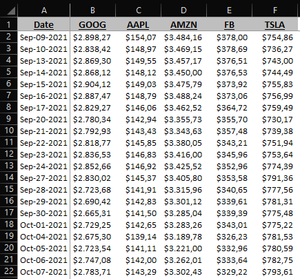
Below is a sample of 5 tech stocks quotes for the last 30 days that I pulled via STOCKHISTORY function. From the above data I need to create a TREND (LINE) CHART that starts with 100 so I can compare price performance across stocks under the same baseline. The problem I have is: the above sample covers 5 stocks over 21 market days, but on my real world that stock list may grow/shrink depending on an user's watchlist, and same thing goes with the dates span, which may grow/shrink as per the user's choice (i.e.: 1 week, 1 month, 3 months, 1 year, 5 years, etc.). So we're talking about a 2-dimensional dynamic data array, and we all know that if I plot the chart just by highlighting the table and picking the chart type, Excel will just assume that static data array I had selected. Which means every time this data grows either horizontally (additional series) and/or vertically (larger dates span) the chart will just miss out on those new items. And in case the opposite happens the chart will just show empty series and/or an empty space on the horizontal axis. I already know the work around that prevents that from happening as far as DATES go, by setting up formula names for each data column spilled-range formula and putting them in place of each respective static data array for each series (since Excel chart STILL WON'T WORK WITH HASH REFERENCES - GO FIGURE!!!), as shown on the screenshots sequence that follows: 1D spilled range formula on row 4 for every column: Formula names created for the dates series and each stock trend data series: Chart series getting plotted via named formula: The above approach does work great, but only takes care of growing/shrinking date spans though. So I went ahead and created a 2D spilled range formula array as you may have already noticed at the above screenshots located on the right trend data set and named it "xALL". And then I tried to tweak the chart I had created using the 1D approach, got rid of all data series except one, and then switched its formula name to the 2D xALL named formula: But as I was expecting, line charts work only with single rows/columns, so I keep getting this error message: And then I thought: why not consolidate the entire tabular set (headers + date column + data series columns) with one single 2D spilled range via INDEX (named "xyALL"), highlight it, insert the line chart, and then replace the whole data set with this new named formula? Initially the plan seemed to work fine... But then when I checked whether Excel had converted that dynamic span into a static array, low and behold, after all Excel's smart but not THAT smart! And every time I go to the 'Chart data range' box and try to replace the static array "$N$3:$N$24" with the dynamic named formula "xyALL" Excel will just convert it back to the static range: And when I try to edit the SERIES references directly on the formula bar by replacing with the named formulas, I get the same expected "I can only take single row/column" error: So, now I'm stuck in neutral... Is there actually a way to do that? Would a pivot table/pivot chart approach do the trick here? I'm not that well versed with pivot tables and I guess that would require some advanced knowledge I currently don't have in case it can be done via such path. Thanks in advance for any help on this one! Leonardo4.2KViews1like1Comment


Recent Blog Articles
No content to show