User Profile

BoSolo
Copper Contributor
Joined 5 years ago


User Widgets
Recent Discussions
Re: Microsoft 365 network connectivity test hanging on Running web browser tests
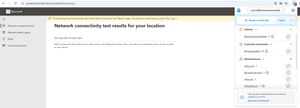
Please excuse the delay, Ares. While preparing to record a video, I noticed that Ghostery had blocked multiple URLs, as depicted in the screenshot below. Knowing that I use Ghostery an all my default browsers (Chrome on one PC and Edge on another), it lit a bulb in my head and I paused Ghostery for this site. Et voilà, Microsoft 365 network connectivity ran the basic tests in browser and prompted me to download the detailed test executable file. I understand that this is Ghostery and not Microsoft issue, but it would be wise if Microsoft would add a warning line on this page mentioning that the user should disable ad blockers during the test.55Views0likes1CommentMicrosoft 365 network connectivity test hanging on Running web browser tests
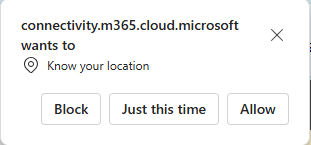
Hi community, I have this issue on different devices and from different locations. Whenever I visit https://connectivity.m365.cloud.microsoft/ and want to run the test, I select "Add location" instead of "Automatically detect location", because I'm on a laptop without GPS and don't wont to use the WiFi recognition. I start typing the town, select it from the list of choices, and click on "Run test". Nevertheless, a pop-up comes asking for access to location services, to which I select "Block" After that, the web application gets stuck on "Running web browser tests" and is not showing any results. I had this issue on Windows 10 and on Windows 11, and on Chrome and on Edge. Any idea how to solve this?401Views0likes5CommentsRe: Attack Simulator
VasilMichev It would be great if Microsoft has an online reference/documentation on all MS365/Defender XDR/Purview admin operations that require this "user has performed MFA" bit. I knew about the Attack Simulator based on an onlie documentation, but was caught by surprise in yet another case where I needed to turn on auditing in Purview (start recording user and admin activity) but received an error at the "Complete organizational setup" step.821Views0likes0CommentsRe: Cannot deploy windows 10 Enterprise subscription activation
Hi mbtfcu275 and all followers, sorry for the late reply, but we had this fixed indeed today, 2022-07-05. In our case: "An issue was identified with the subscription configuration at the tenant backend level, which required a resync of license for your tenant". Please check the event logs of affected computers under Applications and Services Logs / Microsoft / Windows / Store / Operational and search for Event ID 8003. If the content contains something like "The entitlement is in a state that prevents it from being used to create a Content License", then you have very good chances to have it fixed. Simply open a case with email address removed for privacy reasons (or via your CSP, for the ones not having a direct agreement with MSFT).4.4KViews0likes0CommentsRe: Cannot deploy windows 10 Enterprise subscription activation
mbtfcu275 My CSP opened a ticket by MSFT. The usual: 1st level, 2nd level... Gone through three MSFT 3rd level support teams... And then suddenly: "there's a problem with the activation: your firmware key was rejected", or something like this. Obviously a bug in the activation server, because this is an HP UEFI / OEM brand new business laptop key. Still waiting for reply from MSFT - unfortunately no ETA 😞4.5KViews0likes2CommentsCannot deploy windows 10 Enterprise subscription activation
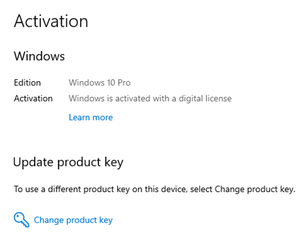
Hi dear community, I got stuck and would really appreciate your help. Key data: Fairly small traditional environment with on-prem AD joined computers running Windows 10 21H2. Previously using Office 365 E3 with cloud services and Office desktop. All devices which connected to, e.g., Exchange Online over Outlook are listed in Azure AD as "Azure AD registered" with "Owner" the respective user, who connected to the cloud service. No surprises here. A previous admin had the glorious idea to provide OS deployment with an on-prem SCCM server. This server is used solely for this purpose - no software, patch or config management happens, but, of course, the SCCM agent is installed and running. Current version is 2107, if at all relevant. Now, in the last month we have migrated the licensing model from Office 365 E3 to Microsoft 365 E3, including the "Windows 10 E3" license, which, theoretically, provisions us with Windows 10 Enterprise licenses, as a "step in" or "upgrade" from existing Pro licenses. The simple task described here https://docs.microsoft.com/en-us/windows/deployment/deploy-enterprise-licenses ended with a nightmare of dependencies. Now, since we are owning OEM OS preinstalled devices, I'm following the "firmware-embedded activation key" path. The Get-CimInstance PowerShell command is returning a key, all fine. Then comes the Azure AD Join. OK, not a fun at all, because I cannot simply have an on-prem AD joined test device and cloud Azure AD join it. It needs to be hybrid Azure AD joined, as also described in the same article. Reading three further MSFT docs, I finally gather all the prerequisites needed (inter alia: password sync AND seamless SSO; Win10 min version; domain and forest functional levels; AD Connect min version; Hybrid AD Join enabled - creating SCP; test computers sync in scope;…) and configure the whole productive environment to comply herewith. After AD Connect sync, the test computer is shown in Azure portal / Devices shortly double - one is Azure AD registered, the other is Hybrid Azure AD joined. But that's expected and well described by MSFT. After a while only the hybrid object is listed. All good here. Now we start with the real issues after the AD Connect synchronization. 1) On the local computer, under Settings / Accounts / Access work or school account my cloud account had disappeared, leaving only the local domain account listed. And I'm sure that it was there before. For once, there is an issue with MFA, as described here https://docs.microsoft.com/en-us/windows/deployment/windows-10-subscription-activation#multifactor-authentication , I headed out to Notifications / "Work or school account problem" and then Fix now. The MFA authentication was successful, and the warning disappeared from the Notifications, but my MS365 account was still missing. And in Azure portal, my device was listed with Owner "N/A" instead of my account. 2) This is where I bluntly decided to click on "Connect" and add the cloud account. This worked, but strangely, onboarded the device in Intune as well (instead of simply adding an owner to the computer object in Azure). And yes, now I have under Access work or school account both buttons: "Disconnect" and "Info", the latter being the typical sign for a successful Intune/MDM onboarding. But despite all these integrations, I'm still missing the main goal, to upgrade Windows 10 from Pro to Enterprise. I have followed the Troubleshooting section from the initially mentioned online documentation, but my GUI experience is deviating from Figure 11. There is no mentioning of Enterprise. And also there is no "Troubleshoot", as in link Figure 12. All I see is this: Dsregcmd /status clearly lists AzureAdJoined status as YES; and I DO have a MS 365 E3 license assigned to me. The device is listed in Azure as follows (btw, still not showing me as owner there) And listed in Endpoint Manager admin center as follows. Here yet another issue - the device was initially listed as Personal. I needed to manually change the ownership to Corporate. What a nonsense, when it got obviously hybrid AAD joined and MSFT is detecting the SCCM agent (therefrom the Co-managed status, even though we have not activated ANY cloud functionality and integration on the on-prems SCCM server) PS: Reading through https://techcommunity.microsoft.com/t5/microsoft-365/microsoft-365-e5-windows-10-subscription-activation-for-hybrid/m-p/269919/page/2 and https://techcommunity.microsoft.com/t5/microsoft-365/m365-win-10-e3-activation-issue/m-p/341179 I have already tried the UPN login, the “Do not connect to any Windows Update Internet locations"=Disabled, and the manual activation script. No improvement. What am I overseeing?4.8KViews1like4Comments
Recent Blog Articles
No content to show