User Profile

Iqra_Sharif
Former Employee
Joined 5 years ago


User Widgets
Recent Discussions
Wolfram data types now available to Enterprises
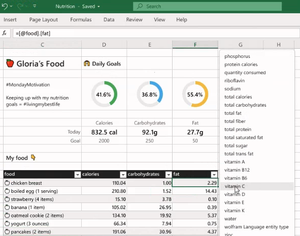
Office Insider Excel, in partnership with Wolfram, Excel users can now utilize more than 100 new data types. Up until now, they were only available to the Consumer audience. We’re excited to be releasing an add-in so that organizations can get access to them, starting with Insiders today. Discover how it works, requirements and availability in this blog by Excel Program Manager Sam Radakovitz. Read the blog post here. All the best, Iqra Become an Office Insider and gaining exclusive access to new features and help shape the future of Office. Join Now: Windows | Mac | iOS | Android854Views0likes0CommentsComments and notes updates in Excel for the web
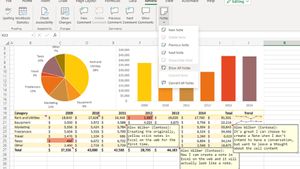
When the threaded comments in Excel for Windows, Excel for Mac, and Excel for the web was first released in January 2019, we decided to keep the original legacy comments (the yellow sticky notes) in the Windows and Mac versions and rename them notes. We recognized that notes and comments serve different purposes, and that supporting both allows us to address different user scenarios (conversations vs. annotations). However, when we introduced threaded comments, we also removed the ability to create notes in Excel for the web. This meant that notes created in the desktop version looked and worked differently in Excel on the web. Today, we are announcing some important steps we’ve taken to address the inconsistencies and improve the overall user experience with notes and comments in Excel for the web. Discover how it works, scenarios to try and tips & tricks by Scott McFadden, a Program Manager on the Excel team. Read the blog here. All the best, Iqra Office Community Manager Become an Office Insider and gaining exclusive access to new features and help shape the future of Office. Join Now: Windows | Mac | iOS | Android785Views0likes0CommentsFind stock and Wolfram data types using Search
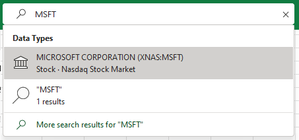
Hey Office Insiders! Alex Yang, Program Manager on the Microsoft Search team in Office is excited to share with you an improvement to the Microsoft Search experience in Excel. You can now find and insert real-time stock quotes and over 100 additional Wolfram data types in your worksheets. Using data types, you can quickly insert information powered by trusted sources directly into your worksheet, without having to configure a data connection or log in to a data provider service. We are now making it easier to leverage the power of data types by accessing them directly from the Microsoft Search box. For more detailed descriptions on how it works, requirements, and availability, please read our original blog post. Find out how it works here. Cheers, Iqra Office Insider Community Manager Become an Office Insider and gaining exclusive access to new features and help shape the future of Office. Join Now: Windows | Mac | iOS | Android583Views0likes0CommentsChange Case feature added to Word for Android
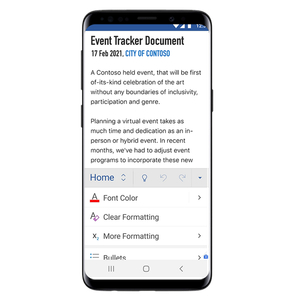
Hey Office Insiders! Sai Deepthi Kovvuru, a Program Manager on the Office Mobile team is pleased to announce that the highly requested feature in Word for Android: the Change Case feature has been released. Being able to change case is a core editing capability, and we wanted to increase your confidence and flexibility while editing text on your device. You can now change the capitalization, or case, of any amount of text in a document by tapping a single button. This convenient and highly popular feature in Word for iOS and the desktop has now come to Android by popular demand. For more detailed descriptions of the update, requirements and more, please read our original blog post. Cheers, Iqra Office Insider Community Manager Become an Office Insider and gaining exclusive access to new features and help shape the future of Office. Join Now: Windows | Mac | iOS | Android600Views0likes0CommentsDo more with modern comments in PowerPoint
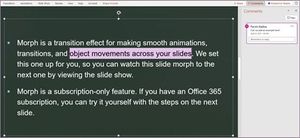
Greetings, Office Insiders! John Teichman, Program Manager on the PowerPoint team, is excited to share with you that we are turning on Modern Comments by default to help you collaborate more effectively. We would love for you to try out a couple of scenarios and give us feedback. We started our Modern Comments journey a couple years ago to introduce collaboration features to PowerPoint that take advantage of the cloud-based, connected world we live and work in. For a quick review of that feature set, check out this post. Today, we’d like your feedback on two ways you can create and use comments: text anchors and comment bubbles. Take a look at the full blog post here. Cheers, Iqra Office Insider Community Manager Become an Office Insider and gaining exclusive access to new features and help shape the future of Office. Join Now: Windows | Mac | iOS | Android945Views0likes0CommentsTrack Changes improvements in Word for the web
Hey there, Office Insiders! Kimberley Chua, Program Manager on the Word team, is excited to share with you the latest Track Changes improvements in Word for the web. Getting feedback from your collaborators is a critical part of producing great content. The Track Changes feature has played an essential role in that process for many years. With this recent update, we’ve introduced new pop-up cards that make it easier to preview any tracked change in Word for the web before you accept or reject it. Take a look at the full blog post here. Cheers, Iqra Office Insider Community Manager Become an Office Insider and gaining exclusive access to new features and help shape the future of Office. Join Now: Windows | Mac | iOS | Android780Views0likes1CommentAdd Cartoon People to Office creations
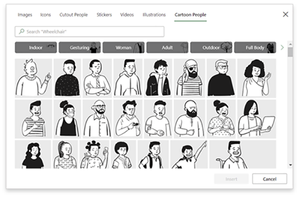
Hi Office Insider! Aimee Leong, Program Manager on the Office Graphics team, is happy to announce the latest addition to our premium content library: Cartoon People in Office! Cartoon People illustrations are a fun way to create artwork and tell stories using a diverse set of characters and scenery. Now, you can put together just about any scene you can imagine, selecting from a huge variety of elements found in the premium content libraries of Word, Outlook, PowerPoint, and Excel. Take a look at the full blog post here. Cheers, Iqra Office Insider Community Manager Become an Office Insider and gaining exclusive access to new features and help shape the future of Office. Join Now: Windows | Mac | iOS | Android3.9KViews0likes0CommentsUse premium images to celebrate Day of the Dead
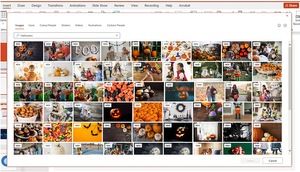
Hey there, Insiders! Kushal Kapoor, Program Manager on the Office Graphics team, is pleased to announce that we’ve now added a curated set of images for the Day of the Dead holiday! The Day of the Dead (or Día de los Muertos) is a special holiday in early November that reunites the living and the dead. It’s a time when families honor and welcome back their deceased friends and relatives by offering up their favorite food and drinks. Whether you plan to dress up in skeleton-themed outfits, eat freshly prepared treats, tell family stories, or just spend time with your family and friends, the holiday is a perfect occasion to get together and forge lasting memories. To help you celebrate, we’ve produced a set of royalty-free premium Day of the Dead images to use in your documents, worksheets, presentations, and emails. We hope you enjoy these colorful and creative images! Take a look at the full blog post here. Cheers, Iqra Office Insider Community Manager Become an Office Insider and gaining exclusive access to new features and help shape the future of Office. Join Now: Windows | Mac | iOS | Android1.2KViews0likes0CommentsHave a happy Halloween with premium images
Howdy, Insiders! Kushal Kapoor, Program Manager on the Office Graphics team, is excited to share with you a new set of curated premium images, part of our latest editorial offering for Premium Creative Content: Halloween-themed images! Late October is here, and that can only mean one thing: Halloween is right around the corner! Whether it involves trick-or-treating, dressing up in costumes, carving pumpkins, or simply spending time with family and friends, this holiday is a perfect time to create great memories. To help you tell your stories, we have developed a set of royalty-free premium Halloween images to use in your documents, worksheets, presentations, and emails. We hope you enjoy these fun images and have a happy Halloween! Take a look at the full blog post here. Cheers, Iqra Office Insider Community Manager Become an Office Insider and gaining exclusive access to new features and help shape the future of Office. Join Now: Windows | Mac | iOS | Android581Views1like0CommentsPlay videos in Office Mobile for iPhone
Hi, Office Insiders! Arpit Agarwal, Program Manager on the Office Mobile team, is excited to introduce a new feature that allows you to play videos directly from within the Office Mobile app on your iPhone. Watching video content on your mobile device is becoming a productivity must-have. Whether it’s a training video, a recording of a work meeting, or an idea pitch from a colleague, you want to be able to access and play the video as quickly and easily as possible. With the new Stream OnePlayer app for iPhone, you no longer need to leave the app to play videos in Office Mobile. You can seamlessly find, access, and play videos any time you want, right from the app. Take a look at the full blog post here. Cheers, Iqra Office Insider Community Manager Become an Office Insider and gaining exclusive access to new features and help shape the future of Office. Join Now: Windows | Mac | iOS | Android610Views1like0CommentsIntroducing the preview of Feedback for Microsoft 365
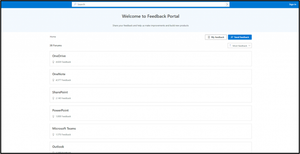
Hi, Office Insiders! Devin Sinha, Program Manager on the Release and Delivery Experiences team, is pleased to announce the preview of Feedback for Microsoft 365 apps and services, a new community feedback experience from Microsoft. Built on Dynamics 365 Customer Service, Feedback is the one place where users can go to provide feedback about Microsoft 365 apps and services. From there, they can submit new feedback for the community, weigh in on items posted by others, or comment on existing topics. Starting today, the preview of Feedback is available for Microsoft 365 apps and services as well as Microsoft Edge. It will later be available for Windows and other products. Take a look at the full blog post here. Cheers, Iqra Office Insider Community Manager Become an Office Insider and gaining exclusive access to new features and help shape the future of Office. Join Now: Windows | Mac | iOS | Android899Views0likes0CommentsAdd Cartoon People to Office creations
Aimee Leong, Program Manager on the Office Graphics team is excited to share this recent update. Our team is constantly adding new types of rich media to enhance your Office creations and bring your stories and presentations to life. We’re happy to announce the latest addition to our premium content library: Cartoon People in Office! Cartoon People illustrations are a fun way to create artwork and tell stories using a diverse set of characters and scenery. Now, you can put together just about any scene you can imagine, selecting from a huge variety of elements found in the premium content libraries of Word, Outlook, PowerPoint, and Excel. Take a look at the full blog post here. Cheers, Iqra Office Insider Community Manager Become an Office Insider and gaining exclusive access to new features and help shape the future of Office. Join Now: Windows | Mac | iOS | Android1.6KViews1like1CommentOffice Insider Spotlight: Oz du Soleil
Oz du Soleil still remembers the first time he discovered the real value of Excel in resolving a pesky data problem. “I was working in a call center, and customers kept calling up with the same kinds of complaints. I was in charge of a program where people would get awards when they completed their continuing education, and I had to look up people who completed it and send out this gold pin and a certificate. And the admins would call up and say, ‘You people sent me this one again, and you didn’t send me these other two? You people! You people!’” he recalled with a laugh. “And I would get these canned reports sent to me, and I could tell they were wrong. So after a while I would say, ‘Just stop sending me that dang report. I will write a query, and then get this big data dump and just peel it down myself in Excel.’ So that’s where I really got into Excel—and all I could do at that time was drag stuff around, and filter and sort, and hand-color cells. I didn’t know Excel really, I didn’t know data. I just saw myself as a guy who was solving problems.” Take a look at the full blog post here. Cheers, Iqra Office Insider Community Manager Become an Office Insider and gaining exclusive access to new features and help shape the future of Office. Join Now: Windows | Mac | iOS | Android563Views0likes0CommentsFree up space with Online Archive in Outlook for Mac
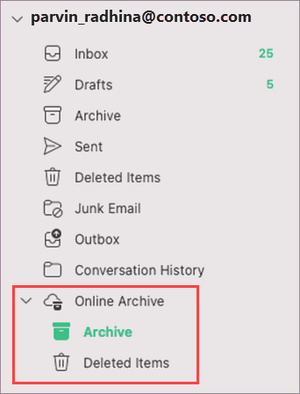
Hey Insiders! Priya Ganta, Program Manager on the Outlook team, is excited to share that one of the most-requested Outlook for Mac features is finally here: Online Archive! An Online Archive (also called an archive mailbox) is a place for storing old email messages, freeing up space in your primary mailbox. This archive mailbox appears alongside your primary mailbox, and is accessed the same way that you access your primary mailbox and folders in the new Outlook for Mac. Take a look at the full blog post here. Cheers, Iqra Office Insider Community Manager Become an Office Insider and gaining exclusive access to new features and help shape the future of Office. Join Now: Windows | Mac | iOS | Android1.3KViews1like0CommentsFind All in Excel for Mac
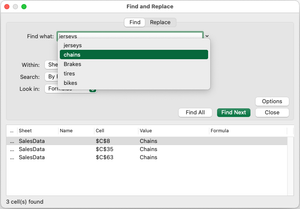
Hey, Office Insiders! Steve Kraynak, Program Manager on the Excel team, is excited to announce some improvements to the Find and Replace feature in Excel for Mac—you can now edit cells without having to close the dialog box first. We’ve also added some long-requested search functionality: Find All! Over the years, many users have asked us to add the Find All feature they enjoy in Excel for Windows to Excel for Mac. Now, it’s here! This update helps you find what you’re looking for faster and more easily, because you can see a list of all the cells that contain your search term. No more having to click Find Next to check the cells one at a time. Also, since the updated Find and Replace dialog box is non-modal, you can make edits to cells even with the dialog open (something that wasn’t previously possible). Take a look at the full blog post here. Cheers, Iqra Office Insider Community Manager Become an Office Insider and gaining exclusive access to new features and help shape the future of Office. Join Now: Windows | Mac | iOS | Android1.5KViews1like2CommentsAccessibility ribbon in PowerPoint: Accessibility made easier
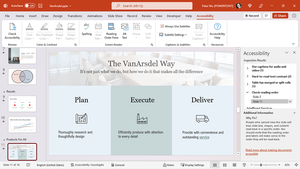
Hi, Office Insiders! Peter Wu, Principal Software Engineer on the PowerPoint team, is here to share that it’s now easier than ever to make your presentations accessible in PowerPoint for Windows, Mac, and the web. Introducing the Accessibility ribbon! The Accessibility ribbon brings together in one place all the tools you need to make your presentation accessible. The new ribbon complements the Accessibility Checker, which automatically alerts you to many of the common accessibility issues found in PowerPoint presentations. With the Accessibility ribbon, you can access the tools needed to fix accessibility issues that arise as you’re working on your presentation. (If you are already using the Accessibility ribbon in Excel , you’ll find that the Accessibility ribbon in PowerPoint works in a similar way.) Take a look at the full blog post here. Cheers, Iqra Office Insider Community Manager Become an Office Insider and gaining exclusive access to new features and help shape the future of Office. Join Now: Windows | Mac | iOS | Android1.2KViews0likes0CommentsTell your story with video recording in PowerPoint
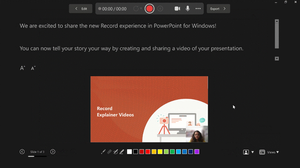
Hey, Office Insiders! Ridhima Gupta, Program Manager on the Office Video team, is excited to let you know about a new way to bring your presentations to life, enabling you to asynchronously tell your story with video recordings in PowerPoint for Windows. Video is perhaps the most influential storytelling medium. In an era when coworkers are often scattered across many different locations and time zones, and the ability to meet synchronously is frequently limited, recording your own videos in PowerPoint can serve as a powerful tool to tell a story your way. With the new Record experience, you can easily create and share videos of your presentation, getting your message across in your own words. This includes the new Teleprompter view, which enables you to look at the camera and refer to notes at the same time, delivering your message with confidence. You can also blur your video background to eliminate distractions for your audience. Take a look at the full blog post here. Cheers, Iqra Office Insider Community Manager Become an Office Insider and gaining exclusive access to new features and help shape the future of Office. Join Now: Windows | Mac | iOS | Android904Views1like1CommentBookmark and rotate pages in PDFs in Office Mobile for iOS
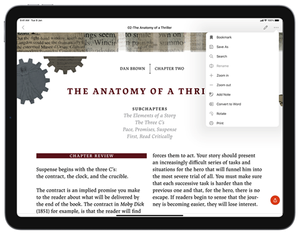
Tirtha, Program Manager on the Office Mobile team, is excited to share the ability to bookmark and rotate pages in PDFs have been among the most heavily requested features in Office Mobile for iOS. We heard you, and these capabilities are here! PDFs are a great way to consume text content on your mobile device. But it can be easy to lose your place when reading an e-book or a lengthy report in PDF form. With the new Bookmark feature, you can now mark important pages in your PDF with just a tap. You can also view and access all your bookmarked pages in one place. Another common frustration with PDFs is issues related to page orientation: one of the pages is scanned in landscape mode, while all the other pages are in portrait mode (or vice versa). Problem solved! With the new Rotate feature, you can easily switch any PDF page to the desired orientation. Take a look at the full blog post here. Cheers, Iqra Office Insider Community Manager Become an Office Insider and gaining exclusive access to new features and help shape the future of Office. Join Now: Windows | Mac | iOS | Android1KViews0likes0CommentsImproved search experience in the Outlook Address Book
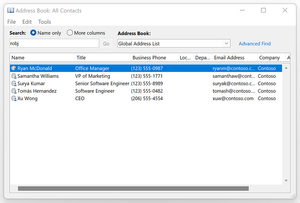
All of you are no doubt familiar with the Address Book in Outlook for Windows. It’s full of information about your contacts or your company’s list of employees. Brett Waldbaum, a Software Engineer Manager on the Outlook team, is excited to share with you some improvements we’ve made to the Address Book search experience. It is easy to miss that there are two options available at the top of the Address Book dialog box: Name only and More columns. When searching with the Name only option selected (the previous default setting), the list of results scrolls as you type to where there are listings that match the beginning of that name (known as prefix matching) or later in the alphabet. For example, typing “Rob” in the Address Book Search box would show results such as “Robbie Johnson” and “Roberta Smith” (along with other names below them in the Address Book). Read all about it, right here. Best, Iqra Office Insider Community Manager Become an Office Insider and gaining exclusive access to new features and help shape the future of Office. Join Now: Windows | Mac | iOS | Android4.1KViews0likes1CommentA new view: File Cards in Office Mobile for iOS
Priya Mehta, Program Manager on the Apple Shared Experiences team, is pleased to be able to tell you about File Cards, a new way to preview Office Mobile files in iOS without opening them. File Cards offer a rich, modern way to consume Office content on your iPhone or iPad. This view features: Inline previews Contextual information (who shared the file and the context in which it was shared) Quick actions that allow you to share or save the file offline As part of this rollout, File Cards in Office Mobile will be available for your Word, Excel, PowerPoint, and PDF files stored in your OneDrive for Business and Personal accounts. Word and PDF files stored locally on your device will be supported in a future update. Read all about it, right here. Best, Iqra Office Insider Community Manager Become an Office Insider and gaining exclusive access to new features and help shape the future of Office. Join Now: Windows | Mac | iOS | Android559Views0likes0Comments





Recent Blog Articles
No content to show