User Profile

JosePinos55
MCT
Joined 5 years ago


User Widgets
Recent Discussions
Re: Microsoft Defender for Endpoint
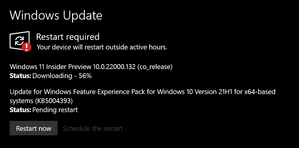
Hello Nigel_Ward I would recommend you run this command Get-MpComputerStatus and ensure Defender is running on active mode. Could you also share the results here? Also, it is recommended to run Windows updates, make sure everything is up to date.11KViews0likes4CommentsRe: Windows Update error (Your device is missing important security and quality fixes)
You can try these methods to troubleshoot your Windows 10 update issue: Method 1: Run SFC Scan. To run an SFC scan, follow these steps: Run Command Prompt as Administrator. Type sfc /scannow and hit Enter. This will check and run an auto-repair on the issue. Method 2: Run DISM Tool. After running the SFC scan and the issue still persist, run the DISM to check the system health and to try restoring the files. To run DISM tool, follow these steps: Run Command Prompt as Administrator. Type the following commands: DISM.exe /Online /Cleanup-image /scanhealth DISM.exe /Online /Cleanup-image /Restorehealth NOTE: This might a while to finish scanning. Do not cancel. Method 3: After doing Method 1 and Method 2 but the issue still persist, you can manually reset the Windows Update Components and Run Windows Update process again. Resetting Windows Update Components will fix those corrupted Components and will help the Update installation quickly. To reset Windows Update Components, follow these steps: Run Command Prompt as Administrator Stop BITS, Cryptographic, MSI Installer and Windows Update Services. To do this, type the following commands: Net stop wuauserv Net stop cryptSvc Net stop bits Net stop msiserver Rename SoftwareDistribution and Catroot2 folder. To do this, type the following commands: Ren C:\Windows\SoftwareDistribution SoftwareDistribution.old Ren C:\Windows\System32\catroot2 Catroot2.old Restart BITS, Cryptographic, MSI Installer and Windows Update Services. To do this, type the following commands: Net start wuauserv Net start cryptSvc Net start bits Net start msiserver Restart your computer and try to install Windows Update. Let us know how it goes.404KViews1like17CommentsRe: integrating / linking an existing domain into the O365 account
Hello MiguelDiez This process is very straight forward these days. No outage or data loss should happen if domain is added correctly. Make sure you add publish your DNS records and follow the instructions from the link below. Add a domain to Microsoft 365 - Microsoft 365 admin | Microsoft Docs Thanks, Jose721Views0likes0CommentsRe: User restricted from sending email false positive
Hello tk298 What is the reason for the block? There are several ways to tackle this issue without removing security but you first need to find out the reason for the block? For example, if you send 200 emails within 5 minutes you are likely to get blocked. All depends, on your organisation email policies. You need to find out what policy is getting triggered. With this information I should be able to help you further. Thanks, Jose5.1KViews0likes0CommentsRe: Add school account to a working machine
Hello thunguyen To fix this issue I would normally run the Step 1 from the link below, download the recovery assistant and follow the steps. This tool will troubleshoot the issue and hopefully resolve it. Cannot connect to your account when activate Office from Office 365 - Office | Microsoft Docs Let me know how you get on. Thanks, Jose916Views0likes0CommentsRe: Docx will not save in Word
Hello Mike_StilesBCS I would recommend you either repair or reinstall Office on your device. Please, follow the link below for further instructions. I have seen this issue before and normally a quick repair will sort it out. Repair an Office application (microsoft.com) Please, let me know how you get on. Regards, Jose1.8KViews0likes0CommentsRe: Purchase Windows 10 Home to Pro upgrade through 365 account
Hello JW_Singh If you sign into Windows (your user session) using the Microsoft account to which the license has been assigned, Windows should then automatically be activated. Hope this information helps. Thanks, Jose6.9KViews0likes0CommentsRe: Email address is a mess
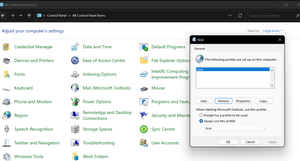
Hello KazzaB, I would recommend you create a new Mail profile. Please, do the following: 1- Go to Control Panel and select Mail (Microsoft Outlook) 2- Under Profiles, go to Show Profiles 3- Then click on Add > choose a name > click OK 4- Follow the Auto Account setup process 5- Proceed to signing in. See image for reference: Let me know if after this the issue is resolved. I would also recommend updating to the latest version of Office available. Thanks, Jose893Views0likes0CommentsRe: Searchbox bug
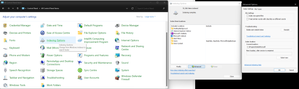
Hello GamingRecordTV To fix this issue you need to rebuild your search index. Please follow the instructions below: Open the Control Panel (icons view), click/tap on the Indexing Options icon, and close the Control Panel. Click/tap on the Advanced button. In the Index Settings tab, click/tap on the Rebuild button under Troubleshooting. Click/tap on OK to confirm. Indexing will now be in progress. When indexing has completed, click/tap on Close. Also have attached a screenshot for guidance. If after rebuilding still does not work, force Windows updates by doing the following: Open CMD as an admin and run the below: Reg delete HKLM\Software\Policies\Microsoft\Windows\WindowsUpdate yes Net stop wuauserv >NUL Cd C:\windows rmdir softwaredistribution /s /q Net start wuauserv >NUL Once you have done this, run Windows Updates. When finished, reboot the computer. Also worth running the below commands on CMD one by one until they are complete to repair Windows corrupted files. DISM.exe /Online /Cleanup-image /Restorehealth fsutil resource setautoreset true C:\ sfc /scannow Hope this helps, Thanks, Jose706Views0likes2CommentsRe: Windows audio endpoint / Windows Audio not responding
Hello CasWijers I want you to try two things for me: 1- Please, backup your registry before making any changes Open Regedit. Go to HKEY_LOCAL_MACHINE\SYSTEM\CurrentControlSet\Control right click on the right hand side and select New > DWORD (32-bit) Value name it ServicesPipeTimeout, then right click on the new entry and select Modify. change the base to Decimal and set the value to 600000, then hit OK You will need to reboot the machine to see the results. If this doesnt help, try the following: 2- Error: “No Audio Output Device is Installed" After... (intel.co.uk) Thanks, Jose23KViews0likes3CommentsRe: Windows audio endpoint / Windows Audio not responding
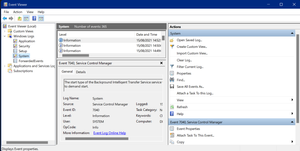
CasWijers Hello, Would you be able to go to Windows Event viewer and see if you can see any errors related to host_audio? See image below for guidance. If you find something, could you please attach it here for me to take a look? Thanks, Jose23KViews0likes5CommentsRe: Restore data (OneDrive) after deleting Email or user
Hello u_almatar It is probably a bit too late to recover this data for you but thought it would be idea to share some knowledge about this subject. When you remove or delete a license, the user's old email, contacts, and calendar are retained for 30 days, then permanently deleted. If you remove or delete a license but don't delete the account, the content in the user's OneDrive will remain accessible to you even after 30 days. You could forward a former employee's email to another employee or convert to a shared mailbox. This lets you keep the former employee's email address active. If you have customers or partners still sending email to the former employee's address, this gets them to the person taking over the work. Creating a shared mailbox is the less expensive way to go because you won't have to pay for a license as long as the mailbox is smaller than 50GB. Over 50GB and you'll need to assign a license to it. If you convert the mailbox to a shared mailbox, all the old email will be available, too. This can take up a lot of space. If you set up email forwarding, only new emails sent to the former employee will now be sent to the current employee. Email forwarding requires that the former employee's account has a license. Important If you're setting up email forwarding or a shared mailbox, at the end, don't delete the former employee's account. The account needs to be there to anchor the email forwarding or shared mailbox. Relevant documentation: Remove a former employee - Overview - Microsoft 365 admin | Microsoft Docs Credits to: jaycekakay5KViews0likes0CommentsRe: Windows audio endpoint / Windows Audio not responding
Hello CasWijers No worries, I would like you to complete a few steps for me. 1- Run CMD as an admin and enter the commands below: (these will remove the windows update registry which means next time you check for updates, WU will check against the entire windows update database) Reg delete HKLM\Software\Policies\Microsoft\Windows\WindowsUpdate yes Net stop wuauserv >NUL Cd C:\windows rmdir softwaredistribution /s /q Net start wuauserv >NUL 2 - Then run the following in order, one after the other. Wait for the first one to complete, then enter the next one: (these will repair windows and look for corrupted files) DISM.exe /Online /Cleanup-image /Restorehealth fsutil resource setautoreset true C:\ sfc /scannow 3- Now run Windows update > new updates should pop up. 4- Assuming your chipset is intel, go to the site below and install the driver assistant, run the tool on your machine. Intel® Driver & Support Assistant 5- After this the problem should be resolved. Regarding buying 3rd party programs to fix these issues, most of them don't work. I would not use them. I rather find the driver required from the manufacturer site. This is always the best and safest way to update or fix hardware. Hope this helps. Thanks, Jose23KViews2likes9Comments
Recent Blog Articles
No content to show