User Profile

Hawkins_IT
Copper Contributor
Joined 5 years ago


User Widgets
Recent Discussions
Multi-Factor Authentication
We use Multi-Factor Authentication on all our Office 365 emails. However, we have a Xerox copier/printer that we use to scan-to-email, so it has its own email address. When we enable the Multi-Factor for that email address, the scan-to-email function stops working. Does anyone know a way around using Multi-Factor on a copier/printer? Thank you.SolvedMigrating files from local file server to OneDrive
We are trying to migrate folders and files from our local file server to OneDrive for business. However, we are running into a problem where our filename paths are too long for OneDrive. Is there any easy solution to fix this? If we start shortening names of the files or folders, won't that break links, etc. Our root is called Hawkins Construction Co. Team Site - Documents. I want to shorten it to HCC, but am afraid that will break links to folder paths or if there are links in any documents, etc.955Views0likes0CommentsRe: Roaming Profile not Synchronizing
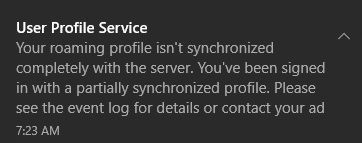
Reza_Ameri I see two Warnings: Warning #1 Windows cannot copy file \\?\UNC\fs3\users\THunter\profile.V6\AppData\Roaming\Microsoft\Installer\{E69269DB-A77B-4BC1-8F39-241107B09F26} to location \\?\C:\Users\thunter\AppData\Roaming\Microsoft\Installer\{E69269DB-A77B-4BC1-8F39-241107B09F26}. This error may be caused by network problems or insufficient security rights. DETAIL - Access is denied. Warning #2 Windows cannot copy file \\?\UNC\fs3\users\THunter\profile.V6\AppData\Roaming\Microsoft\Installer to location \\?\C:\Users\thunter\AppData\Roaming\Microsoft\Installer. This error may be caused by network problems or insufficient security rights. DETAIL - Access is denied.23KViews0likes3CommentsMigrating Zee Drive to OneDrive
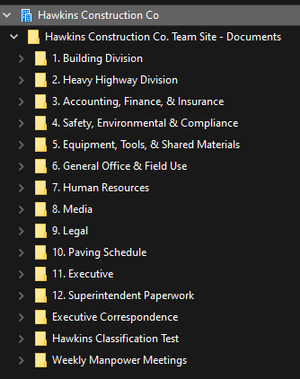
We are currently using Zee Drive for all our file storage, however, we are working on migrating to OneDrive for Business. We have already started the process and have created the directories and moved a large amount of files. My main question is now that we have started the process, can we rename the directories, especially starting at the root level, as we are running into issue with the 400 character limit. For example, our root directory in OneDrive is Hawkins Construction Co. Team Site, we would like to shorten to HCC, will this cause a lot of problems with file paths? Or will OneDrive eventually just sync everything to the new directory name? Any guidance or suggestions would be appreciated. Thank you. Here is our OneDrive file structure now. We would like to shorten all the directories:3KViews0likes1CommentMap OneDrive for Business & SharePoint to Network Drives
We currently are using Zee Drive for mapping OneDrive in our office. Is there any other good alternatives to compare to? Looking at options and want to know what others have done that work well. Thank you for any feedback.1.4KViews1like0CommentsHyper-V Monitoring
Does anyone have good recommendations for monitoring Hyper-V Virtual Machines? I know I can logon to the server and view the Hyper-V Manager dashboard. I would like something a little more detailed if possible. We currently are running 3 Hyper-V Hosts with a total of 23 Virtual Machines, so it would be nice to be able to monitor all of these in one place. Thanks for any recommendations.
Recent Blog Articles
No content to show