User Profile

PaddyB
Brass Contributor
Joined 5 years ago


User Widgets
Recent Discussions
Office 365 Corporate Templates Asset Library - Not showing up
Hi community We have setup an "Office 365 Corporate Templates Asset Library" in our company - according to specifications from Microsoft and various blogs. We have now stored various templates in the library ... and now it's getting exciting we have a multi-geo tenant. A few users see the new "Tab" in Word and a few users not Until recently it was that everyone with @ ****.com did not see it (except me) and everyone with e.g. @ xxx.ch and @ xxx.de saw it. since a few days, also some other with @ ****.com see it - but I see no difference between the other users first thought that in the @ **** location the CDN cannot get through the firewall, which I think I can discard. a few see it I can't "nail" it to a Domain of this multi-geo tenant I think we installed more or less all the latest possible Office version I think it can't be a firewall since a few can and a few not, I can also exclude any permissions (I think) With Microsoft support, I haven't got any further for 6 weeks and about 20 emails ... and everytime test the same things and do a "Steps Recording"2.7KViews0likes3CommentsRe: PowerShell Script to read Product SKU
Hi Vasil thanks for it - i will give it a try, first attempt was not successful. i had also almost the same "line" i will also try to find a way, to put the values from hash table 2 (SKU Price) to the hash table1 (SKU) as a 2nd value need to dig here a bit and learn some basics 🙂3.8KViews0likes0CommentsPowerShell Script to read Product SKU
Hi Pro's 🙂 i fight now since hours to fix a script. my script check for each use the assigned Microsoft licenses and generate a screen output and a CSV... so far so good. the script generates the information according to data from a has table. one has table for the SKU - ProductName and the second hash table for the SKU - ProductPrice i work for the ProductPrice with $Skuprice the SKU - ProductName and all other stuff is working very nice but not the SKU - ProductPrice. there is no output on screen and csv $CSV = "C:\Scripts\Office_365_User_Licensing.csv" $Sku = @{ "SPE_F1" = "Enterprise - Plan F3" "DYN365_SCM" = "Dynamics CRM SCM" "D365_SALES_ENT_ATTACH" = "Dynamics CRM Sales AddOn" "OFFICE365_MULTIGEO" = "Microsoft 365 GEO Location" "O365_BUSINESS_ESSENTIALS" = "Office 365 - Business Essentials" "O365_BUSINESS_PREMIUM" = "Office 365 - Business Premium" "DESKLESSPACK" = "Office 365 - Plan K1" "DESKLESSWOFFPACK" = "Office 365 - Plan K2" "LITEPACK" = "Office 365 - Plan P1" "EXCHANGESTANDARD" = "Office 365 - Exchange Online Only" "STANDARDPACK" = "Office 365 - Enterprise - Plan E1" "STANDARDWOFFPACK" = "Office 365 - Enterprise - Plan E2" "ENTERPRISEPACK" = "Office 365 - Enterprise - Plan E3" "ENTERPRISEPACKLRG" = "Office 365 - Enterprise - Plan E3" "ENTERPRISEWITHSCAL" = "Office 365 - Enterprise - Plan E4" "STANDARDPACK_STUDENT" = "Office 365 - Office 365 - Plan A1 for Students" "STANDARDWOFFPACKPACK_STUDENT" = "Office 365 - Office 365 - Plan A2 for Students" "ENTERPRISEPACK_STUDENT" = "Office 365 - Plan A3 for Students" "ENTERPRISEWITHSCAL_STUDENT" = "Office 365 - Plan A4 for Students" "STANDARDPACK_FACULTY" = "Office 365 - Plan A1 for Faculty" "STANDARDWOFFPACKPACK_FACULTY" = "Office 365 - Plan A2 for Faculty" "ENTERPRISEPACK_FACULTY" = "Office 365 - Plan A3 for Faculty" "ENTERPRISEWITHSCAL_FACULTY" = "Office 365 - Plan A4 for Faculty" "ENTERPRISEPACK_B_PILOT" = "Office 365 - Enterprise Preview" "STANDARD_B_PILOT" = "Office 365 - Small Business Preview" "VISIOCLIENT" = "Visio Pro Online" "POWER_BI_ADDON" = "Power BI - Addon" "POWER_BI_INDIVIDUAL_USE" = "Power BI - Individual User" "POWER_BI_STANDALONE" = "Power BI - Stand Alone" "POWER_BI_STANDARD" = "Power BI - Standard" "PROJECTESSENTIALS" = "Project Lite" "PROJECTCLIENT" = "Project Professional" "PROJECTONLINE_PLAN_1" = "Project Online - Plan 1" "PROJECTONLINE_PLAN_2" = "Project Online and PRO - Plan 2" "ProjectPremium" = "Project Online Premium - Plan 3" "ECAL_SERVICES" = "ECAL" "EMS" = "Enterprise Mobility Suite" "RIGHTSMANAGEMENT_ADHOC" = "Azure Rights Management" "MCOMEETADV" = "PSTN conferencing" "SHAREPOINTSTORAGE" = "SharePoint Storage" "PLANNERSTANDALONE" = "Office 365 - Planner Standalone" "CRMIUR" = "CMRIUR" "BI_AZURE_P1" = "Power BI - Reporting and Analytics" "INTUNE_A" = "Intune Plan A" "PROJECTWORKMANAGEMENT" = "Office 365 - Planner Preview" "ATP_ENTERPRISE" = "Exchange Online Advanced Threat Protection" "EQUIVIO_ANALYTICS" = "Office 365 - Advanced eDiscovery" "AAD_BASIC" = "Azure Active Directory Basic" "RMS_S_ENTERPRISE" = "Azure Active Directory Rights Management" "AAD_PREMIUM" = "Azure Active Directory Premium" "MFA_PREMIUM" = "Azure Multi-Factor Authentication" "STANDARDPACK_GOV" = "Office 365 - Plan G1 for Government" "STANDARDWOFFPACK_GOV" = "Office 365 - Plan G2 for Government" "ENTERPRISEPACK_GOV" = "Office 365 - Plan G3 for Government" "ENTERPRISEWITHSCAL_GOV" = "Office 365 - Plan G4 for Government" "DESKLESSPACK_GOV" = "Office 365 - Plan K1 for Government" "ESKLESSWOFFPACK_GOV" = "Office 365 - Plan K2 for Government" "EXCHANGESTANDARD_GOV" = "Office 365 Exchange Online - Plan 1 for Government" "EXCHANGEENTERPRISE_GOV" = "Office 365 Exchange Online - Plan 2 for Government" "SHAREPOINTDESKLESS_GOV" = "SharePoint Online Kiosk" "EXCHANGE_S_DESKLESS_GOV" = "Exchange Kiosk" "RMS_S_ENTERPRISE_GOV" = "Windows Azure Active Directory Rights Management" "OFFICESUBSCRIPTION_GOV" = "Office ProPlus" "MCOSTANDARD_GOV" = "Lync - Plan 2G" "SHAREPOINTWAC_GOV" = "Office Online for Government" "SHAREPOINTENTERPRISE_GOV" = "SharePoint - Plan 2G" "EXCHANGE_S_ENTERPRISE_GOV" = "Exchange - Plan 2G" "EXCHANGE_S_ARCHIVE_ADDON_GOV" = "Exchange Online Archiving" "EXCHANGE_S_DESKLESS" = "Exchange Online Kiosk" "SHAREPOINTDESKLESS" = "SharePoint Online Kiosk" "SHAREPOINTWAC" = "Office Online" "YAMMER_ENTERPRISE" = "Yammer Enterprise" "EXCHANGE_L_STANDARD" = "Exchange Online - Plan 1" "MCOLITE" = "Lync Online - Plan 1" "SHAREPOINTLITE" = "SharePoint Online - Plan 1" "OFFICE_PRO_PLUS_SUBSCRIPTION_SMBIZ" = "Office ProPlus" "EXCHANGE_S_STANDARD_MIDMARKET" = "Exchange Online - Plan 1" "MCOSTANDARD_MIDMARKET" = "Lync Online - Plan 1" "SHAREPOINTENTERPRISE_MIDMARKET" = "SharePoint Online - Plan 1" "OFFICESUBSCRIPTION" = "Office ProPlus" "YAMMER_MIDSIZE" = "Yammer" "DYN365_ENTERPRISE_PLAN1" = "Dynamics 365 Customer Engagement Plan Enterprise Edition" "ENTERPRISEPREMIUM_NOPSTNCONF" = "Enterprise E5 (without Audio Conferencing)" "ENTERPRISEPREMIUM" = "Enterprise E5 (with Audio Conferencing)" "MCOSTANDARD" = "Skype for Business Online Standalone - Plan 2" "PROJECT_MADEIRA_PREVIEW_IW_SKU" = "Dynamics 365 for Financials for IWs" "STANDARDWOFFPACK_IW_STUDENT" = "Office 365 - Education for Students" "STANDARDWOFFPACK_IW_FACULTY" = "Office 365 - Education for Faculty" "EOP_ENTERPRISE_FACULTY" = "Exchange Online Protection for Faculty" "EXCHANGESTANDARD_STUDENT" = "Exchange Online - Plan 1 for Students" "OFFICESUBSCRIPTION_STUDENT" = "Office ProPlus Student Benefit" "STANDARDWOFFPACK_FACULTY" = "Office 365 - Education - Plan E1 for Faculty" "STANDARDWOFFPACK_STUDENT" = "Office 365 - Plan A2 for Students" "DYN365_FINANCIALS_BUSINESS_SKU" = "Dynamics 365 for Financials Business Edition" "DYN365_FINANCIALS_TEAM_MEMBERS_SKU" = "Dynamics 365 for Team Members Business Edition" "FLOW_FREE" = "Flow Free" "POWER_BI_PRO" = "Power BI Pro" "O365_BUSINESS" = "Office 365 Business" "DYN365_ENTERPRISE_SALES" = "Dynamics Office 365 Enterprise Sales" "RIGHTSMANAGEMENT" = "Rights Management" "PROJECTPROFESSIONAL" = "Project Professional" "VISIOONLINE_PLAN1" = "Visio Online - Plan 1" "EXCHANGEENTERPRISE" = "Exchange Online - Plan 2" "DYN365_ENTERPRISE_P1_IW" = "Dynamics 365 P1 Trial for Information Workers" "DYN365_ENTERPRISE_TEAM_MEMBERS" = "Dynamics 365 For Team Members Enterprise Edition" "CRMSTANDARD" = "Microsoft Dynamics CRM Online Professional" "EXCHANGEARCHIVE_ADDON" = "Exchange Online Archiving For Exchange Online" "EXCHANGEDESKLESS" = "Exchange Online Kiosk" "SPZA_IW" = "App Connect" "WINDOWS_STORE" = "Windows Store for Business" "MCOEV" = "Phone System" "VIDEO_INTEROP" = "Polycom Skype Meeting Video Interop for Skype for Business" "SPE_E5" = "Microsoft 365 - Plan E5" "SPE_E3" = "Microsoft 365 - Plan E3" "ATA" = "Advanced Threat Analytics" "MCOPSTN2" = "Domestic and International Calling Plan" "FLOW_P1" = "Flow - Plan 1" "FLOW_P2" = "Flow - Plan 2" "CRMSTORAGE" = "Dynamics CRM Online Additional Storage" "SMB_APPS" = "Business Apps" "MICROSOFT_BUSINESS_CENTER" = "Business Center" "DYN365_TEAM_MEMBERS" = "Dynamics 365 Team Members" "STREAM" = "Stream Trial" "EMSPREMIUM" = "Enterprise Mobility + Security (EMS) - Plan E5" "M365_E5_SUITE_COMPONENTS" = "Microsoft M365 - E5" "PROJECT_P1" = "Project - P1" "WIN_DEF_ATP" = "Defener ATP" "THREAT_INTELLIGENCE" = "Defender for Office 365 - Plan 2" "TEAMS_EXPLORATORY" = "Teams Premium Access Trial" "POWERAUTOMATE_ATTENDED_RPA" = "Power Automate per user plan with attended RPA Plan 2" "DYN365_REGULATORY_SERVICE" = "Dynamics - Regulierungsdienst, Enterprise Edition" } $Skuprice = @{ "SPE_F1" = "12345" "DYN365_SCM" = "123456" "D365_SALES_ENT_ATTACH" = "123457" "OFFICE365_MULTIGEO" = "123458" "O365_BUSINESS_ESSENTIALS" = "123459" "O365_BUSINESS_PREMIUM" = "1234510" "DESKLESSPACK" = "1234511" "DESKLESSWOFFPACK" = "1234512" "LITEPACK" = "1234513" "EXCHANGESTANDARD" = "1234514" "STANDARDPACK" = "1234515" "STANDARDWOFFPACK" = "1234516" "ENTERPRISEPACK" = "1234517" "ENTERPRISEPACKLRG" = "1234518" "ENTERPRISEWITHSCAL" = "1234519" "STANDARDPACK_STUDENT" = "1234520" "STANDARDWOFFPACKPACK_STUDENT" = "1234521" "ENTERPRISEPACK_STUDENT" = "1234522" "ENTERPRISEWITHSCAL_STUDENT" = "1234523" "STANDARDPACK_FACULTY" = "1234524" "STANDARDWOFFPACKPACK_FACULTY" = "1234525" "ENTERPRISEPACK_FACULTY" = "1234526" "ENTERPRISEWITHSCAL_FACULTY" = "1234527" "ENTERPRISEPACK_B_PILOT" = "1234528" "STANDARD_B_PILOT" = "1234529" "VISIOCLIENT" = "1234530" } $Cred = Get-Credential Connect-MsolService -Credential $Cred $Users = Get-MsolUser -All | Where-Object { $_.isLicensed -eq "TRUE" } | Sort-Object DisplayName Foreach ($User in $Users) { Write-Host "Working on $($User.DisplayName)..." -ForegroundColor Yellow #Gets users license and splits it at the semicolon Write-Host "Getting all licenses for $($User.DisplayName)..." -ForegroundColor White $Licenses = ((Get-MsolUser -UserPrincipalName $User.UserPrincipalName).Licenses).AccountSkuID If (($Licenses).Count -gt 1) { Foreach ($License in $Licenses) { Write-Host "Finding $License in the Hash Table..." -ForegroundColor White $LicenseItem = $License -split ":" | Select-Object -Last 1 $TextLic = $Sku.Item("$LicenseItem") $Skuprice = $Skuprice If (!($TextLic)) { Write-Host "Error: The Hash Table has no match for $LicenseItem for $($User.DisplayName)!" -ForegroundColor Red $LicenseFallBackName = $License.AccountSkuId $NewObject02 = $null $NewObject02 = @() $NewObject01 = New-Object PSObject $NewObject01 | Add-Member -MemberType NoteProperty -Name "Name" -Value $User.DisplayName $NewObject01 | Add-Member -MemberType NoteProperty -Name "User Principal Name" -Value $User.UserPrincipalName $NewObject01 | Add-Member -MemberType NoteProperty -Name "Department" -Value $User.Department $NewObject01 | Add-Member -MemberType NoteProperty -Name "City" -Value $User.City $NewObject01 | Add-Member -MemberType NoteProperty -Name "UsageLocation" -Value $User.UsageLocation $NewObject01 | Add-Member -MemberType NoteProperty -Name "License" -Value "$LicenseFallBackName" $NewObject01 | Add-Member -MemberType NoteProperty -Name "License Price per Month" -Value "$Skuprice" $NewObject02 += $NewObject01 $NewObject02 | Export-CSV $CSV -NoTypeInformation -Append } Else { $NewObject02 = $null $NewObject02 = @() $NewObject01 = New-Object PSObject $NewObject01 | Add-Member -MemberType NoteProperty -Name "Name" -Value $User.DisplayName $NewObject01 | Add-Member -MemberType NoteProperty -Name "User Principal Name" -Value $User.UserPrincipalName $NewObject01 | Add-Member -MemberType NoteProperty -Name "Department" -Value $User.Department $NewObject01 | Add-Member -MemberType NoteProperty -Name "City" -Value $User.City $NewObject01 | Add-Member -MemberType NoteProperty -Name "UsageLocation" -Value $User.UsageLocation $NewObject01 | Add-Member -MemberType NoteProperty -Name "License" -Value "$TextLic" $NewObject01 | Add-Member -MemberType NoteProperty -Name "License Price per Month" -Value "$Skuprice" $NewObject02 += $NewObject01 $NewObject02 | Export-CSV $CSV -NoTypeInformation -Append } } } Else { Write-Host "Finding $Licenses in the Hash Table..." -ForegroundColor White $LicenseItem = ((Get-MsolUser -UserPrincipalName $User.UserPrincipalName).Licenses).AccountSkuID -split ":" | Select-Object -Last 1 $TextLic = $Sku.Item("$LicenseItem") If (!($TextLic)) { Write-Host "Error: The Hash Table has no match for $LicenseItem for $($User.DisplayName)!" -ForegroundColor Red $LicenseFallBackName = $License.AccountSkuId $NewObject02 = $null $NewObject02 = @() $NewObject01 = New-Object PSObject $NewObject01 | Add-Member -MemberType NoteProperty -Name "Name" -Value $User.DisplayName $NewObject01 | Add-Member -MemberType NoteProperty -Name "User Principal Name" -Value $User.UserPrincipalName $NewObject01 | Add-Member -MemberType NoteProperty -Name "Department" -Value $User.Department $NewObject01 | Add-Member -MemberType NoteProperty -Name "City" -Value $User.City $NewObject01 | Add-Member -MemberType NoteProperty -Name "UsageLocation" -Value $User.UsageLocation $NewObject01 | Add-Member -MemberType NoteProperty -Name "License" -Value "$TextLic" $NewObject01 | Add-Member -MemberType NoteProperty -Name "License Price per Month" -Value "$Skuprice" $NewObject02 += $NewObject01 $NewObject02 | Export-CSV $CSV -NoTypeInformation -Append } Else { $NewObject02 = $null $NewObject02 = @() $NewObject01 = New-Object PSObject $NewObject01 | Add-Member -MemberType NoteProperty -Name "Name" -Value $User.DisplayName $NewObject01 | Add-Member -MemberType NoteProperty -Name "User Principal Name" -Value $User.UserPrincipalName $NewObject01 | Add-Member -MemberType NoteProperty -Name "Department" -Value $User.Department $NewObject01 | Add-Member -MemberType NoteProperty -Name "City" -Value $User.City $NewObject01 | Add-Member -MemberType NoteProperty -Name "UsageLocation" -Value $User.UsageLocation $NewObject01 | Add-Member -MemberType NoteProperty -Name "License" -Value "$TextLic" $NewObject01 | Add-Member -MemberType NoteProperty -Name "License Price per Month" -Value "$Skuprice" $NewObject02 += $NewObject01 $NewObject02 | Export-CSV $CSV -NoTypeInformation -Append } } } any idea?4.2KViews0likes4CommentsPowerQuery remove Columns
Hi Guys is there an uncomplicated way to remove an "unknown number" of columns? for example, all what start with "column.01, column.02, column.03" and so on for example with column.0* 1. i need to remove approx. 400 columns 2. it can be that there are more than the 400 columns1.1KViews1like2CommentsRe: Date / Time manipulation with PowerQuery
Riny_van_Eekelen thank you for your time... i as trying to "reproduce" your script step by step as i had an error. i already start struggling at the step of change the type of my source column = Table.TransformColumnTypes(TeamsMeetings,{{"Start Time (UTC)", type number}}) the Error from a sample line (in german) DataFormat.Error: Die Konvertierung in "Number" war nicht möglich. Details: 8/8/2022 11:58:26 AM the error from a sample line (translated) DataFormaError converting to "Number" was not possible Details: 8/8/2022 11:58:26 AM the source column, in my case "Start Time (UTC)" is a "Text type". this comes from a previous step. we converted there on "big message block" to this column1.7KViews0likes2CommentsDate / Time manipulation with PowerQuery
I have a few columns in my Excel and try to do some change with PowerQuery. Very new to it and thanks to Sergei for the first steps, I have the following columns Start Time (UTC) 8/8/2022 11:58:26 AM Duration 00:50:42.5186092 I want to to add a new column “StartTime (CEST)” and add there the value from “Start Time (UTC)” + 2hourse to be in “my timezone” Question here is, how to manage it if I add 2h for example and 11pm? This also needs a change in the date From this new “StartTime (CEST)” I want to add the Time-Value from the Field “Duration” to get the “EndTime (CEST)” Here I run in the same situation, what if the duration is over a day-change alternate i have also already the End-Date wiht UTC datas in it, if this is easier to change then do the math via Duration Happy to get some input… thanks1.9KViews0likes5CommentsRe: Convert Text to Cell
SergeiBaklan very interesting what PQ can do - thank you for showing me i had to do some changes, because i got after approx. 500 some Erros - something about date not sure if my changes make any sense 🙂 but the error is gone let Source = Excel.CurrentWorkbook(){[Name="TeamsMeetings"]}[Content], #"Removed Other Columns" = Table.SelectColumns(Source,{"Received UTC", "Sender", "ToRecipient", "ccRecipient", "Subject", "Importance", "Body"}), #"Added Custom" = Table.AddColumn(#"Removed Other Columns", "Custom", each Text.Split([Body], "#(lf)" )), AddStartTime = Table.AddColumn(#"Added Custom", "Start Time (UTC)", each [Custom]{0}), AddEndTime = Table.AddColumn(AddStartTime, "End Time (UTC)", each [Custom]{1}), AddDuration = Table.AddColumn(AddEndTime, "Duration", each [Custom]{2}), #"Removed Columns" = Table.RemoveColumns(AddDuration,{"Custom"}), #"Extracted Text After Delimiter" = Table.TransformColumns(#"Removed Columns", {{"Start Time (UTC)", each Text.AfterDelimiter(_, "Start Time (UTC): "), type text}}), #"Extracted Text After Delimiter1" = Table.TransformColumns(#"Extracted Text After Delimiter", {{"End Time (UTC)", each Text.AfterDelimiter(_, "End Time (UTC): "), type text}}), #"Extracted Text After Delimiter2" = Table.TransformColumns(#"Extracted Text After Delimiter1", {{"Duration", each Text.AfterDelimiter(_, "Duration: "), type text}}), #"Changed Type" = Table.TransformColumnTypes(#"Extracted Text After Delimiter2",{{"End Time (UTC)", type datetime}, {"Start Time (UTC)", type datetime}, {"Duration", type datetime}, {"Received UTC", type datetime}}), #"Geänderter Typ mit Gebietsschema" = Table.TransformColumnTypes(#"Extracted Text After Delimiter2", {{"Start Time (UTC)", type text}}, "en-US"), #"Geänderter Typ mit Gebietsschema1" = Table.TransformColumnTypes(#"Geänderter Typ mit Gebietsschema", {{"End Time (UTC)", type text}}, "en-US"), #"Geänderter Typ mit Gebietsschema2" = Table.TransformColumnTypes(#"Geänderter Typ mit Gebietsschema", {{"Received UTC", type number}}, "en-US") in #"Geänderter Typ mit Gebietsschema1"3.5KViews0likes0CommentsRe: Convert Text to Cell
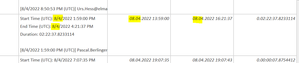
SergeiBaklan was running the Query on 1 of my files with 5k entry's - very nice but i think there is still a small problem.or maybe 2 🙂 the source files have UTC time-zone, i think in this way also the US-Dateforma. but witht eh query we just "format" this new see PrintScreen. so, it should be the 4. August 2022 and with he Query we make out if this 8. April or I'm wrong? i also have approx 529 errors... maybe connected to the same problem above3.6KViews0likes2CommentsUSE IF Function in Ecel for Time
Hi Guys i want to read the Time (in 24h Formatting) out of a cell (Example = 12:25:36) I want to check if the Time is betw. 23:00 and 07:00. if so write NIGHT and if not DAY i use =WENN(UND(D2>WERT("07:00");D2<WERT("23:00"));2;"NIGHT") in some Cell's i see 00:00:00 in some Night... what i did wrong?Solved992Views0likes2CommentsRe: Convert Text to Cell
SergeiBaklan hi thank you Guys so much, for all you help. i upload a manually edited version. column A to G is how i get i from my CSV import i then manually add for testing the column H, I, J after it i copied for testing the stuff by hand from column E to H, I, J Line 2 and 3 are a result what would makes me already happy 🙂 Line 4 and 5 are the ultimate "i can go to weekend and relax" version3.6KViews0likes5CommentsRe: Convert Text to Cell
Riny_van_Eekelen thanks for the Idea. this split is more than i need 🙂 would be happy just have the 3 "1st Lines" in a separate cell for example Starte Time line in one cell End Time Line in one cell Duartion Time in one Cell end the rest if possible in a last cell3.7KViews0likes0Comments- 3.8KViews0likes10Comments
Convert Text to Cell
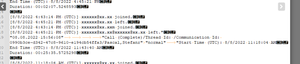
Hi i have in a cell a Multiple Line Text - what i want to split in columns "Start Time (UTC): 8/8/2022 11:58:26 AM End Time (UTC): 8/8/2022 12:49:08 PM Duration: 00:50:42.5186092 [8/8/2022 11:58:26 AM (UTC)] xxx@xxx joined. [8/8/2022 12:26:00 PM (UTC)] xxx@xxx left. [8/8/2022 11:59:41 AM (UTC)] xxx@xxx joined. [8/8/2022 12:49:08 PM (UTC)] xxx@xxx left." i test it with "Text to column" function and as a delimiter "CTRL + J" - it takes the first line, that's it. for me, the solution would be if i just can Splitt the first 3 lines to separate columns "Start Time (UTC): 8/8/2022 11:58:26 AM End Time (UTC): 8/8/2022 12:49:08 PM Duration: 00:50:42.5186092 any idea for a absolutely NO Excel Guy?Solved4.2KViews0likes14Comments
Recent Blog Articles
No content to show