User Profile

GI472
Brass Contributor
Joined 5 years ago


User Widgets
Recent Discussions
How do I port my alerts from the old Purview portal to the new?
Hi all, We have alerting in the old Purview portal for things like admin submissions, forwarding rule creations etc. The admin submissions also show in Defender XDR, but the rule creations alert only shows in Purview. These were set up before my arrival at the company I work for. However, these are not (as far as I can see) available in the new Purview portal. I have checked under DLP and Compliance alerts in the new portal, and the only alerts I get are for a change to the Compliance Score. How do I replicate and/or aggregate these alerts in the new portal?215Views0likes0CommentsAny alternatives to Change service executable path to a common protected location?
Hi all, We have a security recommendation to Change service executable path to a common protected location, e.g., move the service/app to C:\Program Files. The service/app in question was installed by a vendor on a different drive letter, and to move it per the above recommendation will cost (a lot of) time and money for them to do. Are there any alternatives to this, such as hardening/strengthening the current file/folder path?602Views0likes0CommentsHow can I turn off PIM Digest emails?
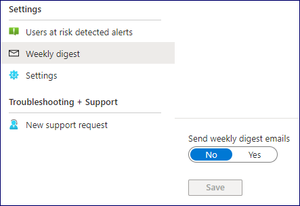
Hi all, We currently receive a weekly digest email with an update on our risky users/sign ins. However, I check these daily and act accordingly, so we really don't need them. I tried disabling the weekly digest and unticking my role, but still they come. Can these weekly PIM digest emails be turned off and if so, how?1.2KViews0likes6CommentsRe: What is "Microsoft SharePoint Online and OneDrive for Business Infra Endpoints" in Cloud Apps
Hi Barry, I have this exact same problem except my alert only has the IP address on a particular day. We have 7 devices used that IP address on that day, so I am really struggling to find out who sent what to where and when. Do you have any idea on how I can find this out? For context, I have really struggled to investigate these alerts if the end user doesn't recognise the activity, so any tips are greatly appreciated!1.7KViews0likes0CommentsRe: How do I investigate data exfiltration alerts?
Hi dchevalier, I tried the query and no joy. I don’t think it’s a file or files triggering it, I think it might just be a lot of data when scrolling or just browsing. The activity log under MCAS was no use either. I know there is the Zeek integration in the CloudAppEvents table so now I’m thinking I can try and parse/extend the RawEventData or ActivityObject columns to search.5.9KViews0likes0CommentsHow do I investigate data exfiltration alerts?
Hi all, I regularly get alerts in Microsoft Defender (not Sentinel) for data exfiltration to an app that has not been sanctioned. In the alert get a date, the local IP address, the place the data ended up (as in AWS, or Azure Blob Storage etc), and the username. The most recent alert was for data exfiltration to Facebook. The end user said she was hungover Instagram surfing on her mobile phone, which doesn’t explain the activity being on her laptop. Previously, it seems that long Teams calls may have been the culprit (if the end user is to be believed!). However, I would like to know WHAT was uploaded, WHERE from, HOW it was uploaded (e.g., using Teams, OneDrive, etc.) and HOW MUCH data was uploaded. Does anyone have any ideas on the best way to do this? I am looking at a KQL query that maybe ties together DeviceNetworkEvents and DeviceEvents. Does that sound right? I tried looking at the device timeline for the end user’s laptop and I can find the RemoteIP but I can’t clearly see what the upload activity was. Or would I be better using the Cloud Apps search queries?Re: Defender KQL query for Windows firewall status changes?
Hi Marcin_Gorski , Thanks for taking a look, but I should have been clearer. I don't have Sentinel, only Defender. I can use KQL, but I don't have a table called SecurityEvent to query. If I could quickly and easily get data from the EventViewer without having to logon to each machine that would be awesome, but I understand that you can no longer create a query in EventViewer and have it email you. I'm guessing Defender just doesn't integrate closely enough to accurately tell when the Firewall is stopped/changed. Probably because they want you to buy Sentinel!2.6KViews0likes1CommentWhy are these alerts in Microsoft Purview and not Microsoft Defender for Endpoint?
Hi all, I'm hoping this might be an obvious thing that I'm missing, so apologies in advance for asking! I regularly see alerts in Purview for a user creating a new/amending an email forwarding rule. I always follow up with them to confirm that this was them, even if it's internal. I tried to firm up my knowledge around what to do in Defender if one of these rules did turn out to be malicious, but all of the guidance relates to these alerts being in Defender. However, the alerts I see are always in Purview and never in Defender. Why is that? Where is Purview pulling this data from? Why is Defender not pulling this data down and alerting? Should it be? And how do I turn on the data stream/create alerts for this activity? I tried some of the KQL queries in advanced hunting, and Defender can find the activity, it's just not alerting. Also, when I was researching (last week), under the Defender 'Explorer' tab there was a cog settings wheel that showed that the Microsoft Defender for Endpoint connection was switched off. When I checked today, it's not there! How do I check whether the this connection is enabled, and if not, where and how do I enable it?!?1.5KViews0likes2CommentsWhy are these alerts in Microsoft Purview and not in Microsoft Defender for Endpoint?
Hi all, I'm hoping this might be an obvious thing that I'm missing, so apologies in advance for asking! I regularly see alerts in Purview for a user creating a new/amending an email forwarding rule. I always follow up with them to confirm that this was them, even if it's internal. I tried to firm up my knowledge around what to do in Defender if one of these rules did turn out to be malicious, but all of the guidance relates to these alerts being in Defender. However, the alerts I see are always in Purview and never in Defender. Why is that? Where is Purview pulling this data from? Why is Defender not pulling this data down and alerting? Should it be? And how do I turn on the data stream/create alerts for this activity? I tried some of the KQL queries in advanced hunting, and Defender can find the activity, it's just not alerting. Also, when I was researching (last week), under the Defender 'Explorer' tab there was a cog settings wheel that showed that the Microsoft Defender for Endpoint connection was switched off. When I checked today, it's not there! How do I check whether the this connection is enabled, and if not, where and how do I enable it?!?Solved1.2KViews0likes1CommentRe: Where are these externally shared files?
Hi Leon, Thank you so much for your help. I've already done steps 1 and 2. Do you know where I can find the guidance as to how to use the MCAS PowerShell module? This was done previously by our engineer, so I haven't used it before. Also, if I put the file in admin quarantine, will the user be notified? And do you know what the 'periof of time' is before the flles may be deleted? Is there a way to audit how the external user gained access, e.g., through joining a group or team?2.5KViews0likes0CommentsRe: File Policy: Change stale externally shared files from modified to created with same parameters
Hi, I don't have your answer, sorry! But I am trying to do the same thing and literally just raised a question on here. My question is, what do you do once you have found stale files shared externally? What are your governance actions? Ideally I'd like to remove the external access but want to know the implications of doing so before I do!954Views0likes0CommentsWhere are these externally shared files?
Hi all, Apologies in advance for the specifics of the question! We currently set our OneDrive sharing policy to make links for files and folders accessible for 30 days, view-only by default, and the recipient must re-authenticate every 24 hours. I have noticed that I have around 120,000 file shares showing in Defender (in one of the helpful cards that I now can't find). The top 10 on this card and the overwhelming majority of file shares listed are from now left users, who shared data prior to us setting up the above policy. I have found Microsoft guidance on how to find and govern stale externally shared files: In the Microsoft 365 Defender portal, under Cloud Apps, go to Policies -> Policy management. Create a new File policy. Select and apply the policy template Stale externally shared files. Customize the filter Last modified to match your organization's policy. Optional: Set Governance actions to be taken on files when a violation is detected. The governance actions available vary between services. For example: Google Workspace: Make the file private and notify the last file editor Box: Notify the last file editor SharePoint online: Make the file private and send a policy-match digest to the file owner Create the file policy. Source: https://learn.microsoft.com/en-us/defender-cloud-apps/policies-information-protection I ran a search and found a user who left 2 years ago and who had around 1,000 files as shared External, Public, or Public (Internet) for which he was the file owner. However, when I exported the list of these discovered files for the long-since left user, I found that under Collaborators there were staff who joined well after he left. I also cannot find those files in OneDrive or our file management system. My questions are: 1. Does the MCAS file search find actual files that are current in our environment or does this show a historic series of snapshots? 2. Why are recent joiners shown as collaborators on documents and folders for someone who left so long ago? 3. How can I actually find the files the search tells me it found? 4. If I set up a governance action to remove external users from the file share, will this actually work? 5. If I want to test, can I create an admin quarantine site/location on SharePoint and use the option to 'Put in admin quarantine'? If so, what will happen and what are the possible implications/ramifications? Any help, guidance, or advice is greatly appreciated!Solved3KViews0likes2CommentsWhere are my stale externally shared files?
Hi all, Apologies in advance for the specifics of the question! We currently set our OneDrive sharing policy to make links for files and folders accessible for 30 days, view-only by default, and the recipient must re-authenticate every 24 hours. I have noticed that I have around 120,000 file shares showing in Defender (in one of the helpful cards that I now can't find). The top 10 on this card and the overwhelming majority of file shares listed are from now left users, who shared data prior to us setting up the above policy. I have found Microsoft guidance on how to find and govern stale externally shared files: In the Microsoft 365 Defender portal, under Cloud Apps, go to Policies -> Policy management. Create a new File policy. Select and apply the policy template Stale externally shared files. Customize the filter Last modified to match your organization's policy. Optional: Set Governance actions to be taken on files when a violation is detected. The governance actions available vary between services. For example: Google Workspace: Make the file private and notify the last file editor Box: Notify the last file editor SharePoint online: Make the file private and send a policy-match digest to the file owner Create the file policy. Source: https://learn.microsoft.com/en-us/defender-cloud-apps/policies-information-protection I ran a search and found a user who left 2 years ago and who had around 1,000 files as shared External, Public, or Public (Internet) for which he was the file owner. However, when I exported the list of these discovered files for the long-since left user, I found that under Collaborators there were staff who joined well after he left. I also cannot find those files in OneDrive or our file management system. My questions are: 1. Does the MCAS file search find actual files that are current in our environment or does this show a historic series of snapshots? 2. Why are recent joiners shown as collaborators on documents and folders for someone who left so long ago? 3. How can I actually find the files the search tells me it found? 4. If I set up a governance action to remove external users from the file share, will this actually work? 5. If I want to test, can I create an admin quarantine site/location on SharePoint and use the option to 'Put in admin quarantine'? If so, what will happen and what are the possible implications/ramifications? Any help, guidance, or advice is greatly appreciated!2.8KViews0likes1Comment
Recent Blog Articles
No content to show