User Profile

m_zorich
Iron Contributor
Joined 5 years ago


User Widgets
Recent Discussions
Re: Send email using playbook to office 365 user by retrieving user email address
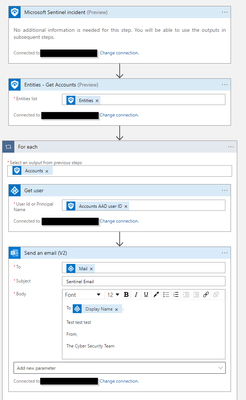
Senti1905 There is a native Azure AD connector in Logic Apps, so if you map the AAD User Object Id in your entity mapping you can then use that to get the user information such as email address. First retrieve the entities from the incident, then use the connector to grab the user information. Here is a little mock up for you. You can even grab their display name and pass that into the email too if you wanted.2.1KViews1like0CommentsRe: KQL String Search With Wildcards?
You can parse out the stuff between the C:\ProgramData\ and \ to a new column and then search on it DeviceFileEvents | parse FolderPath with * 'C:\\ProgramData\\' file '\\' * | where file contains "evil.exe" Alternate way, search for startswith then split based on the \ DeviceFileEvents | where FolderPath startswith "C:\\ProgramData\\" | extend paths = split(FolderPath,"\\") | extend file = paths.[2] | where file contains "evil.exe"55KViews1like0CommentsRe: KQL Query for Match IoC from WatchList
Have a look at this example here - https://github.com/Azure/Azure-Sentinel/blob/master/Detections/MultipleDataSources/ZincJan272021IOCs.yaml This has a few different types of IOCs, in this example they are just a list which is cast as a variable but with your example you can use your watchlist as the source, i.e let domains= _GetWatchlist('ioc') | where ioc_type == "domains" | project ioc_type; let hashes= _GetWatchlist('ioc') | where ioc_type == "hashes" | project ioc_type; Then search in your relevant data for the information using unions like in that example above5.2KViews0likes0CommentsRe: Create Playbook to send Sign In Logs email
There are a few examples on the official GitHub page - https://github.com/Azure/Azure-Sentinel/tree/master/Playbooks/Send-email-with-formatted-incident-report or https://github.com/Azure/Azure-Sentinel/tree/master/Playbooks/Send-basic-email1.4KViews0likes0CommentsRe: Logic App - MDATP permissions
You can add them to an app registration, they are just a little weird to find vs MS Graph permissions. On the Add a permission window in Azure AD, select 'APIs my organization uses', then type in WindowsDefenderATP. You should see it listed, select it, then application permissions. Then select the ones you need. Guide here too - https://docs.microsoft.com/en-us/microsoft-365/security/defender-endpoint/exposed-apis-create-app-webapp?view=o365-worldwide5.9KViews0likes0CommentsRe: User Events Per Second KQL
Something like this? SecurityEvent | where TimeGenerated > ago( 1h) | summarize EventCount=count() by TargetAccount | extend EPSCount = EventCount/60/60 Not sure too many single user accounts would be generating so many events to actually get very high EPS, so that last line may be redundant, if you take it out you will just get a count per TargetAccount Also with SecurityEvent logs in particular, depending on the EventId the TargetAccount field can be blank, maybe just double check you are getting everything you need5KViews0likes0CommentsRe: How to correlate Security Alert Entities further with a WorkList
Hi there, the best way to extract the individual entities from alerts within the SecurityAlerts table is using the mv-expand operator. There are some examples here - https://github.com/reprise99/Sentinel-Queries/tree/main/Security%20Alert In your example there if you wanted to retrieve the IP address, you could do | extend x = todynamic(Entities) | mv-expand x | parse-where x with * '$id":"4","' IPAddress '","Type' * That would create you a new column called IPAddress with everything between $id":"4"," and ","Type You can then map them to other tables or watchlists etc like normal1.8KViews0likes1CommentRe: Sentinnel Entity Mapping Issue
Yep parse will work on that, you can use parse multiple times as well, the key is just telling parse what is at the start and end of the data you are after. | parse EventData with * 'Command>"' CommandRun '</Command>' * That will create you new column called CommandRun with everything between Command> and </Command>2.6KViews0likes1CommentRe: Overview of quarantined/blocked files from Defender for Endpoint
Larssen92 There are two parts to the Defender for Endpoint to Sentinel integration, if you enable all the connectors then the telemetry from the devices go into the Device* tables, such as DeviceProcessEvents or DeviceNetworkEvents. If you didn't mean to ingest all those logs you may want to switch it off because it could cost you a lot of money in ingestion. If you want just actual alerts generated from Defender for Endpoint (say when a file is blocked) then you are after the SecurityAlerts table. This will give you a summary of the time the alert was generated, the name of the alert and the device SecurityAlert | where ProviderName == "MDATP" | project TimeGenerated, AlertName, CompromisedEntity If you wanted to retrieve the details of the particular files you need to parse the 'entities' from the alert, take this as an example SecurityAlert | where ProviderName == "MDATP" | extend x = todynamic(Entities) | mv-expand x | parse-where x with * 'Directory":"' FileDirectory '","' * | parse-where x with * '"Name":"' FileName '","' * | project TimeGenerated, AlertName, CompromisedEntity, FileDirectory, FileName Keep in mind that the entities will be different for the different types of alerts, so for an alert where a file was blocked you are interested in the file, but for an alert that say obfuscated PowerShell, you are interested in the command that was run. If you want to get a summary of the types of alerts you are seeing you can start with SecurityAlert | where ProviderName == "MDATP" | summarize count()by AlertName2.7KViews0likes0CommentsRe: Linux VM Image and Size
Dean_Gross the guidance here recommends 8GB ram/4 CPU cores to cover you for up to 8500 events per second. If you are just doing some testing though I don't think it would be an issue if it was smaller though. https://docs.microsoft.com/en-us/azure/sentinel/connect-log-forwarder?tabs=rsyslog1.8KViews1like1CommentRe: Cisco Meraki Solution
Yep you are 100% right, sometimes the data connectors are all encompassing and they will deploy whatever is needed for you (often an Azure function, or API connections or whatever else) and sometimes they are really just a guide on how to go and do it manually. The Meraki stuff is especially confusing, having gone and looked at the content hub listing they are basically totally different. Cisco Meraki Data Connector - connects to your devices themselves and retrieves syslog from them Cisco Meraki Solution on the Content Hub - connects to the Cisco Meraki web portal and retrieves information from there3.4KViews0likes0CommentsRe: Cisco Meraki Solution
Hey Dean, having a look through that connector you can do things in any order you want. It is just a function to parse syslog. You can forward syslog using the instructions provided in the data connector (which gets you to install the agent onto a linux vm, then send the Meraki syslog to the vm, the vm then sends it to Sentinel), or you can forward it up any number of other ways (using syslog-ng, or another kind of appliance you may already have). Then just install the function to your workspace - https://raw.githubusercontent.com/Azure/Azure-Sentinel/master/Parsers/CiscoMeraki/CiscoMeraki.txt You can install the function without having the logs there yet3.5KViews0likes2CommentsRe: Historical IOC searches
You can also look at integrating your IOC list with the Microsoft Security Graph - https://docs.microsoft.com/en-us/graph/api/resources/tiindicator?view=graph-rest-beta Then they will show in the ThreatIntelligenceIndicator table. You could also look at ingesting them to a custom table - https://docs.microsoft.com/en-us/rest/api/loganalytics/ Guess it depends how dynamic that list is, if it is a once off investigation then a watchlist is probably the easiest/most effective, if that list updates more often then I would go one of the other two options.3.9KViews0likes0CommentsRe: Sentinnel Entity Mapping Issue
Yep you will need to use the parse operator to take the field you want out of your EventData Not exactly sure what EventID you are after (feel free to post an example of the EventData), but an example of parsing EventData is as follows SecurityEvent | parse EventData with * '<Data Name="SubjectUserName">' User '</Data>' * Add that to your query and it will create you a new column called 'User' from everything between <Data Name="SubjectUserName"> and '</Data>' and you can then map it to an entity in your analytic rule. I did a little guide to using parse and split on my GitHub if you are interested - https://github.com/reprise99/Sentinel-Queries#parse-and-split-basics2.8KViews1like4CommentsRe: Sharing sentinel logs with another SIEM
Check out this guidance, you can export from Log Analytics to either a storage account or event hub - https://docs.microsoft.com/en-us/azure/azure-monitor/logs/logs-data-export?tabs=portal The cost of the export itself is free, but you will obviously pay charges on either storage or event hub depending on where you send it too.3.5KViews0likes1CommentRe: Security Event 4732 and 4733 is missing details
Fatspiderman the best way is to join the membersid property from your SecurityEvent to the IdentifyInfo table to return the actual account name (requires UEBA enabled as Clive_Watson notes) SecurityEvent | where EventID in ("4732","4733") | where AccountType <> "Machine" | project TimeGenerated, Activity, GroupName=TargetAccount, UserWhoAdded=Account, MemberSid | join kind=inner( IdentityInfo | where TimeGenerated > ago(21d) | summarize arg_max(TimeGenerated, *) by AccountName ) on $left.MemberSid==$right.AccountSID | project TimeGenerated, Activity, GroupName, UserWhoAdded, UserAdded=AccountName4.1KViews0likes0CommentsRe: Dynamics365 - Check user's group membership
Larssen92 If you use Microsoft Sentinel UEBA - https://docs.microsoft.com/en-us/azure/sentinel/identify-threats-with-entity-behavior-analytics you have access to the IdentityInfo table which you can use to leverage group membership, then do a rightanti join to your D365 tables. Something like this - IdentityInfo | where TimeGenerated > ago(21d) | summarize arg_max(TimeGenerated, *) by AccountUPN | mv-expand GroupMembership | where GroupMembership has_any ("Group x", "Group y", "Group z") | project AccountUPN | join kind=rightanti ( Dynamics365 | where your query here | project UserId ) on $left.AccountUPN==$right.UserId Rightanti will return results from only the right table (your dynamics query) who aren't in the left table (members of your groups).2.4KViews0likes1CommentRe: I need to create a sentinel dynamic list
Yep there are lots of ways to achieve that, I would probably start by looking at what format do your firewalls need that IP information in order to ingest it - do they need json or csv or something like that, or can you push the bad IP addresses and domains directly to the devices using an API? If you just want your firewalls to pick up a csv or json file then you could use Logic Apps to run a KQL query that retrieves all the information from your incidents and then exports that list to a csv/json file somewhere (storage account, s3, whatever makes sense for you)1.7KViews0likes0Comments
Recent Blog Articles
No content to show