User Profile

jawiley
Copper Contributor
Joined 5 years ago


User Widgets
Recent Discussions
Re: Stale data in OneDrive Sync Admin Report Dashboard
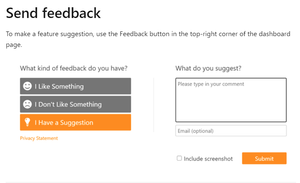
Can you post your displeasure at the link below also? I did and got a response from MS. The response was, "we don't plan on changing it but we're taking feedback". https://techcommunity.microsoft.com/t5/microsoft-onedrive-blog/announcing-public-preview-of-onedrive-sync-admin-reports/ba-p/2303407 Also did you submit feedback on the dashboard itself? I have experienced the same as you 24-36 hours before any change. I think the only reason it's not getting more negative feedback is because people aren't using it or it's not rolled out to them yet.2.2KViews0likes1CommentRe: What steps to follow to move users from their mapped personal drives to One drive for business?
Use this guide for an overview of how it will work: https://docs.microsoft.com/en-us/onedrive/redirect-known-folders And this guide on how to enforce KFM policies: https://docs.microsoft.com/en-us/onedrive/use-group-policy Basically your options are either user the SPMT to seed the folders with user data or redirect the stuff back local and then let the OneDrive Client move it for you. Here is the SPMT article: https://docs.microsoft.com/en-us/sharepointmigration/introducing-the-sharepoint-migration-tool1.2KViews0likes1CommentRe: Prompt Users to move known folders to one drive
We do the same thing but with registry keys through our RMM tool (that way it works whether they are domain joined or not). I believe GPO's just set these reg keys so I imagine that's why we are seeing the same results as you (meaning flaky results). I would definitely advise to use more that just that one policy. There are some really good ones to enable, like silent move and files on demand. That being said, it still is not 100% for us. For example, it only works if the user is signed in to OneDrive and OneDrive has to be open. Even then it doesn't always work until a reboot and OneDrive is launched again. You can use the new public preview of OneDrive sync admin center to see if users are even signed in to OneDrive: https://docs.microsoft.com/en-us/onedrive/sync-health Below is the script we use with our RMM tool: param( [Parameter(Mandatory = $true)] [string] $AzureTenantID, [Parameter(Mandatory = $false)] [string] $TenantName, [Parameter(Mandatory = $false)] [string] $TenantKey ) #Defining Variables ##Path to HKLM keys $HKLMregistryPath = 'HKLM:\SOFTWARE\Policies\Microsoft\OneDrive' #Create Function Function New-RegistryKey { if (!(Test-Path $HKLMRegistryPath)) { Write-Host 'Registry Key Not Found, Creating Key' New-Item -Path 'HKLM:\SOFTWARE\Policies\Microsoft' -Name OneDrive -Force } else { Write-Host "Key Already Present" Get-Item $HKLMregistryPath } } Function New-RegistryKeyAutoMount { if (!(Test-Path $AutoMountKey)) { Write-Host 'Registry Key Not Found, Creating Key' New-Item -Path 'HKLM:\SOFTWARE\Policies\Microsoft\OneDrive' -Name TenantAutoMount -Force } else { Write-Host "Key Already Present" Get-Item $AutoMountKey } } #Run Functions New-RegistryKey New-RegistryKeyAutoMount #Create the Values ##Redirect WKFs silently New-ItemProperty -Path $HKLMregistryPath -Name "KFMSilentOptIn" -Value $AzureTenantID -PropertyType "String" -Force ##Redirect with wizard New-ItemProperty -Path $HKLMregistryPath -Name "KFMOptInWithWizard" -Value $AzureTenantID -PropertyType "String" -Force ##Enable Files on Demand New-ItemProperty -Path $HKLMregistryPath -Name "FilesOnDemandEnabled" -Value 1 -PropertyType DWORD -Force ##Enable silent account configuration New-ItemProperty -Path $HKLMregistryPath -Name "SilentAccountConfig" -Value 1 -PropertyType DWORD -Force ##Block Opt Out New-ItemProperty -Path $HKLMregistryPath -Name "KFMBlockOptOut" -Value 1 -PropertyType DWORD -Force ##Enable Automatic Upload Bandwidth Management New-ItemProperty -Path $HKLMregistryPath -Name "EnableAutomaticUploadBandwidthManagement" -Value 1 -PropertyType DWORD -Force ##Block file downloads when users are low on disk space New-ItemProperty -Path $HKLMregistryPath -Name "MinDiskSpaceLimitInMB" -Value 5120 -PropertyType DWORD -Force ##Set OneDrive to Production Ring New-ItemProperty -Path $HKLMregistryPath -Name "GPOSetUpdateRing" -Value 5 -PropertyType DWORD -Force ##Enable Sync Admin Reports if ($TenantKey) { New-ItemProperty -Path $HKLMregistryPath -Name "SyncAdminReports" -Value $TenantKey -PropertyType "String" -Force } else { Write-Host "TenantKey parameter was not defined" }1.9KViews1like0CommentsRe: Stale data in OneDrive Sync Admin Report Dashboard
Microsoft's official response to my feedback: "Thanks for your feedback! The reports currently refreshes once every 24 hours. We will be listening to feedback and improving the experience. " It was nice of them to response to me! If anyone thinks this is way too long to be actionable, please give feedback as well here:2.2KViews0likes3CommentsStale data in OneDrive Sync Admin Report Dashboard
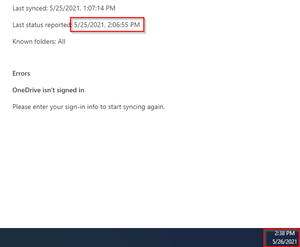
We are testing the OneDrive Sync Health public preview internally and at a couple test sites. Today I noticed a user had an error saying OneDrive isn't signed in (Last status report time was yesterday at 2PM). I went to the user and they were signed in, they stated they were prompted to sign in this morning when they came in (at 8AM). It's now 2PM, I just double checked and he is definitely signed in (I had him close and open OneDrive) and the dashboard still shows them not signed in. Why is the polling time so high for agents to check in to the dashboard? Providing us 12 or 24 hour stale errors isn't helping. It's going to cause frustrations if techs reach out to resolve a sync or sign in error only to find out there is no problem and the dashboard is just showing old errors. Is anyone else seeing these types of problems? Is there a way to lower the polling time for the OneDrive client?2.4KViews0likes4Comments
Recent Blog Articles
No content to show