User Profile

dgillespie-adf
Brass Contributor
Joined 8 years ago


User Widgets
Recent Discussions
Re: User not found after removing user from SP groups
Thanks for the reply KotiReddy. Looking more at the Remove-SPOUser cmdlet, the official description states, "Removes a user or a security group from a site collection or a group." This is why I ran it, but I am wondering if it also removes a user from the site collection (at least the way I sent the command)?508Views0likes0CommentsUser not found after removing user from SP groups
First thing I did was list all the SP groups a user was a member of via Powershell by running: Get-SPOUser -Site https://xxxx.sharepoint.com -LoginName email address removed for privacy reasons | Select-Object -ExpandProperty Groups | FL * This spit out a list that included groups and sharing links and look something like: SharingLinks.xxxxxxxx.OrganizationView.aca4629b-2156-466f-be31-eead2188db4e SharingLinks.xxxxxxxx.Flexible.630dde56-f7ca-47bd-86bb-c26dbba1a903 SharingLinks.xxxxxxxx.OrganizationView.04dd59e4-7cae-4290-aff0-477af7626f26 Facilities Management Members So I ran these commands to define the user and groups: $user = Get-SPOUser -Site https://xxxx.sharepoint.com -LoginName email address removed for privacy reasons $userGroups = Get-SPOUser -Site https://xxxx.sharepoint.com -LoginName $userLoginName | Select-Object -ExpandProperty Groups And then I ran this command to remove him from the groups: foreach ($group in $userGroups) { Remove-SPOUser -Site https://xxxx.sharepoint.com -LoginName $userLoginName -Group $group.Title Write-Host "Removed user $userLoginName from group $($group.Title)" } This took a long time and I suspect it removed the user from all the sharing links too. Now when I run the Get-SPOuser command, I get the error: Get-SPOUser : User cannot be found. At line:1 char:1 + Get-SPOUser -Site https://xxxx.sharepoint.com -LoginName users@co... + ~~~~~~~~~~~~~~~~~~~~~~~~~~~~~~~~~~~~~~~~~~~~~~~~~~~~~~~~~~~~~~~~~~~~~ + CategoryInfo : NotSpecified: (:) [Get-SPOUser], ServerException + FullyQualifiedErrorId : Microsoft.SharePoint.Client.ServerException,Microsoft.Online.SharePoint.PowerShell.GetSPOUser So my questions are: why would it remove the user from SP if I am only removing him from SP groups? what would be the behavior of the documents he modified if he is removed from SP?637Views0likes2CommentsBlock Display Name Spoof in EAC
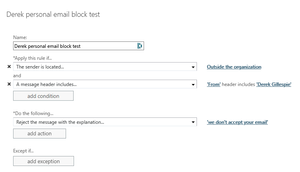
I'm sure we are all dealing with a tremendous uptick in spam/spoof since Covid so what I am looking to do is combat the Display Name spoof. The typical scenario is a bad actor sends from a gmail account but changes the display name to one of our execs. Even though we train users on this and have the "Caution, external email" flag it still eats up time with chaos depending on how many are received. What I would like to do is this: tell exchange to look at the display name and if it is one that I have flagged (one of the execs who gets spoofed a lot) it will only allow the email if it has our domain in the email id - all other domains will be blocked. Is this possible? Thanks in advance!SolvedMS ToDo Doesn't Mark Off Planner Tasks
Been Using the ToDo app Plan 2 with my E3 licensing and I find that when I mark off a Planner Task in the ToDo app, it doesn't mark it completed in Planner. This is frustrating since I thought the point of aggregating everything into ToDo was so you would only need to be at one interface. Does anyone have a similar experience or know why this happens?530Views0likes0CommentsHow Do I delete a Termed user from all Future Outlook Appointments?
When a user is termed and eventually their account is deleted, it seems they stay as attendees on any future appointments. When organizers send updates on these appointments, they get a NDR from exchange about the deleted user. What is the easiest way to remove a termed user from all future appointments she accepted an invite to? Thus avoiding the NDR.691Views0likes0CommentsRe: Approval with email
Thanks for the clarification. When getting started with Approvals in Flow, I assumed the mechanism would work via email but it only works in Teams. The only way I know to add the action of "sending an email" is to actually add the action. I am using the "Start an approval in Teams when a file is added to a SharePoint folder" template.Re: Schedule view - all of a sudden, tasks are white?
dbuchter The only update I see in Message Center related to this change in Planner could be the Planner tasks storage location update but it doesn't show anything directly. Maybe because the tasks are now also stored in exchange mailboxes it affected the coloring? How this will affect your organization: A secondary copy of Planner tasks which are assigned to at least one user will be stored in the user’s Exchange mailbox. If a task is assigned to multiple users, each user will have a copy of the task stored inside their individual mailbox. Unassigned tasks will not be copied to a mailbox. For end users, existing To Do, Planner, and Outlook Task experiences will remain the same. This update supports our work to add Planner tasks to eDiscovery and to build deeper integrations between To Do and Planner. What you need to do to prepare: There are no changes to end user experiences for the Planner or To Do apps. Planner tasks assigned to users will automatically start appearing as part of existing eDiscovery experiences.3KViews0likes0CommentsHelp with Changing Metadata of Files in a Document Library
Here is the flow I am trying to make: If a file is created or modified in this folder look at the content type of the document if it's a Campaign document then look at the Campaign End Date; if not = end If the campaign end date is 30 days after today then: change content type to archive document and change the archive date to today - if not = end Please see screenshots for what I have so far and advise. Thanks.PowerApps Template for Database Searching of a SP Document Library
In getting familiar with PowerApps, I haven't yet found a template that serves my need. The datasource is a SP document library with folders and files as assets. What I need PowerApps to do is all or at least one of the following: pure search yielding all results filtering + search yielding more accurate results all filtering yielding precise results The app will be non-mobile and there is no need to add assets from the app. Can anyone point me in the right direction template-wise? Thank you.730Views0likes0CommentsPowershell script to export all attachments from a user mailbox and save them locally
So it seems there are a bazillion ways to do this but I settled on the simplest one and I am getting an Invoke-RestMethod error. Office 365 exchange online and I am testing with my user account and I am a global admin. Any help is greatly appreciated - thanks. The method I chose is listed here (The Brent Ellis reply): https://techcommunity.microsoft.com/t5/exchange/need-an-example-powershell-script-to-get-attachments-from-an/m-p/4400 Here is my script: Connect-EXOPSSession -UserPrincipalName xxx@xxx..com $Mailbox = "myuser@xxx.com" $url = "https://outlook.office365.com/api/v2.0/users/$Mailbox/messages" $date = "2020-06-01" ## Get all messages that have attachments where received date is greater than $date $messageQuery = $url + "?`$select=Id&`$filter=HasAttachments eq true and DateTimeReceived ge " + $date $messages = Invoke-RestMethod $messageQuery -Credential $cred ## Loop through each results foreach ($message in $messages.value){ # get attachments and save to file system $query = $url + "/" + $message.Id + "/attachments" $attachments = Invoke-RestMethod $query -Credential $cred # in case of multiple attachments in email foreach ($attachment in $attachments.value){ $attachment.Name $path = "c:\Attachments\" + $attachment.Name $Content = [System.Convert]::FromBase64String($attachment.ContentBytes) Set-Content -Path $path -Value $Content -Encoding Byte } # Move processed email to a subfolder $query = $url + "/" + $message.Id + "/move" $body="{""DestinationId"":""AAMkAGRiZmVmOTFlLWJmNjctNDVmZi1iZDkyLTZhOTEzZjI4MGJkNQAuAAAAAAAAkEHub27VS7X8pWwWnKIcAQCxICvUWGkmS6kBXjFB5cP/AADk/q7pAAA=""}" Invoke-RestMethod $query -Body $body -ContentType "application/json" -Method post -Credential $cred } The error I get is: Invoke-RestMethod : The remote server returned an error: (401) unauthorized At C:\new-pw-dl-attach.ps1:9 char:13 + $messages = Invoke-RestMethod $messageQuery -Credential $cred + categoryInfo : InvalidOperation: (System.Net.HttpWebRequest:HttpWebRequest) [Invoke-RestMethod], WebException + FullyQualifiedErrorId : WebCmdletWebResponseException,Microsoft,Powershell.Commands.InvokeRestMethodCommand27KViews0likes2CommentsRe: OneDrive for Business falsly throws invalid filename error when saving word docs
PeterRisingthanks for the reply - valid option but I was hoping to try other fixes first. I forgot to mention I did run the MS Support and Recovery Assistant and it found a problem with some of her OneNote notebooks being saved in OneDrive for Business. The tool automatically moved them out and I ran the OneDrive reset after.1.5KViews0likes2CommentsOneDrive for Business falsly throws invalid filename error when saving word docs
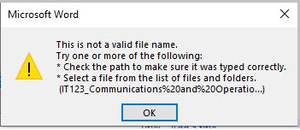
One of our users is getting the error below when attempting to save over 50% of her documents in OneDrive for Business. What is odd is that the filenames don't have % in them but the error seems to show that they do. If she changes the filename by removing about 25% of it, then it will save. Here is what I've tried: the file path is not over 200 characters so the 259 limit isn't the reason it doesn't contain any invalid characters " * : < > ? / \ | deleting all cached docs from Office Upload Center updating Office resetting OneDrive by opening it with the /reset switch worked with the exact same docs with no error on other computers Anyone have any ideas? I feel like the % is a big clue. Thanks.1.6KViews0likes4CommentsHow to generate a SharePoint List to pull users from Office 365?
We have created some great SharePoint lists for deployment purposes and the one SWEET function I would like to see is every time we generate a new SP list, it populates the Name field with users from Office 365 based on the location. This would allow us to get active user lists instead of manually adding them. One workaround we know works now is to export the users from Office 365 into a csv file and then import them into the list. I would like this "process" to happen automatically when the list is created. Any ideas?46KViews0likes11CommentsQuick Chat Feature?
Since we are working from home now, I would like to mimic the in-person office quick chat experience. In other words, when a co-worker just walked up to you and asked you a quick question at the office. I know clicking the Audio Call button will call the person but that seems more formal and I wanted something more discrete. I was hoping for an add-on that might: allow one-click to notify the user that a Teams colleague wants to have a quick audio chat in a unique discreet way: vibrate sound or an automated voice saying: "quick chat?" the user can then reply with one click that will either yes: start the call no: decline and propose to wait xx minutes Does anything like this exist?2.8KViews0likes1Comment
Recent Blog Articles
No content to show