User Profile

Nick-S
Copper Contributor
Joined 5 years ago


User Widgets
Recent Discussions
Re: Storage service StorSvc in Win 10 multi-session causing high CPU
Hi Bacharbader. Just found this thread as I am experiencing the same issue. Have you had any re-occurrence since you "simplified" your FSLogix rules? I am getting the issue on all fresh built AVD's (takes about an hour for the Storage Service to start - then it just ramps up over the next few hours to 100%. I have gone through all my App Making rules applied to my AVD's and removed all registry values etc, so my rules are now very simple folder structure and Start menu shortcuts etc that get masked. Everytime I think I have fixed it (with simplified Masking Rules), I build fresh AVD's and it returns. I also find that removing ALL the masking rules, creates an instant fix, and re-applying them - t doesn't return, but clearly this can't be the solution. Would appreciate to hear if you fully resolved your issue? Thanks Nick6.1KViews0likes2CommentsRe: MSIX AppAttach FSLogix Profile issue between packaged app versions
Hi Aditi, Thanks for the reply, yes this turned out to be the cause of my issue: Cause: Used Package Full Name (PFuN) with version and not the Package Family Name (PFaN) without version Resolution: To upgrade the existing package , use Package Family Name (PFaN) without version; if the same Package Family Name (PFaN) IS Not used then this will result in a new package and the existing previous package settings will not migrate. You should not put in the version alongside the Package Family Name (PFaN) For application upgrades the Package Family Name must be consistent throughout. The Version Control will come from the PFuN ( Package Full Name )2KViews0likes0CommentsRe: MSIX app attach, disks are mounted but shortcuts are not published
I have something similar (kind of). App Attach applications are showing in Start Menu and launch fine. However, on removing app attach application, app shortcut remains in users start menu (FSLogix Profile). Also occurs if I log onto a separate AVD (which has never had the app attach app presented to it). So 100% profile related. Only way to resolve currently is to reset FSLogix Profile (which is a hammer to break a walnut approach). Have logged a support call with MS. Be interested to know if others are experiencing this? Many thanks Nick3.4KViews0likes1CommentMSIX AppAttach FSLogix Profile issue between packaged app versions
Has anyone experienced the following scenario: Application (PowerBI) packaged as MSIX and delivered via App Attach: Package Name: PowerBI-2.104.702.0.MSIX Delivered via App Attach to AVD FSLogix Profile created, and Application user data stored path: \\CLIENTNAME.file.core.windows.net\fslogix\$GUID_username%\Profile_User_name.vhdx\ Profile\AppData\Local\Packages\PowerBI-2.104.702.0\LocalCache\Local\Microsoft\Power BI Desktop (or similar) End user can access application, app profile data is retained to FSLogix and works as expected between sessions, retaining app settings etc. Now, a new version is required: Package Name: PowerBI-2.104.941.0.MSIX Delivered via App Attach to AVD FSLogix Profile created, and Application user data stored path: \\CLIENTNAME.file.core.windows.net\fslogix\$GUID_username%\Profile_User_name.vhdx\ Profile\AppData\Local\Packages\PowerBI-2.104.941.0\LocalCache\Local\Microsoft\Power BI Desktop (or similar) So, between the different versions of the same Application, I am not able to access the roaming profile application data from the original package, forcing my users to have to re-configure the application afresh for the new release. I could just repackage the new version using the EXACT SAME name, but this makes it impossible to differentiate between packages, and also does not meet any version control naming conventions. Has anyone come across this before, and has anyone discovered a viable solution? Thanks NickSolved2.3KViews0likes2CommentsRe: Registry settings missing on app launch, but exists in User.dat in msix package
Hi Timothy, Thanks for the reply. Yes you are correct, I am using the latest MS MSIX packaging tool, creating the MSIX then migrating to a VHDX for App Attach. I can confirm that when I open the MSIX I can see both registry.dat and user.dat, and when I import either or BOTH into a dummy key, I can see my HKCU hive entries just fine. Would I be correct in thinking that when the MSIX is installed (ignoring App Attach), the embedded HKCU hive should be visible within my HKCU, and again gets removed on uninstallation? (As I am NOT seeing this). Interestingly, if I simply mount the VHDX disk and browse the VFS to my application launcher, everything appears to work fine. I have downloaded your PsfTooling from the store, but am unable to see how the RegLegacyFixup works, as when I select it for HKCU, I do not get any option to "Apply to Proposed Changed List" and the JSON file does not get modified. Do you have any guides on how this tool should be used? Thanks Again Nick2KViews0likes1CommentRe: Registry settings missing on app launch, but exists in User.dat in msix package
pysjkrig and TIMOTHY_MANGAN I know this is an old post, but did either of you discover a workaround / solution to this? I am having a very similar issue: 1. Package up ARCGisPro as a MSIX, and confirm that I have some required keys under HKCU within the user.dat (within the package) 2. Install MSIX (via App Attach) and the HKCU keys are not available. On a thick install, the process of launching the product would generate the required keys (linked to licensing), however with the MSIX, it will NOT generate the HKCU key. My only workarounds are: 1. Run the application elevated as ADMIN, still I can't see the keys get generated, but it appears to launch the product with the information previously captured in the user.dat (its a unique license portal URL) 2. Manually create the HKCU keys for the logged on user, then the application will launch. Any help / ideas on how you resolved your similar issue would be greatly appreciated. Thank you2KViews0likes3CommentsMSIX package Support Framework JSON Argument issue
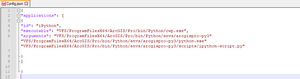
I am trying to create some additional app shortcuts for Python (as part of ARCGISPro). Firstly, I find it incredible that MS have not included basic shortcut functionality within MSIX, and we have to utilize PSF for some pretty basic requirements. However, I guess this is where we are.. I have a problem with my config.json file as the arguments for Python also include file paths, and the .json file does not seem to accept these. My local installation shortcut for iPython looks like this: "C:\Program Files\ArcGIS\Pro\bin\Python\cwp.exe" "C:\Program Files\ArcGIS\Pro\bin\Python\envs\arcgispro-py3" "C:\Program Files\ArcGIS\Pro\bin\Python\envs\arcgispro-py3\python.exe" "C:\Program Files\ArcGIS\Pro\bin\Python\envs\arcgispro-py3\Scripts\ipython-script.py" So cwp.exe is calling 1. arcgispro-py3, 2. python.exe, 3. ipython-script.py I have created my config.json file as follows: { "applications": [ { "id": "iPython", "executable": "VFS/ProgramFilesX64/ArcGIS/Pro/Bin/cwp.exe "arguments":"VFS/ProgramFilesX64/ArcGIS/Pro/Bin/python/envs/arcgispro-py3""VFS/ProgramFilesX64/ArcGIS/Pro/Bin/python/envs/arcgispro-py3/python.exe" "VFS/ProgramFilesX64/ArcGIS/Pro/Bin/python/envs/arcgispro-py3/scripts/ipython-script.py" } ] } But I keep getting a failure of: I'm not sure how the "arguments" should be recorded: 1. Should I still be using the full VFS path for each call 2. Should I remove / add the " marks 3. Is this at all possible? I can get it to work n more simple applications with standard "/argument " context, but not with this long VFS imbedded string. Any help would be greatly appreciated. Thanks1.3KViews0likes1CommentManage Remote Apps StartMenu structure / naming
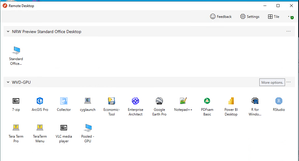
I have AVD setup with a selection of Remote Apps available via Remote Desktop for WVD From within Remote Desktop I can list and access all my available applications, with the apps named correctly: However, the application list via the webfeed in the Start Menu shortcuts are named as such: AppName(TennantName)(username) e.g. VLC (WVD-GPU)(mailto:first.last@mycompany.net) Is there any method where I can: 1. Create a Startmenu Folder Structure 2. Ensure the RemoteApps just display the shortened Application name I know I can modify within the %username%\AppData\Roaming|microsoft\Windows\Startmenu\Programs, but this will only hold for that session only, and on refresh get re-created. Thanks all3KViews0likes0CommentsApp Attach issue with remote app with multiple applications / entry points
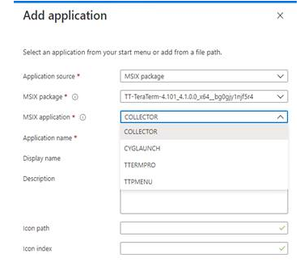
I have AppAttach running in a POC environment and am running in to something a little odd, but repeatable. Sample Application eg "TeraTerm" – packaged as MSIX (confirmed working) then converted to a AppAttach VHDX. Application consists of several start menu shortcuts (entry points), for example 4. (below) AppAttach works fine in a desktop session, and all 4 start menu items are visible, any of these can be launched – the correct destination binaries launch without issue. However in a Remote App scenario, regardless of the MSIX application that is selected (below), it always launches the last application / entry point in the list (last application in the XML) eg we can specify that the application is Collector and the application will appear in RD Client, but on launch TTPMENU will launch This is consistent regardless which application I choose (Collector, CygLaunch, TTermPro, TTPMenu), it is always TTPMenu that launches (despite shortcut icon appearing correct for the selected application). I have tried removing the unwanted shortcuts from the AppXManifest.XML, but this just causes the app to break (they don't seem to be as configurable as AppV XML files). Simple apps with only the one application / single entry point within all work fine. Help?1.4KViews0likes2Comments
Recent Blog Articles
No content to show