User Profile

Rmartin0000
Copper Contributor
Joined 5 years ago


User Widgets
Recent Discussions
Re: Assistance Required: BitLocker Policy Configuration Issue
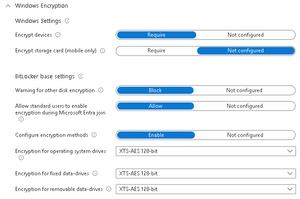
rahuljindal I’ve rebooted the machine several times, but unfortunately, the issue persists. Given that the same policy was applied to another machine with the same result, I suspect the configuration might be the root cause. I’m sharing the configuration below for your advice. Let me know if anything stands out or if you suggest any changes.139Views0likes0CommentsHow to prevent accessing sharepoint online through Proxy Network
Hi Experts, I would like to inquire if there is a way to block access through proxy networks. Currently, our SharePoint is allowed to access only from the corporate region and block the rest, with access blocked by default through Conditional Access Policy and Network Location settings. However, I have noticed that users outside our corporate region can still access SharePoint by using a proxy of our corporate region, which bypasses the restrictions. I have not been able to find any options to prevent this. Could someone assist with a solution to address this issue? Thank you for your help.238Views0likes0CommentsAssistance Required: BitLocker Policy Configuration Issue
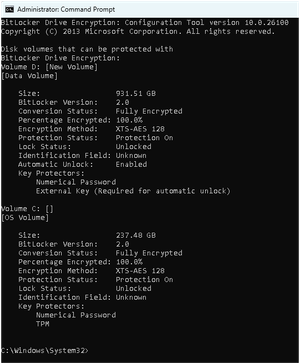
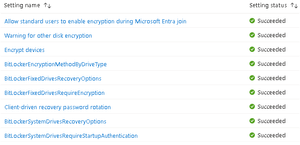
Hi Experts, I’ve recently configured a BitLocker policy on one of our corporate devices, and the policy was successfully deployed without any errors, as shown in the attached picture. However, there was no effect on the client machine—it was still shows that BitLocker is off. The corporate device has no other BitLocker policies enabled and has a TPM 2.0 chip available. After performing the workaround, the status now shows as “Encrypted.” However, the machines are still in an “Unlocked” state, which means that any data copied is still accessible on other machines. Could you please suggest any solutions to address this issue? Looking forward to your advice.315Views0likes4CommentsO365 Email Encryption to internal tenants not working
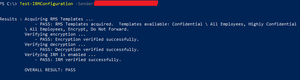
Hi, We are using O365 Business Premium E1 license.....We've created new exchange rule for encryption for one of the test user only and assigned the Right mgmt license to that specific user but while sending an email with encrypt option enabled it works only for Gmail services whereas internal tenants and Hotmail appears plain text with a mail tip. checked the rule is correctly configured but Right mgmt service shows disabled tried to manually activate the service but didn't work so we've raised the ticket to Microsoft to investigate on this and as per their confirmation, Encryption works only 3rd party services like Gmail not for own domain users and Hotmail. However, I disable the encryption rule and remove the Right mgmt license to everyone yet all users can still able to send encrypt msg to Gmail and it works but not for internal users and Hotmail, I've attached the IRM test config for your easy reference, kindly review and advice if this is normal or do I need to do some changes in order to work Appreciate your support. Thank you3.5KViews1like9CommentsRe: O365 Email Encryption to internal tenants not working
ChristianJBergstrom our simple requirement is, to use encryption for both internal tenant & external domains irrespective of the platforms, same time we don't want all outgoing emails to be encrypt using exch. rule but selected users / group when needed. currently encrypt is happening only for Gmail with or without exch. rule. This issue is under investigation with MS since more than 2 months and based to their yesterday's confirmation, encrypt works only for 3rd party services like gmail not for internal / Hotmail. so would like to reconfirm if this is true?3.2KViews0likes3Comments

Recent Blog Articles
No content to show