User Profile

loadedlouie270
Copper Contributor
Joined 5 years ago


User Widgets
Recent Discussions
Re: Azure SQL Database - Diagnostic Settings - Possible Bug
i think the behavior you are seeing, its related to the audit part of the logs. so when you choose "all" you are also choosing the audit logs, and that's why it appears. Try choosing the audit logs and see if those 2 options also popup.89Views0likes0CommentsRe: AKS Pod resource utilization (CPU/Memory) alert
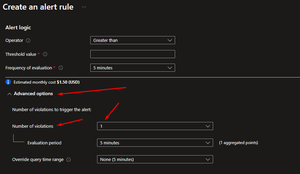
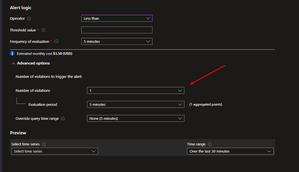
Try using this It means, that on that time window, how much "violations" of the threshold, must have in order for the alert to trigger. Hope it Helps. Keep in mind that in order for this to work you need to have has much "dataPoints" results, at least the amount that you are using in violations. Example: 3 violations means at least 3 5 min timespam, with aggregated values of 5 minutes. Hopefully this will make sense.31Views0likes0CommentsAzure SQL Database - Diagnostic Settings - Possible Bug
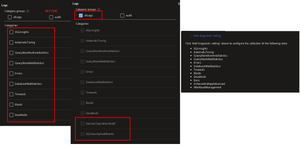
Hi, so when configuring the Diagnostic Settings for a azure SQL databatabe if we select "all logs", 2 new options for diagnostic settings pop up. In the following image, first, you see without checking the "all Logs" checkbox on the left, in the middle of the image, you can see the 2 new logs showing, and on the right, you can see that it doesn't appear on the supposed logs available. I'm pretty sure this is a bug, can someone confirm this behavior. Thanks in advance, best regards.1.3KViews0likes1CommentDeploying Azure Monitor Alert Rules by Pipeline gives error
Hi all, 🙂 Context: I'm deploying a ARM Template in a Azure Devops pipeline... The target is an Application Insights, and the query returns results. This ARM template works, and it's valid, it has been deployed on VisualStudio without a problem. But when I go to deploy the same ARM Template, on a pipeline in DevOps , I get the following error: -------------------------------------------------------------------- "error": { "message": "The request had some invalid properties", "code": "BadArgumentError", "correlationId": "", "innererror": { "code": "SemanticError", "message": "A semantic error occurred.", "innererror": { "code": "SEM0100", "message": "'where' operator: Failed to resolve column or scalar expression named 'timestamp'" } I deleted the correlation id value on purpose on the error up, its not missing 🙂 -------------------------------------------------------------------- I know that this error can be thrown by a non-existing Column, but this is not the case. The column exists on the table, and it's the equivalent to Timegenerated on LAW ... The query is the following: -------------------------------------------------------------------- dependencies | summarize ResponseDurationMS = percentile(duration,95) by timestamp, operation_Name | where ResponseDurationMS >2000 | order by ResponseDurationMS desc -------------------------------------------------------------------- So I need some help. Not really sure if, the name "timestamp" used in the query, is also used on the pipeline by default/design somehow... and when parsed on a query, it needs "special" escapes caracter or something... like the \" per example. I tried to use column_ifexists(timestamp), without success.... and even extend to a new column as a todate(), also without success... I can use and deploy the same template, if i just remove the timestamp from the query.... but, i really want the timestamp column there.. Any thoughts.? Thanks in advance to all ...3.9KViews0likes2CommentsRe: Deploying Azure Monitor Alert Rules by Pipeline gives error
Hi Yaniv, thanks for the reply, I know this is a "strange" behavior, and I know I got access because, if I run the pipeline, without that column on the query, it deploys perfectly without errors, the exact same query,just without that column... So I'm guessing I got access to it, or am I confused, and not understanding / seeing it wrong ? Thanks for your time by the way.3.5KViews0likes0CommentsRe: Loganalytics - Query not able to create a chart?
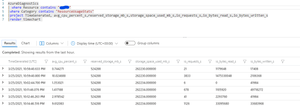
And here is a quick fix, Add the following line for each of your decimal values, |extend cpu = todecimal(avg_cpu_percent_s) Explaining what it does: (extend command, follow by the name of the new colunm, in this case "cpu", provide a equal "=", and the command, "todecimal(nameofthecolumn). this will create a new column and convert the avg_cpu_percent_s, to a decimal value, allowing the chart in log analytics to process it since it sees it in the new column as a number. Hope it helps, and microsoft solve this, i manage a few subscriptions, and i got the same error in all of them, so its a wide spread bug to my opinion, and there will be more people complaining over time. Hope this helps.12KViews0likes0CommentsRe: Loganalytics - Query not able to create a chart?
Digging a bit further i look into the query and exported into powerbi. When i have done this the fields are has "text" fields.... So im guessing this is the problem with log analytics, its looking into it, but it sees the field as a "text" colunm instead of the "decimal Number" type of row... I'm assuming that is is somehow related to a issue that log analytics reported a few weeks about a "missing" colunm... I hope someone at microsoft, look at it and fix it.12KViews0likes1CommentRe: Loganalytics - Query not able to create a chart?
Hi Mattias260, sorry for not helping you resolve the matter, but today i encounter the same problem running this query : So i got results, however, when I switch to chart view, I got the same error as you: Does anyone know what's going on? I'm assuming that this is something related to the type of the fields/columns in log analytics, or the chart not looking to the correct values.12KViews0likes2Comments
Recent Blog Articles
No content to show