User Profile

bughit
Copper Contributor
Joined 5 years ago


User Widgets
Recent Discussions
bug: no tray icon notification badge for new messages in the account not currently active.
The teams windows tray icon is supposed to show a new messages/activity badge. If you have multiple M365 accounts in Teams and there's a new message in the account that's not currently active, it does show the transient notification popup but the tray icon does not change. win11 24h2, Teams version 25094.310.3616.953181Views0likes3CommentsWhen is the end of availability of the classic Teams web client?
I thought it would be today, but with the Teams update policy of "classic teams as default", https://teams.microsoft.com/_ still loads classic. It shows a warning as before: "Classic Teams will soon be unavailable for use. You will be switched to the new Teams at that time." Not a complaint, just want to know what to expect and when. So when will it become "unavailable for use"? And what exactly will happen then, when loading https://teams.microsoft.com/_ ? Will it just quietly redirect to /v2/ ?3.6KViews0likes1CommentRe: User's 'Switch to Public Preview' gone
Shikha_Varshney Thanks for the clarification. I'd like to request that you allow public preview for targeted. My impression is that public preview is a earlier preview channel than targeted (it could get things not yet in targeted). Furthermore, as you explained the targeted rollout is gradual so a targeted user is not even guaranteed to see what's been announced for targeted, whereas switching to public preview would give you everything announced for it (that's certainly the case with the new channel experience). Your current policy essentially blocks previewing teams features. If it were possible to take a specific user out of targeted, then they could public preview, but AFAICT targeted is a tenant wide setting. So the bottom line, to maximize teams preview abilities we either need to be able to enable public preview for targeted or to be able to take a user out of targeted so public preview can be enabled.Re: User's 'Switch to Public Preview' gone
Shikha_Varshney > If the user is in Public Preview with 'Teams update policy -> Allow Public Preview' set to "Enabled", then that user will not have the option to opt in/out of Public Preview from the client. There are a couple of issues with that explanation: Why does it show "developer preview" checked, allow you to uncheck it, but then have it come back checked after a reload? If the user is getting the "targeted release" then that's what it should say. And if opting out of targeted is not possible per user (is it?) then it should not let you uncheck it. For me and at least one other person in this thread, new channel experience is not active, developer preview is checked and public preview is not available but allowed. Per your explanation, we are in the targeted release. So why are targeted release features not active?Re: User's 'Switch to Public Preview' gone
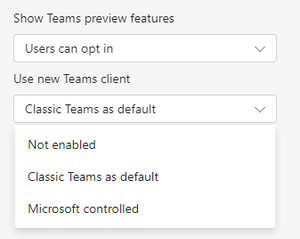
ritchieF404 That does not resolve this issue. The new setting with the "microsoft controlled" option applies to the teams client (app) version, not the public/developer preview. Switching to "classic teams as default" made no difference. And "show teams preview" was already on "users can opt in". Jan_Steberl Multiple people have reported this, could you pass this to the appropriate team?Re: Now in Public preview & Targeted release: Breakout rooms participant shuffle
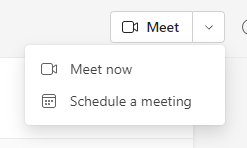
Jan_Steberl This is now being rolled out to the release channel (targeted), still without "meet now". Is there any way to block this targeted release for a given user or the whole tennant? What did the team responsible say about the missing "meet now" functionality?Re: Now in Public preview & Targeted release: Breakout rooms participant shuffle
Jan_Steberl The "meet now" button has been removed from the General channel of teams. Release: Public preview: The new button (with a plus) is only for scheduling. Is this a bug or intentional? If intentional, why and how do you do "meet now"?
Recent Blog Articles
No content to show