Forum Widgets
Latest Discussions

Removing an old Universal Print printer automatically and printing issues
Hi smart people of the Microsoft Community Hub, I have a requirement to remove a particular old Universal Print printer on all Windows devices automatically (via an MDM solution such as Microsoft Intune). As the printer is mapped via Intune originally, I tried to just simply remove the printer from the Intune configuration policy but the printer stays mapped. I checked for PowerShell cmdlets that would help to automate this process, but the Universal Print PowerShell module has very limited documentation and it does not seem to support unattended removal of a Universal Print printer via PowerShell script. In addition, I have another issue relating to printing where Universal Print print jobs may sometimes print off 20 or more pages of Wingdings characters. The only pattern I've noticed with this is that it is related specifically to PDF files. If Universal Print wasn't involved I'd chalk this up to a printer driver issue or mismatch, but I don't know how to troubleshoot this specifically on Universal Print. The printer models that have had this issue are HP LaserJet MFP H577, LaserJet MFP M578 and LaserJet MFP M633. Please can you assist me with either issue? Thanks!danieldavies997Dec 17, 2025Occasional Reader8Views0likes0Comments
Status - Aborted
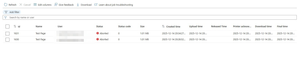
I have 2 Brother printers. Recently, I encountered an 'Aborted' error for every print from a Windows computer. I deleted the printer and reconnected it, but that didn't resolve the issue. The printer communicates directly with the cloud, eliminating the need for a connector.np9090Dec 14, 2025Copper Contributor26Views0likes0Comments
Unversal print & Azure virtual desktop (pooled/multisession)
Hello all, We have Univeral print(UP) setup, and i want to introduce it into our AVD setup that is running 24h2-multisession. Now normally a UP printer is mapped via Intune or GPO as i understood. But in multisession OS the Intune user configuration is not applicable to the multisession OS... and GPO is not a option here. so i was thinking of creating a scripted action to map the univeral printer(s) but i cant find any way to map a univeral printer via scripting(thinking to run it as-user) Redirection of printer from local device is not a option here https://learn.microsoft.com/en-us/universal-print/fundamentals/universal-print-avd any help is much appreatedOverlookedandovercookedDec 10, 2025Copper Contributor10Views0likes0Comments
Slow Printing HP Futuresmart 5.9.0.2
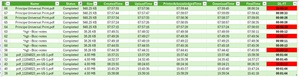
Hello everyone, I am testing Universal Print with an HP MFP running Futuresmart 5.9.0.2, and overall I find it quite interesting 😀 However, it is extremely difficult to get support from printer manufacturers, and there is very little feedback or shared experience available 😢 During my tests, I noticed internal processing delays (=DownloadTime–FinalTime) on the HP MFP that vary without any apparent Reason (printing PDF from W11/EDGE and content-type is Application/PDF). In addition, I observed significant differences in internal processing time for certain documents (such as plans) between Universal Print Cloud printing and direct TCP/IP 9100 printing. The delay increases from 2 minutes of processing to 3 minutes. I contacted HP support, but it is very complicated to get assistance regarding Universal Print. Do you have any insights? How should I proceed? Thank you in advance, and have a great day ☀️Antoine26Dec 09, 2025Copper Contributor120Views0likes4Comments
How does a Universal Print Ready Printer communicate with IPP infrastructure printer?
The Universal Print Ready Printer is acting as an IPP proxy, is it correct? According to PWG 5100.18, the IPP proxy inside a printer should send Update-Output-Device-Attributes to the Infrastructure printer. After obtaining Device Access Token following https://learn.microsoft.com/en-us/universal-print/hardware/universal-print-oem-printer-device-token , which URL is used to post Update-Output-Device-Attributes with that device access token?KinlinNov 26, 2025Copper Contributor39Views0likes1CommentFetch jobs for printer
Hello everyone, we`ve managed to register and fetch a device/access token described at https://docs.microsoft.com/en-us/universal-print/hardware/universal-print-oem-printer-registration. The next step would be to use these tokens to fetch jobs which were sent to this printer. Do i have to use the "normal" graph API endpoints to fetch these jobs? Or is there another way to fetch the jobs for the registered printer? Thanks DennisdennishaseloffalemoNov 25, 2025Copper Contributor1.7KViews0likes5Comments
Adding Printer Slowness
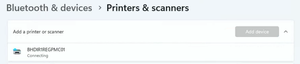
It used to only take 15 - 20seconds, it then progressed to 1min, 2min and now can be 3minutes before connecting and adding the printer or it may not add the printer. This is what it looks like. I found that sometimes you can go back to Bluetooth & Devices, then to Printers & Scanners, add another printer and eventually they will both show as installed. On VPN Adding printers to my computer after a restart and no UP Printers installed to see how that works. BHFBC1RECPMC01, 154sec BHFBC1NRSPMC02, 48sec BHFBC1OFFPMC01, 36sec There is still a popup for each UP Printer when Epic is launched. Off VPN Removed printers, restarted computer BHFBC1RECPMC01, 34sec BHFBC1NRSPMC02, 28sec BHFBC1OFFPMC01, 26secLenNewgenOct 31, 2025Copper Contributor65Views0likes1CommentUnable to register HP M430 - Error Code 1
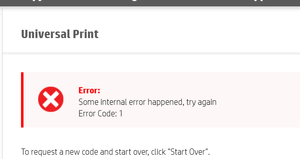
printer is on corp communicating via FW. Not using connector.ITSTorgOct 30, 2025Copper Contributor61Views0likes1Comment
Can't enrol one PC to Win10 ESU
I paid for the ESU program and one of my 5 PC's refuses to enrol. The latest 22H2 and other updates are installed, it's signed in with my MS account as Administrator. location services are on. I tried changing to a local login and then back to the MS account and that did not help. Windows Update reports "Your version of Windows has reached the end of support" and there's no "You have enrolled..." text on the right on the Windows Updates page as there is on my other computers. When I try taking the steps to enrol it in the ESU program I get an error message after entering my Microsoft Account info (which the computer's already using to log on ..) It's not a computer I use often, so there's no huge rush to fix it. But I'm wondering what steps I can take to fix it? I tried doing a chat with MS support but they suggested I try "Microsoft Community Support page for assistance" first: "Microsoft still has a dedicated support team available to assist with ESU enrollment issues. That’s why I’m recommending you reach out to the Windows 10 ESU support team directly—they can help verify your device’s status" .... I assume they mean here?? Thanks for any help. Rrpmtl22Oct 24, 2025Copper Contributor29Views0likes0CommentsUniversal Print & Citrix Popup
Recently, when launching Citrix Applications, we have started getting a printer connection message that pops-up in the foreground which overrides any other application being used (which will also override anything you are typing). This message pops-up for each UP printer that is being added to the Citrix session. This occurrence started with the following 64-bit OS versions, and it doesn't matter if the printer is from a Universal Print Connector Server or if the printer is directly registered with Azure. Windows 11 24H2 Windows 11 25H2 Note: Windows 11 24H2 (Cloud Computer) No Popup Windows 11 25H2 (Cloud Computer) No PopupLenNewgenOct 24, 2025Copper Contributor49Views1like0Comments
Resources
Tags
- universal print25 Topics
- announcements13 Topics
- Universal Print Connector7 Topics
- UniversalPrint5 Topics
- Cloud Print3 Topics
- question2 Topics
- Universal2 Topics
- Paper Size Mismatch2 Topics
- Intune2 Topics
- Ricoh2 Topics