Security and AI Essentials
Protect your organization with AI-powered, end-to-end security.
Defend Against Threats
Get ahead of threat actors with integrated solutions.
Secure All Your Clouds
Protection from code to runtime.
Secure All Access
Secure access for any identity, anywhere, to any resource.
Protect Your Data
Comprehensive data security across your entire estate.
Recent Blogs

6 MIN READ
Deep dive into Microsoft’s identity-centric secure web & AI gateway.
Dec 19, 2025304Views
0likes
0Comments
2 MIN READ
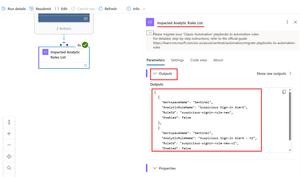
Reminder: Following the Retirement Announcement published in March 2023, classic alert‑trigger automation in Microsoft Sentinel, where playbooks are triggered directly from analytic rules will be dep...
Dec 19, 2025126Views
0likes
0Comments

By: Mukta Agarwal and Parth Jamodkar
Threat actors are increasingly infiltrating organizations by securing legitimate jobs, often through falsified credentials or insider recruitment.
Recently, M...
Dec 18, 2025133Views
0likes
0Comments

Today, Distributed Denial of Service (DDoS) attacks can strike as soon as public connectivity is enabled, highlighting their widespread prevalence. Factors such as easily accessible botnets, the expl...
Dec 18, 2025151Views
0likes
0Comments
Recent Discussions

Microsoft Purview Data Map Approach to scan
I plan to scan Purview data assets owner by owner rather than scanning entire databases in one go because this approach aligns with data governance and RBAC (Role-Based Access Control) principles. By segmenting scans by asset ownership, we ensure that only the designated data asset owners have the ability to edit or update metadata for their respective assets in Purview. This prevents broad, unrestricted access and maintains accountability, as each owner manages the metadata for the tables and datasets they are responsible for. Scanning everything at once would make it harder to enforce these permissions and could lead to unnecessary exposure of metadata management rights. This owner-based scanning strategy keeps governance tight, supports compliance, and ensures that metadata stewardship remains with the right people. This approach also aligns with Microsoft Purview best practices and the RBAC model: Microsoft recommends scoping scans to specific collections or assets rather than ingesting everything at once, allowing different teams or owners to manage their own domains securely and efficiently. Purview supports metadata curation via roles such as Data Owner and Data Curator, ensuring that only users assigned as owners; those with write or owner permissions on specific assets; can edit metadata like descriptions, contacts, or column details. The system adheres to the principle of least privilege, where users with Owner/Write permissions can manage metadata for their assets, while broader curation roles apply only where explicitly granted. Therefore, scanning owner by owner not only enforces governance boundaries but also ensures each data asset owner retains exclusive editing rights over their metadata; supporting accountability, security, and compliance. After scanning by ownership, we can aggregate those assets into a logical data product representing the full database without breaking governance boundaries. Is this considered best practice for managing metadata in Microsoft Purview, and does it confirm that my approach is correct?
Entra Risky Users Custom Role
My customer implemented unified RBAC (Defender Portal) and removed the Entra Security Operator role. They lost the ability to manage Risky Users in Entra. Two options explored by the customer - Protected Identity Administrator role (licensing unclear) or create a custom role with microsoft.directory/identityProtection/riskyUsers/update, which they couldn't find under custom role. Do you know if there are other options to manage Risky Users without using the Security Operator role?
Scam Defender pop Up… help please
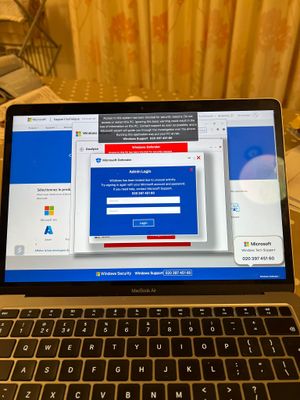
Can someone please help my dad has had what looks like scam pop ups come up on his MacBook I have reported to Microsoft but don’t know how long it will be until they get back to me. I want to know if anyone can confirm they’re scams and how I can get them off his screen, it won’t let us click on the X Thank you31Views0likes1CommentMIP SDK cannot read file labels if a message was encrypted by Outlook Classic.
C++ application uses MIP SDK version 1.14.108. The application does Office files decryption and labels reading. The problem with labels reading is observed. Steps to reproduce: Create a docx file with a label which does not impose encryption. Open Outlook Classic, compose email, attach the document from 1, click Encrypt, send. During message sending our application intercepts encrypted by Outlook docx file in temporary folder C:\Users\UserName\AppData\Local\Temp Application decrypts the intercepted file using mipns::FileHandler::RemoveProtection. Visual inspection demonstrates that decryption runs successfully. Then a separate FileHandler for decrypted file is created, and mipns::FileHandler::GetLabel() returns an empty label. It means that the label was lost during decryption. Upon visual inspection of the decrypted file via Word we can see that the label is missing. Also, we do not see MSIP_Label* entries in meta data (File -> Info -> Properties -> Advanced Properties -> Custom). Here is a fragment of MIP SDK reducted log during file handler creation ================= file_engine_impl.cpp:327 "Creating file handler for: [D:\GitRepos\ ...reducted]" mipns::FileEngineImpl::CreateFileHandlerImpl gsf_utils.cpp:50 "Initialized GSF" `anonymous-namespace'::InitGsfHelper data_spaces.cpp:415 "No LabelInfo stream was found. No v1 custom properties" mipns::DataSpaces::GetLabelInfoStream data_spaces.cpp:428 "No LabelInfo stream was found. No v1 custom properties" mipns::DataSpaces::GetXmlPropertiesV1 file_format_base.cpp:155 "Getting protection from input..." mipns::FileFormatBase::GetProtection license_parser.cpp:233 "XPath returned no results" `anonymous-namespace'::GetXmlNodesFromPath license_parser.cpp:233 "XPath returned no results" `anonymous-namespace'::GetXmlNodesFromPath license_parser.cpp:299 "GetAppDataNode - Failed to get ID in PL app data section, parsing failed" `anonymous-namespace'::GetAppDataNode api_log_cache.cpp:58 "{{============== API CACHED LOGS BEGIN ============}}" mipns::ApiLogCache::LogAllMessages file_engine_impl.cpp:305 "Starting API call: file_create_file_handler_async scenarioId=89fd6484-7db7-4f68-8cf7-132f87825a26" mipns::FileEngineImpl::CreateFileHandlerAsync 37948 default_task_dispatcher_delegate.cpp:83 "Executing task 'ApiObserver-0' on a new detached thread" mipns::DefaultTaskDispatcherDelegate::ExecuteTaskOnIndependentThread 37948 file_engine_impl.cpp:305 "Ended API call: file_create_file_handler_async" mipns::FileEngineImpl::CreateFileHandlerAsync 37948 file_engine_impl.cpp:305 "Starting API task: file_create_file_handler_async scenarioId=89fd6484-7db7-4f68-8cf7-132f87825a26" mipns::FileEngineImpl::CreateFileHandlerAsync file_engine_impl.cpp:327 "Creating file handler for: [D:\GitRepos\...reducted....docx]" mipns::FileEngineImpl::CreateFileHandlerImpl file_format_factory_impl.cpp:88 "Create File Format. Extension: [.docx]" mipns::FileFormatFactoryImpl::Create file_format_base.cpp:363 "V1 metadata is not supported for file extension .docx. Setting metadata version to 0" mipns::FileFormatBase::CalculateMetadataVersion compound_file.cpp:183 "Open compound file for read" mipns::CompoundFile::OpenRead gsf_utils.cpp:50 "Initialized GSF" `anonymous-namespace'::InitGsfHelper compound_file_storage_impl.cpp:351 "Get Metadata" mipns::CompoundFileStorageImpl::GetMetadata compound_file_storage_impl.cpp:356 "No Metadata, not creating GSF object" mipns::CompoundFileStorageImpl::GetMetadata metadata.cpp:119 "Create Metadata" mipns::Metadata::Metadata metadata.cpp:136 "Got [0] properties from DocumentSummaryInformation" mipns::Metadata::GetProperties compound_file_storage_impl.cpp:351 "Get Metadata" mipns::CompoundFileStorageImpl::GetMetadata compound_file_storage_impl.cpp:356 "No Metadata, not creating GSF object" mipns::CompoundFileStorageImpl::GetMetadata metadata.cpp:119 "Create Metadata" mipns::Metadata::Metadata metadata.cpp:136 "Got [0] properties from DocumentSummaryInformation" mipns::Metadata::GetProperties =================Data Quality Error (Internal Service Error)
I am facing an issue while running the DQ scan, when i tried doing manual scan and scheduled scans both time i faced Internal Service Error. ( DataQualityInternalError Internal service error occurred .Please retry or contact Microsoft support ) Data Profiling is running successfully but for none of the asset, DQ is working. After the lineage patch which MS had fixed, they had introduced Custom SQL option to create a rule, and after that only i am facing this issue. Is anyone else also facing the same? I tried with different data sources (ADLS, and Synapse) its same for both. If anyone has an idea, do share it here, it will be helpful.
DLP USB Block
Currently we have DLP policies setup to block the use of USB devices and copying data to it. When checking the activity explorer I am still seeing user's able to copy data to USB devices and for the action item it says "Audit" when in the DLP policies we explicitly set it to block. Has anyone run into this issue or seen similar behavior?
Defender Entity Page w/ Sentinel Events Tab
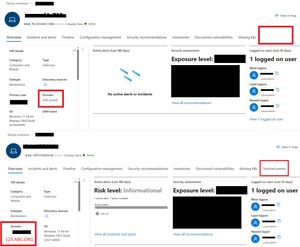
One device is displaying the Sentinel Events Tab, while the other is not. The only difference observed is that one device is Azure AD (AAD) joined and the other is Domain Joined. Could this difference account for the missing Sentinel events data? Any insight would be appreciated!Pre-migration queries related to data discovery and file analysis
Hi Team, A scenario involves migrating approximately 25 TB of data from on‑premises file shares to SharePoint. Before the migration, a discovery phase is required to understand the composition of the data. The goal is to identify file types (Microsoft Office documents, PDFs, images, etc.) without applying any labels at this stage. The discovery requirements include: Identification of file types Detection of duplicate or redundant files Identification of embedded UNC paths, macros, and document links Detection of applications running directly from file shares Guidance is needed on which Microsoft Purview components—such as the on‑premises scanner or the Data Map—can support these discovery requirements. Clarification is also needed on whether Purview is capable of meeting all the above needs. Clarification is also needed on whether Purview can detect duplicate or redundant files, and if so, which module or capability enables this. Additionally, since Purview allows downloading only up to 10,000 logs at a time, what would be the best approach to obtain discovery logs for a dataset of this size (25 TB)? Thank you !14Views0likes0Comments
Explorer permission to download an email
Global Admin is allegedly not sufficient access to download an email. So I have a user asking for a copy of her emaill, and I'm telling her 'sorry, I don't have that permission', I'm only global admin' What? The documentation basically forces you to use the new terrible 'role group' system. I see various 'roles' that you need to add to a 'role group' in order to do this.. Some mention Preview, some mention Security Administrator, some mention Security Operator. I've asked copilot 100 different times, and he keeps giving me made up roles. But then linking to the made up role. How is such a basic functionality broken? It makes 0 sense. I don't want to submit this email - it's not malware or anything. I just want to download the **bleep** thing, and I don't want to have to go through the whole poorview process. This is really basic stuff. I can do this on about 10% of my GA accounts. There's no difference in the permissions - it just seems inconsistent.Security alerts Graph API and MFA
Hello, Does anyone know if https://learn.microsoft.com/en-us/graph/api/resources/partner-security-partnersecurityalert-api-overview?view=graph-rest-beta Security alerts works with app only method (app + cert or app + secret )? Currently i successfully login to graph using both methods Welcome to Microsoft Graph! Connected via apponly access using "ID number" Then i request to get alerts and i get error code: WARNING: Error body: {"error":{"code":"UnknownError","message":"{\"Error\":{\"Code\":\"Unauthorized_MissingMFA\",\"Message\":\"MFA is required for this request. The provided authentication token does not have MFA I found that old API worked with app+user credential only but it's not mentioned in new one about this restriction.
Looking for a way to set up mail moderation using Entra dynamic group
Our organization is working on shifting from a hybrid AD-Entra environment to Entra only. We currently use mail-moderated dynamic distribution lists using Extension Attributes to set the rules for mass internal company emails. In conjunction with us migrating to Entra only, we are also planning to use an API integration to manage our Entra account creation and updates. This integration does not have the ability to populate the Extension Attribute fields. Because of these changes we will no longer be able to use the existing dynamic distribution lists we have, and we have not had luck finding a solution for it yet. Has anyone else gone through this or have any experience solving for this same problem?4Views0likes0Comments
Tenant Forwarding - Trusted ARC Sealer
As part of a tenant to tenant migration we often need to forward mail from one tenant to another. This can cause some issues with email authentication verdicts on the destination tenant. Is it possible or best practice to configure another tenant as a Trusted ARC sealer to help with forwarded email deliverability?How to make DLP\Auto labeling more efficient
Good Morning All As part of come new compliance policy, I have introduced labels to an organisation to manage some data. Part of the requirements is auto labeling. I have identified a set of documents that I want to apply this to, selected around 10 to 15 of the these documents and put these into a test SharePoint site. I created a bespoke sensitive info type and tested by uploading the file to this, it does recognize this document falls under this remit however when I apply this to an auto labeling policy it does not pick anything up, I have attempted to change the confidence level and still getting little to no success. I run a DLP policy and it picked up 2 of the documents, even though they are all pretty much the same document. I originally used a regex to target as the primary element that is specific to all these files (project code), however I got no results, so I reverted to a keyword list that had specific words in all these folders, and still I get very in-accurate results. Are there any tips to making DLP/Auto labeling more efficient?50Views1like2CommentsIssues with Microsoft Authenticator not popping up Approval message
We have recently implemented MFA with a conditional access policy. We turned off the ability to receive texts/calls and are forcing the Authenticator app. This is causing issues when users need to re set up the account in the Authenticator app. I have had multiple scenarios this week where the Microsoft Authenticator app has stopped displaying the approve/deny message. The end users try to fix the issue themselves and will remove their accounts from the app and try to reenroll by going to myapps.microsoft.com and restarting the setup process. The problem lies in that even though they are visiting the portal from devices that are excluded from MFA via conditional access (Compliant/Hybrid AD Joined) the myapps.microsoft.com portal is still enforcing MFA to log in. Since they have removed their account from the application they can not authenticate to the portal. There is no alternate method since Phone/Text are disabled. In order to get the end user back into the portal I have to go to the regular MFA Setup page, enable phone calls or texts, enable and enforce MFA on the end user, and they can finally get in to re-set up the account. All of this could be fixed with a one time bypass for cloud!SolvedeDiscovery KeyQL
I am hoping someone might be able to help me with some KeyQL syntax. I want to find documents that contain a combination of SITs with a minimum occurrence of 1 and a confidence level of between 85 - 100%. I have used the following syntax which shows no errors before I run the query. I have tested the first Sensitive type using the condition builder and it returns matches but even if I try the first line of KeyQL on it's own nothing is returned. Could anyone help please SensitiveType:“50b8b56b-4ef8-44c2-a924-03374f5831ce” |1..|85..100 - Microsoft built in SIT "All Full Names" AND SensitiveType:“accaf4c2-fb54-40f7-aea8-db0e36a2e9eb” |1..|85..100 - Custom SIT "DOB" AND SensitiveType:“8B9E5FBC-4AA9-4017-8256-BE3E8241AEB5” |1..|85..100 - Microsoft built in SIT "U.K. Physical Address" Thanks Chris22Views0likes0CommentsHow to stop incidents merging under new incident (MultiStage) in defender.
Dear All We are experiencing a challenge with the integration between Microsoft Sentinel and the Defender portal where multiple custom rule alerts and analytic rule incidents are being automatically merged into a single incident named "Multistage." This automatic incident merging affects the granularity and context of our investigations, especially for important custom use cases such as specific admin activities and differentiated analytic logic. Key concerns include: Custom rule alerts from Sentinel merging undesirably into a single "Multistage" incident in Defender, causing loss of incident-specific investigation value. Analytic rules arising from different data sources and detection logic are merged, although they represent distinct security events needing separate attention. Customers require and depend on distinct, non-merged incidents for custom use cases, and the current incident correlation and merging behavior undermines this requirement. We understand that Defender’s incident correlation engine merges incidents based on overlapping entities, timelines, and behaviors but would like guidance or configuration best practices to disable or minimize this automatic merging behavior for our custom and analytic rule incidents. Our goal is to maintain independent incidents corresponding exactly to our custom alerts so that hunting, triage, and response workflows remain precise and actionable. Any recommendations or advanced configuration options to achieve this separation would be greatly appreciated. Thank you for your assistance. Best regardsSolved
Clarification related to JIT for EDLP
Can someone help clarify how JIT actually works and in which scenario we should enable JIT. The Microsoft documentation is very differently from what I’m observing during hands-on testing. I enabled JIT for a specific user (only 1 user). For that user, no JIT toast notifications appear for stale files when performing EDLP activities such as copying to a network share, etc. However, for all other users even though JIT is not enabled for them their events are still being captured in Activity Explorer. See SS below.SolvedDLP Policy not Working with OCR
Hello Community, i activated the OCR in Microsoft Purview, and scan works fine infact Purview find image that contains sensible data. I have created DLP Policy that not permit print and move to rdp file that containts "Italy Confidential Data" like "Passport Number, Drivers License ecc..." this policy works for xlsx or word that contains data, but if file word contains image with this data not apply the DLP Rule infact i'm able to print or move into rdp this file also only the jpeg file. Policy match correctly i see it into "Activity Explorer" Is this behavior correct? Regards, GuidoMicrosoft Defender for Endpoint for Vulnerability Management and Reporting
Hi All, We’re currently using Rapid7 for vulnerability management and reporting, but we’re actively evaluating the possibility of moving to Microsoft Defender for Endpoint going forward. We’d like to better understand how to properly leverage Defender for Endpoint for vulnerability management and reporting. If this means using custom reports—such as building dashboards in Power BI—we’re definitely open to that approach. At a high level, we’re looking for guidance on best practices and the right direction to meet the following requirements: Ongoing vulnerability tracking and remediation Clearer reporting on vulnerability trends and areas needing improvement Breakdown of vulnerabilities by severity (Critical, High, Medium, Low), grouped by aging buckets (e.g., 30, 60, 90 days) Defender Secure Score reporting over time (30, 60, and 90-day views) Visibility into non-compliant devices in Intune, including devices in grace period and PCs that have checked in within the last 14 days Any recommendations, examples, or pointers to documentation or reporting approaches would be greatly appreciated. Thanks in advance, Dilan