Forum Discussion

Azure information protection custom policies not working
- Jan 19, 2018
In addition to checking the firewall isn't blocking IP addresses and URLs, check it's not terminating your TLS connection, which breaks certificate pinning. I've added a tip how to check for this client-side, if you don't manage the firewall yourself. See https://docs.microsoft.com/en-us/information-protection/get-started/requirements#firewalls-and-network-infrastructure


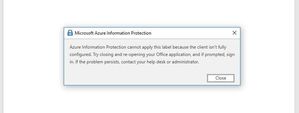
Thank you for that, unfortunately it still displays that error with custom policies.
I have had access to another device today and the very same error pops up there, so I'm assuming the problem must be in the setup.
EDIT: By the looks of it adding protection is causing the issue. The predefine policies which do not have protection activated (therefor are merely a visual thing) do work, however modifying them and adding protection "Azure (cloud key)" will cause this error to pop up.
Again, everything that is needed for this to work (according to the Microsoft documentation) has been done.

I'm getting the same error with and without firewall, We don't see any of the templates downloaded.
any Other help would be appreciated.
-Fermin