Forum Widgets
Latest Discussions

Workload by week/ month export to Excel
I like to use Visual report, but that doesn’t work.. I have MSProject 2016 and office 365. so I have tried to use save as (export) as xls. But I can’t get the load or week or month. anyone that can help out setup in table format. I think… the I can build the rest in Excel if needed br runeRunejorsDec 12, 2025Copper Contributor45Views0likes1Comment
How to visualize data desktop projects after PWA retirement?
This questions is a follow-up to the discussion "Data access after Project Online (PWA) retirement". From the "Data access after Project Online (PWA) retirement" discussion it is clear that data will not be moved somewhere else. We are mainly using the PWA site to enable that the data from the desktop projects can be visualized in Power BI, so that we can create project and portfolio dashboards that summarize information from both desktop projects and planner projects. Any thoughts on how this could be achieved in the future?Bella-PuellaDec 12, 2025Copper Contributor4Views0likes0Comments
Cashflow Visual report export
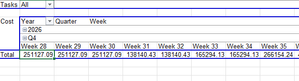
Hi, When I export from Visual reports using the cash flow template, my data uses Years, Quarters, and Weeks. This is fine; however, I want to edit this data. I want to show actual sequential dates, not week numbers, and I want to modify the start date of a Quarter as our business does not follow calendar quarters. There are no fields in the Pivot table selection boxes with dates, and I don't seem to be able to edit the edit section to show the date prior to export. Does anyone know how to change this? Thanks.SolvedPageAndSquireDec 10, 2025Copper Contributor116Views0likes4Comments
Planner and Projects 3 online - getting this onto desktop app
Hi, We have been using Planner and Projects 3 online for the last few months and we needed a bit more functionality, so we downloaded the Project Professional desktop app as per the instructions. Now I want to get all my plans/projects that is in my planner and Projects 3 online accessible or available in Project Professional on my desktop and I have no idea how to do this; please can you assist. I cannot find a way to download paths or files from online to a local drive to be able to open them in the desktop app.MandeMDec 10, 2025Copper Contributor29Views0likes1Comment
MS Teams shift and MS Project online integrations
Hi, we are considering using MS Teams shift app to schedule our team. We also use MS Project online to track our team tasks. Is there any integration available that shows our team members task that have been assigned iin MS Projects, when looking at their shift in MS team shift app? At the moment, I am manually adding an assigned task in the 'shift notes' field in MS Teams shift - ideally I'd like to populate this field automatically from MS project online assigned tasks. thanksMatt_ThomsonDec 10, 2025Copper Contributor1.1KViews0likes3Comments
Project Server Power BI Content Pack - Connect to Billed Work Hours?
Is there a way to use the templates in the Project Server Power BI Content Pack and connect to an excel spreadsheet containing the hours billed/charged to a project? Since MS Project simply calculates Actual Work based on % complete status update, we want to compare the "Actual" hours billed to a project to the Remaining Work to get a better picture of whether labor hours are on track to be over/under budgeted hours. ("Actual" hours from an export from our accounting system + "Remaining Work" from the MS Project schedule = Estimated Work at Completion; compare this to Baseline Work). Has anyone done something like this in your organization, and if so, how did you connect these 2 sets of data and create a visual for people in your organization?Brett_Phifer_SCIDec 10, 2025Copper Contributor31Views0likes1CommentSharing project failed after reaching the maximum number of retries.
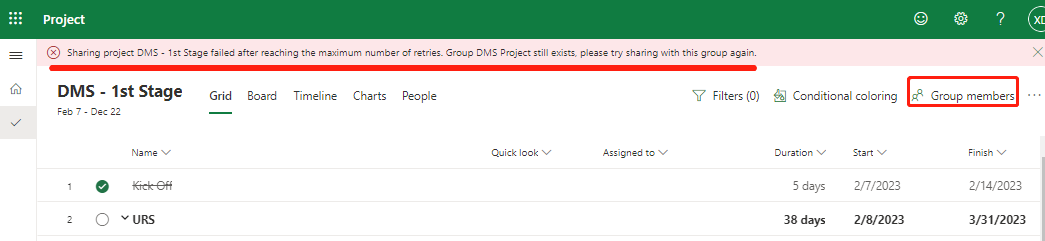
Hi does anyone know how it happend? I cannot share my MS project to any group today (was able to before). Already tried many groups for few hours now. ThanksSolvedXiaoqingDengDec 09, 2025Copper Contributor4.3KViews0likes17CommentsFilter Creation
Hello, I'm hoping this community can help me. I want to create a filter that will dynamically show all in progress tasks as of today's date. I've built the filter as follows: Start is less than or equal to [Value] -AND- Finish is greater than or equal to [Value]. My issue is what to enter as the Value. Copilot said to use "Current Date," "Now()" and "Today," but none of them are dynamic. It even told me to create a new field titled "Today" using the following formula for the Custom Attribute: Today=Date(). Then, it said to reference the "Today" field as the filter Value (e.g. Start is > or = to Today). But that returns the following error: "The entry is not valid. The test value cannot be used with the field for the data you want to find or filter for." At this point I'm at a loss. This seems like it should be a very easy filter to set up; I'm surprised there isn't a built-in system filter for this already. There 's a built in filter titled "In Progress Tasks," but that only filters tasks with an Actual Start that is not blank, and an Actual Finish that is blank. Thanks in advance for any help you can provide!vincentcbvDec 04, 2025Copper Contributor131Views0likes8Comments
%Complete didnt change the Finish Duration
I have an issue on my Microsoft Project work, when I update the %Complete on a single task (tracking mode) the Finish duration didnt change (the task type is Fixed Units). For example: My task was Start 20 Nov 2025 and Finish 5 Dec 2025 The actual task Start 20 Nov 2025 (on schedule) The status date is 28 Nov 2025 The %complete until the status date is 10% From the example, the task should be delayed because I cant increase the works time and the manpower but the Finish Date still locked in 5 Dec 2025. any advice or solution how to solved it? Thanks for the timestevenjDec 02, 2025Copper Contributor48Views0likes2Comments
People Picker in Project Detail Pages - Not Working for Already Created Projects
Hi, I have a non-mandatory field (say, "Expert") in PDP. When I create a new project, I can select the "Expert" using People Picker. When I try to open an existing project (to assign/reassign an "Expert") the People Picker feature does not work. Custom scripting is already activated. Any insight from users, as to what configuration changes should be made, would be much appreciated. ThanksBhatiaDec 01, 2025Copper Contributor141Views0likes5Comments
Resources
Tags
- Project698 Topics
- Online290 Topics
- Project Server159 Topics
- Project Desktop156 Topics
- office 36598 Topics
- developer76 Topics
- 201664 Topics
- On Premise61 Topics
- api51 Topics
- Reporting41 Topics