Recent Discussions

Insert -> Shapes & Text box in Outlook new version
Am I the only one missing the entire Insert option in Outlook .. Generic corporate communications includes shapes, text boxes and other objects -Which we were able to use in old versions of Outlook .. the New version looks to miss the entire set of options under insert tab. Appreciate your help hereSolved20KViews0likes5Comments
Outlook freezing after 20-30 minutes
Hello, I have a user whose outlook freezes after 20-30 minutes of use. This is a new HP 450 G10 laptop running windows 11 business. All windows updates are completed along with HP driver updates. Outlook has been re-installed however it still freezes. Has anyone come across a similar issue and found a fix for it? Many Thanks, Nik31Views1like3Comments
Issue with emails being delayed when sent
Good Morning, I am working with a user who is sending emails, but they are being delivered a week or in one case two weeks later. She is not using Delayed Send\Delivery, that was the first thing I asked, or at least she said she didn't. This is not all the time and we were not able to replicate while I was on a call with her. What she is doing... Open a document in MS Word to fill out a report and Save it. Share the document, attach a copy instead and choose PDF. This opens, the email window, add the recipients and hits send Let's say for example she does this a 2pm on 12/4 Her sent items in Webmail show it was sent from her mailbox at this time. Recipients might receive it a week later on 12/11 at 11am Message traces in Exchange Online console show the delivered on this date, and her sent items in the Outlook Classic version on the desktop show the 12/11 date as well. My question would be, besides Delayed send, any thoughts as to what might cause emails to sit undelivered and then just be released a week later? I even checked our backup software and looked at the backup for her mailbox during the timeframe of it being sent vs. delivered to see if there was something in her Drafts or Outbox, but I did not see anything there. She says she did not do delayed send and I can't prove she didn't. In the interim, I did suggest she put a delivery receipt on these emails since they are time sensitive and need to be delivered weekly, so if she does send it and does not get the Delivered receipt, we can take a look right away. Thoughts or suggestions... Thank YouSolved72Views0likes2Comments
Outlook on the web -- Search tools appear whether I want them or not!
Hi all, An apparent recent behaviour change that is frustrating me immensely when using Outlook on the web is the default assumption that I want to use Search tools. I now get automatically moved to this even if I'm searching with the "Home" menu option as my default. This is infuriatingly annoying. Before this started happening if I wanted to do some manipulation of the search results (eg a batch "Archive" of them) I can just select what I want, then hit the ""Archive" tool in the "Home" menu (ie right where I was!). Now, because Microsoft assume I can't cope without their "Helpful" search options I have to do an extra click, back to where I was, to achieve the same results. When manipulating a lot of mail, this is deeply, deeply infuriating. Anyone know of a workaround? Or can we consider changing the search menu to include some tools too (delete, archive, etc)? Note to be clear this is specific to the Outlook Web interface -- I don't know what happens in the desktop app.40Views0likes2Comments
Calendar search in New Outlook only 12 months
I'm trying out the new Outlook and right away found the Search in Calendar is limited to only 12 months. That's a disaster, deal breaker! I keep all my client appointments in Outlook and often need to look back many years to see when we spoke last, get a list of dates, etc. How do we get Microsoft to have a real search like we have always had in Outlook classic? I can't use the new Outlook without this critical feature I use almost daily.54Views0likes2CommentsCopilot options are disabled on Mac
I have a Copilot Business and also a Business Standard licences that give me access to desktop apps and copilot on them. I Word it works fine, but on Outlook the Copilot button (top-right select box) shows options like Coaching, Draft and Settings disabled, when in a new message. When replying, the same button shows Reply and Summarize disabled, but Chat and Settings enabled. On the web version everything works. I have already updated to the latest versions and made a check license to make sure all features are ok. What can be missing here? Thanks.14Views0likes0CommentsBest New Outlook Features Released in 2025 — A Practical Wrap-Up
Over the course of 2025, Microsoft delivered a significant number of updates to New Outlook for Windows. For many users who tried New Outlook early and stepped back, the experience today is materially different. I’ve published a recap video that walks through the most impactful New Outlook features released in 2025, focusing on what actually changed, what gaps were closed, and how the product is evolving as Microsoft continues the transition away from Classic Outlook. This video is not a deep dive or step-by-step tutorial. It’s a practical end-of-year review covering: Why Microsoft moved to New Outlook and the current opt-out timelines Account management improvements (account display names, shared mailboxes, drag-and-drop workflows) PST export becoming usable directly in New Outlook Mail experience enhancements (favorites, folder colors, categories, bulk actions, templates, mail merge, newsletter) Calendar layout changes redesigned to accommodate Copilot People / Contacts usability fixes and cleanup Copilot in Outlook: standard vs premium capabilities and real workflow differences This isn’t positioned as “New Outlook is finished” or “Classic is gone tomorrow.” It’s an honest look at where New Outlook landed by the end of 2025 and what it now supports compared to earlier releases. For those managing transitions or advising users: Which Classic Outlook features are still blockers for you? Have the 2025 updates changed your adoption stance? Are there specific workflows you still cannot move yet? Interested in hearing real-world perspectives from admins, trainers, and power users as we move closer to broader default adoption. #traccreations4e-p25 12/11/2025213Views0likes1Comment
Account Recovery Request
I've been trying to recover my hotmail.com email address. I was able to reset the password using my mobile number. But when I sign in again, it is blocked again. When I try to recover using my mobile number: (Try another verification method. That verification method isn't working right now. Please try another method.) I submitted 3 recovery forms already but were unsuccessful. My hotmail.com account is only being used as a receiving email address of important bank emails. I don't remember sending any email. I need help to call or chat with support.25Views0likes0Comments
Outlook Deleting Certain Email Before Delivering to my Mailbox (Not Even Going to Junk)
Hi, I've been trying to troubleshoot this issue for 4 months now. I have become aware that since at least May, 2025, there are some emails which are not making it to my mailbox (neither by inbox or even my junk), Outlook is preventing them from being delivered (or perhaps deleting them before they show up to my mailbox). I have tried changing my Junk email settings, I have tried adding senders who have sent me email (e.g. verification codes from travel booking sites) to my safe senders list or contacts list but nothing is working. This has caused major issues to me, as I'm not seeing vital emails. How do I troubleshoot/solve this? Thanks99Views0likes4CommentsMail Merge in New Outlook
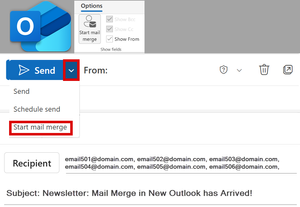
I finally used Mail Merge in New Outlook. I haven’t been able to find any official documentation since the feature was released in December 2024. For anyone who’s been curious or struggling with how it works, I’ve captured my learnings in a detailed blog post and walkthrough video. 📘 Blog Post: Mail Merge in New Outlook: What You Need to Know - TRACCreations4E 📺 Video: https://youtu.be/x-o72L0tSHs Also, the advanced functionality is on the Roadmap for August and September. Microsoft 365 Roadmap | Microsoft 365 If you find this information helpful, please mark it as the best response so others can benefit too. TRACCreations4e 3/24/2025313Views2likes0CommentsCustom Search Folders in New Outlook
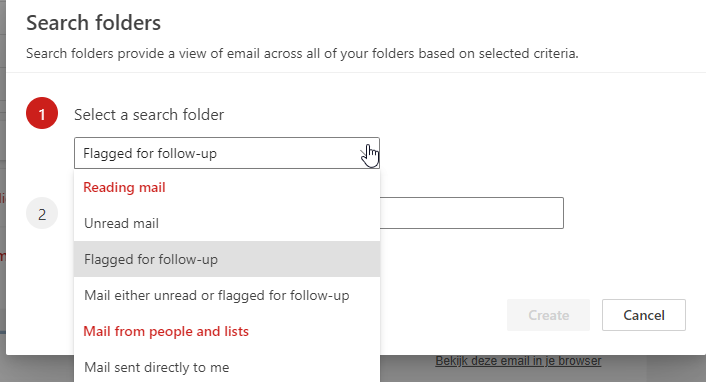
Does anyone know how to create Custom Search Folders in the new Outlook? At this point I only see a couple of standard searches. In the previous version of Outlook used Custom Search Folders: 1. To create a folder of messages with a specific Label 2. To create a folder to find all messages sent on a specific date. Does anyone know if this is possible? Or how I would go about to use the two described filters? At this point I also can't seem to be able to filter the inbox on Label.2.5KViews2likes10Comments
Email sent from Shared Mailbox gets stuck in Outbox
Hello, I am working with a client who has a primary and shared mailbox in Outlook. They are using the newest version of classic Outlook desktop app and they have full permissions to the shared mailbox, including "send as" permissions. They can send email from their primary mailbox without issue. However, when they send email as the shared mailbox, it gets stuck in the Outbox and never sends. I have tried the following: 1. Removing the profiles re-adding 2. Deleting the Outlook data files 3. Reducing cache to as low as 3 months 4. Turning off cache but when I do the shared mailbox gets an error that it cannot connect to the Exchange server 5. Turning on auto-archive to shrink the data files 6. Switching to "New Outlook". This does seem to work but the company uses a plug-in for a program called "Mail Manager" and they don't fully support New Outlook yet Sometimes these solutions will fix the issue for a few days to a week but then it begins happening again. This issue does not happen when they are using the mobile or web clients. To me this sounds like a corrupted data file but I can't pinpoint what exactly is causing the corruption. Any suggestions? Thanks, Mike15KViews0likes5CommentsSync New Outlook with iCloud Calendar
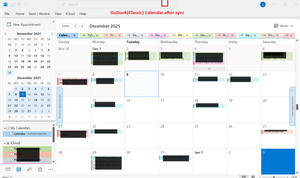
I just got a new laptop and am trying to sync the New Outlook Calendar with my iCloud Calendar. The intent is to have any Calendar changes made on one device (iPad, iPhone, laptop) to sync to all device Calendars. The problem I'm having is that iCloud Calendar only synchs with Outlook (Classic) and I want to sync with New Outlook. The Outlook version is 1.2025.1121.100 ; the Outlook Client Version is 20251128003.09 The list of Apps that comes up after clicking on Start shows both Outlook and Outlook (Classic). If I right click on Outlook (Classic) and click on uninstall (thought that might help fix this), the only Outlook listed in Apps > Installed Apps is Outlook. I did not uninstall Outlook. To set-up Calendar synching I opened iCloud > Calendars and Contacts > Calendars and Contacts Settings. I turned on "Automatically sync your iCloud calendars and contacts to Microsoft Outlook". After syncing completes, all iCloud Calendar entries appear in the Outlook (Classic) Calendar, but nothing syncs to the New Outlook calendar. I'm assuming this is an Outlook issue, not an iCloud issue. Any ideas on how to fix this? Thanks74Views0likes3Comments"Format picture" has disappeared from Outlook Mac
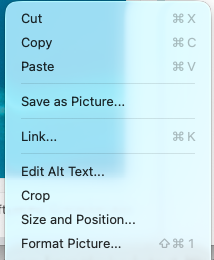
I use the Outlook app on 3 different MacBooks. Two have recently auto-updated Outlook to version 16.102.2, and I've lost the ability to format a picture in the body of an email. I use lots of screenshots in emails, and always put a border around them to clearly differentiate them from the body text. Right-click the image and select Format Picture from the menu. I can still do it in the third MacBook which is running Outlook version 16.84.2. I don't know if the latest update is meant to be an improvement, but I'm not happy about it! I'll turn off automate updates for the third MacBook. Not sure if I can revert the other two to version 16.84.2 - does anybody know if this is possible. Also wonder if users of the Windows app have experienced the same loss of the Format Picture feature?612Views5likes9CommentsOutlook - Windows Security Pop Up Never Goes Away
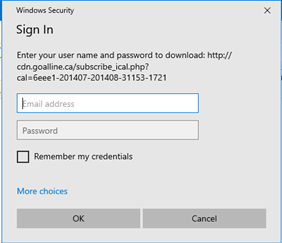
I'm running into a head scratcher type of situation. I have a user who has reported that they are getting a Windows Security pop up from outlook that keeps showing up even after clicking Cancel or signing out/in to Outlook. The user didn't put in their credentials. Below are some things I've checked from a security standpoint: Checked the URL in the image using an analysis tool. Nothing malicious came back. Checked the URL "http://cdn.goalline.ca" it redirects to "https://stacksports.goalline.ca/". Nothing malicious there as well. Checked the domain cdn.goalline.ca and nothing malicious. Appears to be registered 20yrs ago and lines up with the stacksports site stating that it was founded in 2002. Checked enterprise AV, MS Defender and nothing malicious comes back. Can anyone help in why this keeps popping up for the user? Also, how do we stop this from re-occurring?Solved35KViews1like6CommentsPST Export in New Outlook: Progress Update and Current Capabilities
Microsoft has started rolling out PST export support in New Outlook for Windows. While this feature is not yet fully complete, the core mailbox export workflow directly in New Outlook is now functional. Calendar and Contacts remain read-only in the resulting PST file, but the export process is stable enough for early adoption scenarios. This post and the video walk-through cover the current end-to-end experience, including: How to check the mailbox size before initiating the export Exporting the entire mailbox or selecting specific folders Practical guidance for organizing, naming, and managing PST files Full step-by-step guide and video demonstration: https://traccreations4e.com/export-mailbox-to-pst-new-outlook/ If you’ve tested PST export in New Outlook, what has your experience been so far? Any issues, limitations, or reliability considerations others should be aware of? #traccreations4e-p25 12/8/202545Views0likes0Comments





Events
Recent Blogs
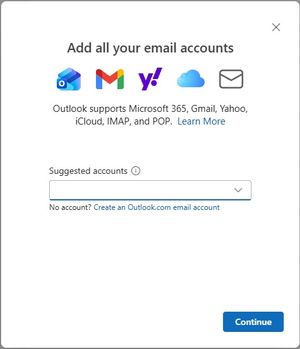
- We’re excited to announce that the new Outlook for Windows, Outlook for Mac, and Outlook for iOS and Android now support easier iCloud Mail, Calendar, and Contacts access. You no longer need to cre...Oct 30, 20251.8KViews2likes12Comments
- As technology moves forward, so do the ways we communicate. The world is rapidly changing with cloud computing, hybrid ways of working, and generative AI. To keep up with all these changes, Outlook i...Jun 24, 20258.7KViews2likes33Comments