Forum Discussion

Enterprise icon vs OneDrive icon
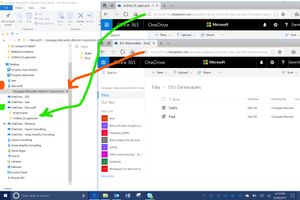

Hi David,
I can appreciate it when you say that OneDrive for Business content and SharePoint content both originate under the same tenant, and so could be combined within the FIle Explorer under the same icon.
Perhaps Microsoft will end up doing that in the future.
I think there are good reasons, however, for them to be separated, and fo rthe time being, when I teach others about how to best leverage synchronized files from OneDrive for Business and from SharePoint, I point out a few differences. (I'm not speaking about OneDrive (consumer) in this post, so I'll use "OneDrive" in place of "OneDrive for Business" going forward here).
Custodian of File Permissions
The origin/ownership of a file is signifcant from a permissions point of view.
Whether a file is in "MY FILESPACE (MYWORK)" (OneDrive) or in a "SHARED FILESPACE (OURWORK)" (SharePoint document libraries) is very significant. When teaching a user how to think about permissions, the user is completely responsible for sharing and permissions management for their individual OneDrive files. This custodial relationship is not the same for SharePoitn document libraries, which pertain to the site owner(s), not the individual user.
Compliance Rules and Impact
As content labeling and retention/deletion rules start to come into awareness across customers, a user will find comfort in being able to easily determine the difference between their own filespace and a shared filespace.
Work In Process and Individual File Storage
Users can be taught to understand that their OneDrive also serves as a convenient Work in Process storage area for their individual documents, and that when they are ready to publish to a shared work area, that SharePoint document libraries are a good place for that.
Within the Windows file explorer, the icons used to distinguish these can be leveraged to make a difference here. Even if Microsoft, in its wisdom, decides to combines the icons into one (or allows a tiny corporate logo to be used in its place, on a per-tenant level), these concepts of the separation of MYWORK and OURWORK will need to be taught and explained.
You may also have other, tenant-specific, categories for distinguishing the differences between OneDrive and SharePoint storage in the file explorer.
I couldn't find a UserVoice entry for making the icons the same in this group (https://onedrive.uservoice.com/forums/262982-onedrive/category/86090-onedrive-for-business), so you might want to create a suggestion there. That might be the right way to further the conversation.
Have a great week.
Owen

- Owen AllenJul 08, 2017Iron Contributor
Hi David,
I did not notice that in the original post - thanks for pointing that out! I wonder if it might be based on the technique that was used to initiate the synch relationship. However, that is somethig that support should be aware of. I'd bet that Stephen Rose will know the right way to get this addressed. He may want you, David, to open a support ticket for this.
I like Salvatore Biscari's rules with the icons, but because this is a case with OneDrive content under a building icon, it breaks the rules, so it must be a bug. :-)
Hope to see you all at Ignite!
Owen
Updated thanks to Salvatore setting me straight. It is not a bug. David's screenshot is taken from the machine running as v-david, and the other content is Shared With Him, so pertains to the blue building icon. No bug. Salvatore's rules still rule. :-) Sorry for adding to the confusion!
-owen
- Salvatore BiscariJul 08, 2017Silver Contributor
Hi Owen.
Maybe I am missing something: what's the bug?
The stuff in your ODfB in some tenant in which you are an user is correctly under OneDrive - <sometenant> (i.e. a cloud icon, meaning that it is YOUR own stuff).
Instead the stuff in someone else's ODfB (i.e. shared with you), since it is from an SPO library (exactly like stuff in a team site or a in Group), is correctly under <sometenant> (i.e. a building, meaning that it is not YOUR own stuff).
Again, the logic is clear and perfectly adheres to the rules I stated above...
- Owen AllenJul 08, 2017Iron ContributorYou are not missing anything - I was. I updated the previous post. You are correct!
- Salvatore BiscariJul 08, 2017Silver Contributor
Hi David.
I hear you, but the current logic is clear to me: what is under OneDrive - <sometenant> is your personal (work) stuff, while what is under <sometenant> is shared with you by someone else or anyway not just your personal stuff.
To be honest, I don't think that this will be changed anytime soon... ;-)
