Forum Discussion

Files on demand - difference in 'locally available' and 'always available' files
 Oct 20, 2017
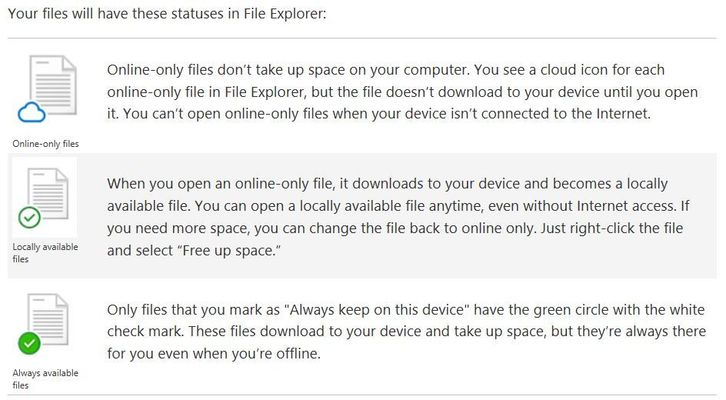
locally available files are ones you've already opened whilst online, or created while online, or created recently on another device while you were online; they stream down to your PC so you have them if you need them, but they're not guaranteed to be there. If you haven't opened the files in a while and the space is needed to stream down other recent files to make them available locally, they'll revert to being online only (AFAIK that's based on heuristics and will vary by free space, not a strict counter). if you want to guarantee that the files are always available offline, right-click and mark them as 'always available offline'. You can mix and match both kinds inside a folder.

Thanks, Mary, for the information. It seems a bit vague as to how locally available files work, when they revert to online only, etc., but that is not a criticism of your explanation.
If they do in fact work like you are saying and whether they (locally available files) would still be available (locally/offline) after a period of time, based on the system freeing up the space for other more recent files, then I can understand why Microsoft would see the need for 3 statuses: online only, offline (always available), and locally available which is somewhat transient and changing over time.
- Oct 21, 2017You have been using Files On Demand since April?
- MaryBOct 21, 2017Iron ContributorSince Build, yes ;) So while I haven't been told details of the offline availability decisions, I can tell you how it works in practice.
- Zero PointOct 21, 2017Copper Contributor
Okay. Thanks, Mary. I've been an Insider since the beginning (October 1, 2014) and appreciate your insight. When Files On Demand were unveiled at Build and then later rolled out to Insiders in the Fast Ring (Build 16215), I tested just a little bit, but didn't want to throw my real OneDrive data into the mix and really see how it worked day in and day out. I'm doing that now.
