Forum Discussion

Video available for everybody within company
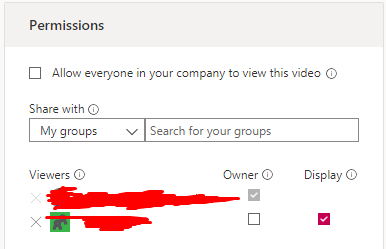

Hello and thank you for your question pbazuin . Are you still running into this issue? One item that may help is to remove all permissions except yourself and save these settings. Confirm that other users can no longer access the video. Then later on add back who is needed to view. It also may be that the settings did not take effect immediately, hence my question on if this is still an issue for you. Thank you!
 pbazuinNov 20, 2019Copper Contributor
NealMHi Neal, thanks for your reply.
Unfortunately this did not help.
After clearing the permissions list, nobody is able to see the video but me; as expected.
As soon as I add a group to the permissions list (which has 9 members), somebody from outside of that group can also view the videos. I just found one more thing to check, otherwise I will have to look for a different solution unfortunately.
- NealMNov 20, 2019Former Employee
Hi there pbazuin do you happen to have other videos uploaded to Stream? Does this issue affect those other videos? I'd be interested to know if this happens for you for all videos or there's something with this specific one, in which case I'd delete and re-upload to see if that resolves.
- pbazuinNov 23, 2019Copper Contributor
NealMUnfortunately this issue can be seen for every video I upload. When I only add one person to the list, nobody else can see it but myself and that one person. As soon as a group of 9 members is added, everybody can see it.
Right now I am asking our sysadmin's help to look into the group I add, perhaps there's a group within the group (not as far as I can see but who knows).