Forum Widgets
Latest Discussions

Why my site Data is not updating in Bing Webmaster Tools
I manage a website focused on https://wendys-menu-with-prices.com/ in the USA and recently added it to Bing Webmaster Tools to monitor clicks and impressions. Initially, I was able to see data showing the performance of my site. However, the data has stopped updating and seems to be stuck. As my site aims to provide up-to-date information on Wendy's menu prices across the USA, it's essential for me to have accurate insights into its performance on Bing. I've verified the site and ensured the correct placement of verification tags. Can anyone help me resolve this issue and ensure my site's data updates correctly on Bing Webmaster Tools?wendys100Dec 16, 2025Copper Contributor1.2KViews3likes13Comments
Error Redeeming Reward due to Change in Price
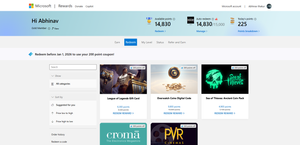
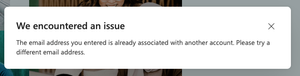
I wanted to buy "Roblox Digital Card—1000 Robux" which is for 16050 points but i had set my goal before its price was changed, earlier the price was 15000 points and with a 200 discount its price had reduced to 14800 points, but when i tried to redeem it says "Sorry you do not have enough points" On clicking manage On clicking redeem reward
Why is my website not showing up on Bing search results?
Hi everyone, I submitted my site to Bing Webmaster Tools a few days ago, and it shows that the pages are indexed, but when I search my domain or specific keywords, it doesn’t appear anywhere in Bing results. I’ve checked robots.txt and sitemap — both seem fine. Is there a delay or some specific SEO requirement Bing prefers that I might be missing? Any insights or similar experiences would help!EthanBrooks9889Dec 16, 2025Copper Contributor107Views1like3Comments
Bing Webmaster Content Removal Tool not working; Raising support ticket also does not work
I have pages that were deleted by the website owner that contained personal information, yet the removed personal information still appears in Bing search results. I tried to remove them using the content removal tool, but it claims: "The URL you submitted still works on the web and isn’t a broken link. You can only request an outdated cache removal for this page. Please enter a word that appears in the cached version of the page but no longer appears on the web page." When I enter any word that appears in the cached version, including unique personal information, I get the message: "The entered text does not appear in the Bing cached version of the page. Please enter a word that appears in the cached version of the page but no longer appears on the web page." When you click on the offending Bing search result, it redirects to the website's home page, but the page showing in the personal information is gone. I tried raising a support ticket, but whenever I go to submit the "Create support ticket" does absolutely nothing. How can I get these outdated search results that contain my personal data off of Bing?synchropsyDec 12, 2025Copper Contributor13Views0likes0CommentsSafe search cannot be disabled in the UK
I am in the UK. I am an adult, logged in using an account which is well over 18 years old, in fact it's closer to 25. Every month, I pay you for 365, using a UK credit card in the name of the account, and the account is registered with many utility providers. I am demonstrably over 18. So why can't I disable safe search? - When I try to change the dropdown on the page, it flips back. - When I go to the settings, the option is disabled, Even using a VPN doesn't disable it. That is, unless I sign out. If I sign out: - Then from a UK IP, I cannot disable safe search. - From any other country, there is no problem. It is blatantly obvious this is a UK block. That's fine, if you give adults an override. So how do I override it? How do I verify my age? And clearly this isn't legally necessary because no other search engine does it. So if you can't treat me like an adult without ridiculous workarounds, I'll search elsewhere. Thanks.AP850Dec 05, 2025Copper Contributor1.7KViews5likes7CommentsMicrosoft Bing AI not Generating Images I search For
why am i getting a crossed out camera icon on every bing ai picture i search for? So I'll enter in a prompt, it will generate, I'll see the thumbnails for the 1,2,3, or 4 images created, but when I click on one it just generates a grey icon with the camera crossed out. It also happens to images on the bing ai front page too. Like the sample photos that show you other people's creations or whatever. For some reason images in collections still generate fine, stuff I've previously saved. I've tried everything, deleting cookies, caches, every option under internet history has been deleted, when I create new accounts the same things happens. I've downloaded the bing app, used bing on chrome, nothing is working. Tried using different phones so it's definitely not a phone issue.coyotegharzaNov 14, 2025Copper Contributor44Views0likes0Comments
Suspended account
I’ve maintained a Bing usage streak of more than 2,800 consecutive days, regularly engaging with trending news, dashboard offers, and manual searches. I have never used automated tools or performed searches outside of my own interests. Despite this, Bing has suspended me from redeeming points. The only response I’ve received is a generic copy of their policies. Does anyone know how I can get reinstated? Any guidance would be greatly appreciated.srbuckeye74Nov 12, 2025Copper Contributor40Views0likes0Comments
Issue: Accessing Business Account on Bing Places for Business
I recently have been signed out of two of my business Bing accounts. Upon signing in, I get a notification that says: Every time I try logging in I get that notification. Even though it is only associated with the email I have. I ultimately decided to make another account and try to reclaim my business. However, when asking for permission to manage the account, it requires approval from the account I cannot get into. Does anyone have any guidance? It keeps sending me through a loop.lynkay139Oct 25, 2025Copper Contributor164Views0likes1CommentSite Suddenly Removed from Bing Search Results – Request for Assistance
Hello, I recently launched a new website and published several blog posts. Initially, the site was receiving impressions and clicks from Bing search. However, all search activity has suddenly stopped without warning. I have already contacted Bing Webmaster Support but did not receive a satisfactory reply, and my ticket was closed. In Bing Webmaster Tools, I see no errors or warnings related to my site. Could you please assist or advise on any steps I can take to resolve this issue and have my site re-included in Bing search results? Thank you for your attention. I am looking forward to your response.Shreya99Oct 15, 2025Copper Contributor81Views0likes1Comment
My Website Suddenly Disappeared from Bing Index – No Errors, No Response from Support
Hey everyone, I’m facing a frustrating issue with Bing, and I could really use some help. My website suddenly disappeared from Bing’s index for no apparent reason. There are no warnings, no manual actions, and no crawl errors in Bing Webmaster Tools. I’ve already reached out to Bing support four times, but I haven’t received a single response. At this point, I don’t know what else to do. Has anyone else experienced this? Any advice on how to get Bing to reindex the site or how to actually get a response from their support team? Would really appreciate any insights or suggestions! Thanks in advance. 🙏trees1ncOct 14, 2025Copper Contributor731Views4likes16Comments
Resources
Tags
- Bing39 Topics
- bing search8 Topics
- developers7 Topics
- edge7 Topics
- Feedback5 Topics
- Search5 Topics
- help5 Topics
- indexing5 Topics
- INDEX4 Topics
- Bing.com4 Topics