Forum Discussion

SharePoint Event Web Part Doesn't Work
 Nov 09, 2018
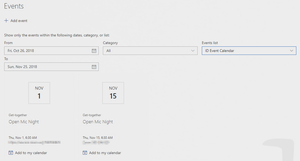
I found out that the Events web part requires the field "All Day Event" to have a value, either true or false to show the event (it is blank when we initially create the event). To update this field in Flow after creating the event, we need to use REST API using the "Send an HTTP request to SharePoint" action. Once you assign a value to the field, the event will show up in the Events web part. Please reference the below link (Mark Invites as Full Day Event section) for the steps to set the "All Day Event" field in Flow.
https://www.anupams.net/send-meeting-invites-sharepoint-online-calendar/

I assume that in the 'Birthdays and Anniversaries' calendar, there are items in that selected date range? (Oct 26th - Nov 25th)?
Also (and I've not tested this - literally just thinking about it) - does that calendar have content approval enabled? (I'm wondering if the Events webpart only displays approved items)
 John LathburyOct 29, 2018Brass Contributor
There are items in the range and I currently do not have content approval turned on, but was going to apply it later to one of the working calendars (for time off requests).
I wouldn't be surprised if the event viewer only displays approved items.
I'm close to deleting the calendars and recreating them with the same name. Luckily I use a flow to populate them, so I can rerun the flow after recreating and it should have minimal impact.
I'll post the result of recreating later today.
- John LathburyOct 29, 2018Brass Contributor
I deleted the Calendar and recreated it, but the events are still not appearing in the Event Web Part. I also removed and re-added the Web Part with the same results. At this point I am going to simply remove the Web Part and try to find another solution.
- Rob EllisOct 29, 2018Bronze Contributorif you manually add items to the calendar - do they appear on the web part? (I can't see how adding the items via Flow would make a difference, but you never know...)