Forum Discussion

Office 365 "The fine print" popup message - is it legitimate?
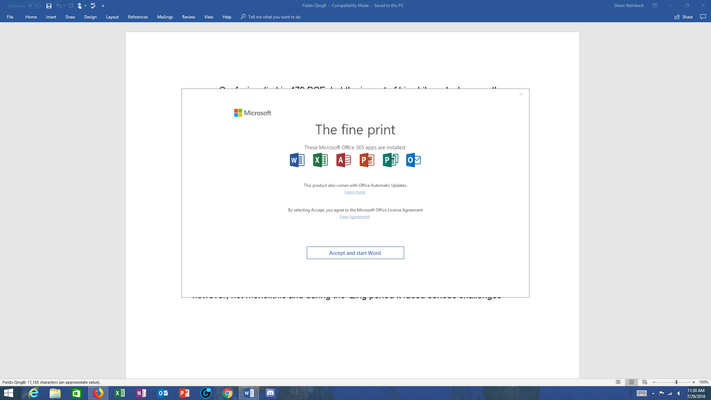
- Aug 03, 2018


That's the detailed information from advisory:
Title: Issues accessing Office Online User Impact: Users may receive an unexpected pop-up regarding the license agreement and may also be unable to access Office clients.
More info: When users receive the pop-up regarding the End User Licensing Agreement (EULA), clicking "Accept" should enable access to Office clients. Dismissing the pop-up may result in Office clients closing. The content of the licensing agreement has not changed.
Current status: We've identified that a recent feature update has modified the storage location of the EULA acceptance information and is causing users to receive a pop-up message prompting them to accept the user agreement. We've initiated the process of reverting this update to mitigate impact.
Scope of impact: This issue may potentially affect any of your users attempting to access Office clients. Start time: Saturday, July 28, 2018, at 2:00 PM UTC
So it was a technical bug which caused for the same EULA agreement which is shown when activating new product to be shown to existing users/installations. It is saying they are now reverting the faulting update.

Oleg, thanks so much for tracking this down!
While I had noticed that the license agreement text said 'last updated September 2017', I was concerned at the possibility of malware concealed by an apparently legitimate page of content.
I even verify updates to products from Adobe and Malwarebytes, when they pop up, out of an overabundance of caution. :)
Thanks!
eta: after reading others' replies, I'd also like to see an official communication from Microsoft.
The screen image in Oleg's reply appears to be from the Office 365 admin portal, so presumably another Office 365 administrator can verify its provenance....
- karenleebethesdaAug 02, 2018Copper Contributor
Oleg, thanks, didn't realize that.
I thought it better to check here, than to open a support ticket for a known issue. And, other comments didn't indicate an exceptional experience with support on this topic. :)
The reason I'm being so cautious is that, years ago, my then-new pc got ransomware. I now use the paid version of Malwarebytes antimalware, but I'm still skeptical about unexpected popup msgs.
I see there are other discussion threads related to this one, where folks are telling each other that the popup just indicates that the most recent updates applied, require new 'fine print' for the user to sign. That's demonstrably incorrect, and your explanation is still the best I've seen. ty.
- wrootAug 02, 2018Silver Contributor
Honestly, i doubt you will get official reaponse here. If you need that, file a support ticket and ask them to provide you one.
Office is not always updating on the same day everywhere (sometimes it takes a week or longer), it can be that update was released on July 28, but your client updated later. Mine hasn't updated until i ran update check manually yesterday and got the same popup. That confirmed my theory of faulty update and not malware.