Forum Discussion

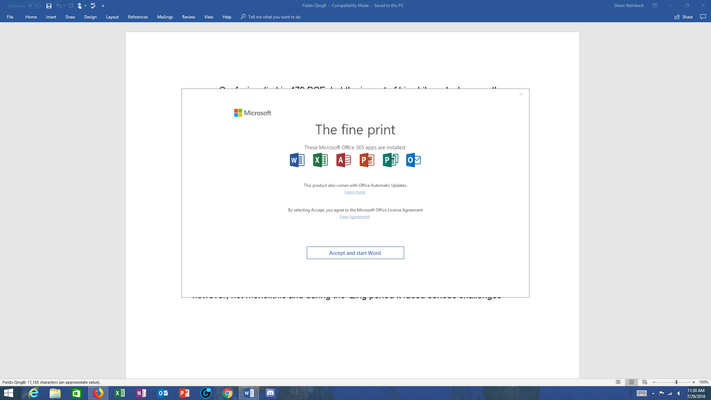
Office 365 "The fine print" popup message - is it legitimate?
- Aug 03, 2018


That's the detailed information from advisory:
Title: Issues accessing Office Online User Impact: Users may receive an unexpected pop-up regarding the license agreement and may also be unable to access Office clients.
More info: When users receive the pop-up regarding the End User Licensing Agreement (EULA), clicking "Accept" should enable access to Office clients. Dismissing the pop-up may result in Office clients closing. The content of the licensing agreement has not changed.
Current status: We've identified that a recent feature update has modified the storage location of the EULA acceptance information and is causing users to receive a pop-up message prompting them to accept the user agreement. We've initiated the process of reverting this update to mitigate impact.
Scope of impact: This issue may potentially affect any of your users attempting to access Office clients. Start time: Saturday, July 28, 2018, at 2:00 PM UTC
So it was a technical bug which caused for the same EULA agreement which is shown when activating new product to be shown to existing users/installations. It is saying they are now reverting the faulting update.

Hello Oleg K,
You have provided some information that you say is from a Microsoft advisory.. No offense, but I still would prefer to see a Microsoft response to this.
Can you provide a link to the Microsoft website that contains this information ?
For one thing, you listed "Start time: Saturday, July 28, 2018, at 2:00 PM UTC", but I was using Office 2016 applications without issue on Monday July 30. I didn't see the popup until Tuesday July 31.
When is Microsoft going to respond to this matter ?
Does Oleg K represent and speak on behalf of Microsoft ?
- Eric NorgrenOct 27, 2018Copper Contributor
Solved, my first option or angle of attack was to disable the Office Updates, the second Randy helped me out with though I would've assumed the same same 2nd process, which was to run Office Repair after disabling the Office Updates so it could overwrite any changed files with the originals. This should get rid of those 365 popups in previous versions of Office.
- wrootAug 02, 2018Silver Contributor
I don't know of a public link to this information. I took it from our Admin center of Office 365. Im not an MS representative. Just a user like you, or more specifically IT admin at organization using Office 365.