Forum Discussion

Office 365 "The fine print" popup message - is it legitimate?
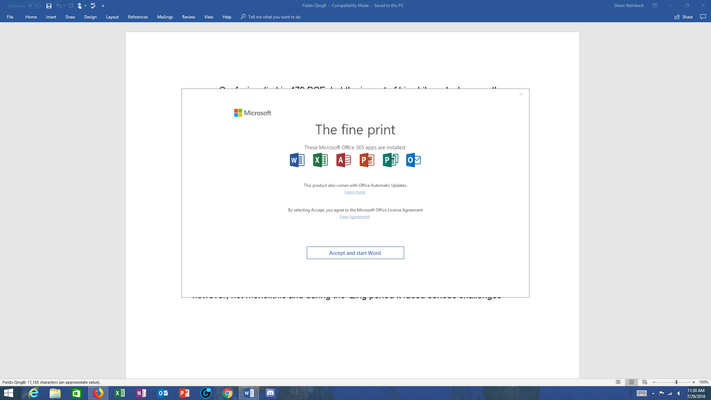
- Aug 03, 2018


Allen AnnaChu Dylan_Snodgrass EricStarker
Sorry for the wide net I've cast, but wasn't sure who could help with actioning the concerning post above by coolingseoblack15 (very suspicious)!
Thanks for keeping us safe.
Cheers
Damien

 Susan WebeckAug 01, 2018Copper Contributor
Hello Anna - it would be nice if we could also count on you to be responsive to the original issue - is this pop-up actually from Microsoft? I think most of the people here are very unhappy with the way that Microsoft has handled this, but almost everyone would be happy to click on 'accept' and get back to work if we can get a confirmation that it is legitimate.
 James FriessAug 01, 2018Brass ContributorI was on a chat with Microsoft support, and he repeatedly refused to answer my question of whether this was a legitimate Microsoft popup. I asked 4 times and even resorted to all caps, but he simply would not answer.
- James FriessAug 01, 2018Brass Contributor
BTW I read the other day that Microsoft might be moving to a "Desktop as a Service" model. It might be a good time to start getting comfortable with Linux.
 Terry MroczekAug 01, 2018Copper Contributor
Anna - why aren't you responsive to the initial problem?
- AnnaChuAug 01, 2018Former EmployeeWe are escalating this - Sorry that I haven't responded, but Eric is in my team and we're both working to get someone from Microsoft to respond officially.
 Martin KimzeyAug 01, 2018Copper Contributor
I received the "Fine Print" dialog this afternoon as well. I have an Office 365 Account for home. But the "Fine Print" dialog appeared on a machine at my work place running Office 2016 (without Office 365). Our Corporate IT is not aware of any changes to our licensing. We are somewhat reticent to simply agree to a "Fine Print" dialog without any details on how and why licensing suddenly changed. This kind of thing is at least unethical.
 helene holmesAug 01, 2018Copper Contributor
@ annachu
There's no \/ in the top right corner of the window. There's 2 options 'X' to close or "Accept and start" the MS app I'm attempting to launch
 PETER FARENWALDJul 31, 2018Copper Contributor
Hi Anna,
Please respond, or refer us to who can respond to the original issue in this stream - this microsoft office 2016 "the fine print" popup. I purchased microsoft office "Home and Student" 2016 several years ago and it has worked fine up to now. Suddenly today when I open a Word, Excel or PPT - any office doc I am seeing this "the fine print" popup. It doesn't seem like a legitimate thing from Microsoft and I don't want to click the "Accept and start..." button until Microsoft confirms it is for real, or what to do about it...
- Russ MeltonJul 31, 2018Copper Contributor
The answer I just got from Microsoft Commercial Support was to just click accept then it will go away. I don't really have a warm fuzzy feeling about that if I'm honest.
 Mark TompkinsAug 01, 2018Brass Contributor
That does not work. When you "x" the popup, the application shuts down.
- James FriessJul 31, 2018Brass Contributor
We have Office 2016, since we're just not interested in participating in the "aas" business model, and also got this pop-up this morning. Not knowing what it was, one of the doctors in our practice didn't want to agree and just X'ed out of it. Word then just shut down.
What kind of corporate practice is this to deny us the use of a program that we purchased?
- Mark TompkinsAug 01, 2018Brass Contributor
I'm experiencing the same problem.
Agree wholeheartedly with the sentiment!
MT
- Damien_RosarioJul 30, 2018Silver Contributor
Thanks for your super speedy response, AnnaChu!
I've completely forgotten about that option as I have never had to report anyone before now (most folks are great on MTC as you know).
Hopefully it gets actioned ASAP before someone falls for the scam!
Cheers
Damien
- EricStarkerJul 31, 2018Former Employee
Thanks for flagging. The post was removed and we've banned this user.
- Damien_RosarioJul 31, 2018Silver ContributorThanks Eric. We all appreciated the quick response!
- Wim BartelsJul 31, 2018Copper Contributor
Customer of mine gets same message EVERY time he starts an office application.. even after clicking accept.. it keeps returning .. any news ?
- Mark TompkinsAug 01, 2018Brass Contributor
I am getting a popup in Office 2016 "The fine print
These Microsoft Home and Business 2016 apps are installed:
It blocks me from using the applications without clicking on the permissions...
Since I have a licensed application, this does not seem appropriate...
Even if it is a Microsoft behavior, it seems to open the possibility that my perpetual license for locally installed Office 2016 will be converted into a subscription to applications that I do not want.
I see that others are getting a similar message but it appears that resolutions are not forthcoming...
Please advise...