Forum Discussion

Office 365 not installing correctly and installing as Microsoft profession pro 2016.
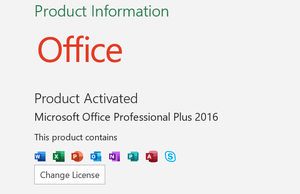

Hi, hopefully you have this sorted already but assuming you have bought a Office 365 subscription (jcrosbie worth checking this O365 subscription is active or has been renewed if I have understood correctly), all I’d do is uninstall Office, with option 2, from the link below, making sure you have the licence/setup details first if it needs to be installed again:
https://support.office.com/en-gb/article/uninstall-office-from-a-pc-9dd49b83-264a-477a-8fcc-2fdf5dbf61d8
Then download Office 365 per these steps, this is done by signing into your account with the Office 365 subscription, which I am assuming you have:
https://support.office.com/en-gb/article/download-and-install-or-reinstall-office-365-or-office-2019-on-a-pc-or-mac-4414eaaf-0478-48be-9c42-23adc4716658
You’ll know if this has worked afterwards, as it will say in the Account screen in Word for example, you have a Subscription product, as shown here, showing it as a Office 365 version:
https://support.office.com/en-gb/article/about-office-what-version-of-office-am-i-using-932788b8-a3ce-44bf-bb09-e334518b8b19
The version you have in your screenshot isn’t the version of Office that comes with Office 365, so it will miss out on new features such as those mentioned here:
https://support.office.com/en-gb/article/what-s-new-in-office-365-95c8d81d-08ba-42c1-914f-bca4603e1426