security
641 Topics
Can't use a SPN in a PowerBi dashboard to access SharePoint lists
Hoping you can help with an ongoing issue I have. I have a PowerBi dashboard I built using regular account to fetch some SharePoint lists and uploaded it to PowerBi for others to view Now in PowerBi portal I want to change the credential from my account to an SPN. I've read what feels like a thousand articles describing the process to create the SPN 99% all the same. Yet when I go into Powerbi portal, edit the semantic model for the dashboard, click edit credentials, select Service Principal put in the tenant ID the Service principal ID (yes using the app id, in fact I tried everything) the service principal key (the secret) and choose any privacy level it fails 100% of the time. Error is: Failed to update data source credentials: The credentials provided for the SharePoint source are invalid. Same error regardless of what privacy level I choose. I'm sure the secret is correct also. Just for fun I tried the Secret ID and the Object ID in place of the Application ID for the Service principal ID field. All failed same error. I'm sure the secret is correct also. The SPN has Graph sites.read.all, Graph user.read and SharePoint Sites.Read.All api permissions configured. All are consented. Everything seems right but gives me the error failed to retrieve oauth token 100% of the time. Am i missing something else? More API permissions maybe? Do i still need ot actually add the SPN to the Sharepoint site itself even though I has API permissions SharePoint Sites.Read.All? I've done days of research and all I find is lots of people with same or similar issue but not resolution. Is this a bug? Help me I'm desperate to get this fixed or I'm going to have to allow people to bypass MFA across my organization which I cant have.202Views0likes1CommentWhy is Excel macros sometimes missing ?
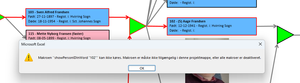
I have an excel file with a lot of rectangular shapes showing a tree structure for a family. When the user clicks on one of the rectangulat shapes the 'story' of that person opens up in a Word dokument. BUT ... Most often the macro 'assigned' to the OnAction WONT run - instead this message comes up: The macros is NOT shown when I "show macros" but it IS present in the VBA section when I press alt+F11 ! When it's working it's most often reight after a reboot og the machine - then it maybe works in 10-30 minuts and then the problem is back again ! I HAVE chesked the security setting allowing macros to be activated ! I have tha SAME file running under Window 10 for years WITHOUT any problems !!!! I can see out there that people FOR YEARS have had similar problems with missing macros - but unfortunately I found no solution ! What the _BEEP_ is wrong here ?444Views0likes9Comments
Compliance licenses at tenant level
Hi, We are a small organization of about 200 employees, and we have following requirements. DLP policies configuration at Exchange, OneDrive, SharePoint BYOD security Users should not be able to send files outside the org And so on as we evaluate We already have M365 Business Premium. However, after researching we figured out that M365 Business premium will alone not solve our requirements. May be compliance license will. We want to apply security policies at tenant level in our organization but definitely do not want every user to get licenses as this will be expensive for us and there is no requirement at all for our users. The question is, Is there a way to solve the above scenario?399Views1like3CommentsUsing the Secret Management PowerShell Module with Azure Key Vault and Azure Automation
If you can't use managed identities, credential resources are a way to manage username and password credentials for Azure Automation runbooks. The Secret Management module is an alternative, and it’s a good option to manage credentials that are shared between interactive scripts and automation runbooks. This article describes how to use the Secret Management PowerShell module to fetch credentials stored in Azure Key Vault for use in an automation runbook. https://office365itpros.com/2025/10/16/secret-management-azure-automation/30Views0likes0CommentsThe My Sign-Ins Portal, Applications, and Conditional Access
A recent change has exposed the applications used by the My Sign-ins portal for use in conditional access policies. This article discusses the app-centric nature of Microsoft 365 and Entra ID and why it’s important that the newly-revealed set of applications are available for conditional access processing, just in case the Entra ID agents planned by Microsoft can’t optimize your policies. https://office365itpros.com/2025/10/15/my-sign-ins-portal/69Views0likes0CommentsChanging the Offline Access Period for Sensitivity Labels
One of the settings for sensitivity labels governs how long items protected by a label remain accessible (including offline access) before reauthentication. The default is 30 days, which is a good balance between security and avoiding users having to constantly reauthenticate to open protected messages and files. If necessary, tenant administrators can change the validity period to be anything from 0 to 65535 days. https://office365itpros.com/2025/10/14/offline-access-validity-period/35Views0likes0CommentsExternal people can't open files with Sensitivity Label encryption.
Question: What are the best practices for ensuring external users can open files encrypted with Sensitivity Labels? Hi all. I've been investigating proper setup of sensitivity labels in Purview, and the impact on user experience. The prerequisites are simple enough, creating and configuring the labels reasonably straightforward, and publishing them is a breeze. But using them appears to be a different matter! Everything is fine for labels that don't apply encryption (control access) or when used internally. However, the problems come when labels do apply encryption and information is sent externally. The result is that we apply a label to a document, attach that document to an email, and send it externally - and the recipient says they can't open it and they get an error that their email address is not in our directory. This is because due to the encryption, the external user needs to authenticate back to our tenant, and if they're not in our tenant they obviously can't do this so the files won't open. So, back to the question above. What's the easiest / most secure / best way to add any user we might share encrypted content with to our tenant. As I see it we have the following options: Users have to request Admins add the user as a Guest in our tenant before they send the content. Let's face it, they'll not do this and/or get frustrated. Users share encrypted content directly from SharePoint / OneDrive, rather than attaching it to emails (as that would automatically add the external person as a Guest in the tenant). This will be fine in some circumstances, but won't always be appropriate (when you want to send them a point-in-time version of a doc). With good SharePoint setup, site Owners would also have to approve the share before it gets sent which could delay things. Admins add all possible domains that encrypted content might be shared with to Entra B2B Direct Connect (so the external recipient doesn't have to be our tenant). This may not be practical as you often don't know who you'll need to share with and we work with hundreds of organisations. The bigger gotcha is that the external organisation would also have to configure Entra B2B Direct Connect. Admins default Entra B2B Direct Connect to 'Allow All'. This opens up a significant attack surface and also still requires any external organisation to configure Entra B2B Direct Connect as well. I really want to make this work, but it need to be as simple as possible for the end users sharing sensitive or confidential content. And all of the above options seem to have significant down-sides. I'm really hoping someone who uses Sensitivity Labels on a day-to-day basis can provide some help or advice to share their experiences. Thanks, Oz.535Views0likes20CommentsMicrosoft Introduces Restore Capability for Conditional Access Policies
New Graph APIs allow Entra administrators to restore a conditional access policy with a Graph request. This article explains how to list, restore, and permanently remove soft-deleted conditional access policies using Graph API requests run in PowerShell. Being able to restore conditional access policies removed in error closes a big gap, especially if agents might begin working on policies. Who knows what errors might happen in future. https://office365itpros.com/2025/10/03/restore-a-conditional-access-policy/75Views0likes0Comments
How to Backup Emails in Outlook?
If you want to backup emails in Outlook, the easiest and most reliable way is by using the Mails.Daddy Email Backup Tool. I’ve used it personally to export my Outlook.com emails to formats like PST, EML, and MBOX with zero data loss. It connects via IMAP and lets you back up selective folders or the entire mailbox. Whether you're planning to backup Outlook emails to a hard drive or migrate them to another email client, this tool is fast, secure, and beginner-friendly. For anyone asking how to backup emails in Outlook, I strongly recommend trying this — it’s a smooth experience and saves a lot of time.73Views0likes1CommentPoor reporting capability
I'm finding the flexibility of exchange online protection and reporting in general to be terrible. I'm trying to get a report of cases where people have clicked a link that was later determined to be malicious. Including links, we have manually determined to be malicious and later zapped those emails. I have kind of done this in threat hunting however I need to run a query that starts older than the 30 days in threat hunting. Of course I don't have these going into sentinel or anything, so the data is gone. Someone suggested reports but I can see how or if there even is a way to report clicks on malicious links (based on them being later determined to be malicious and zapped). Any suggestions?53Views0likes1Comment